






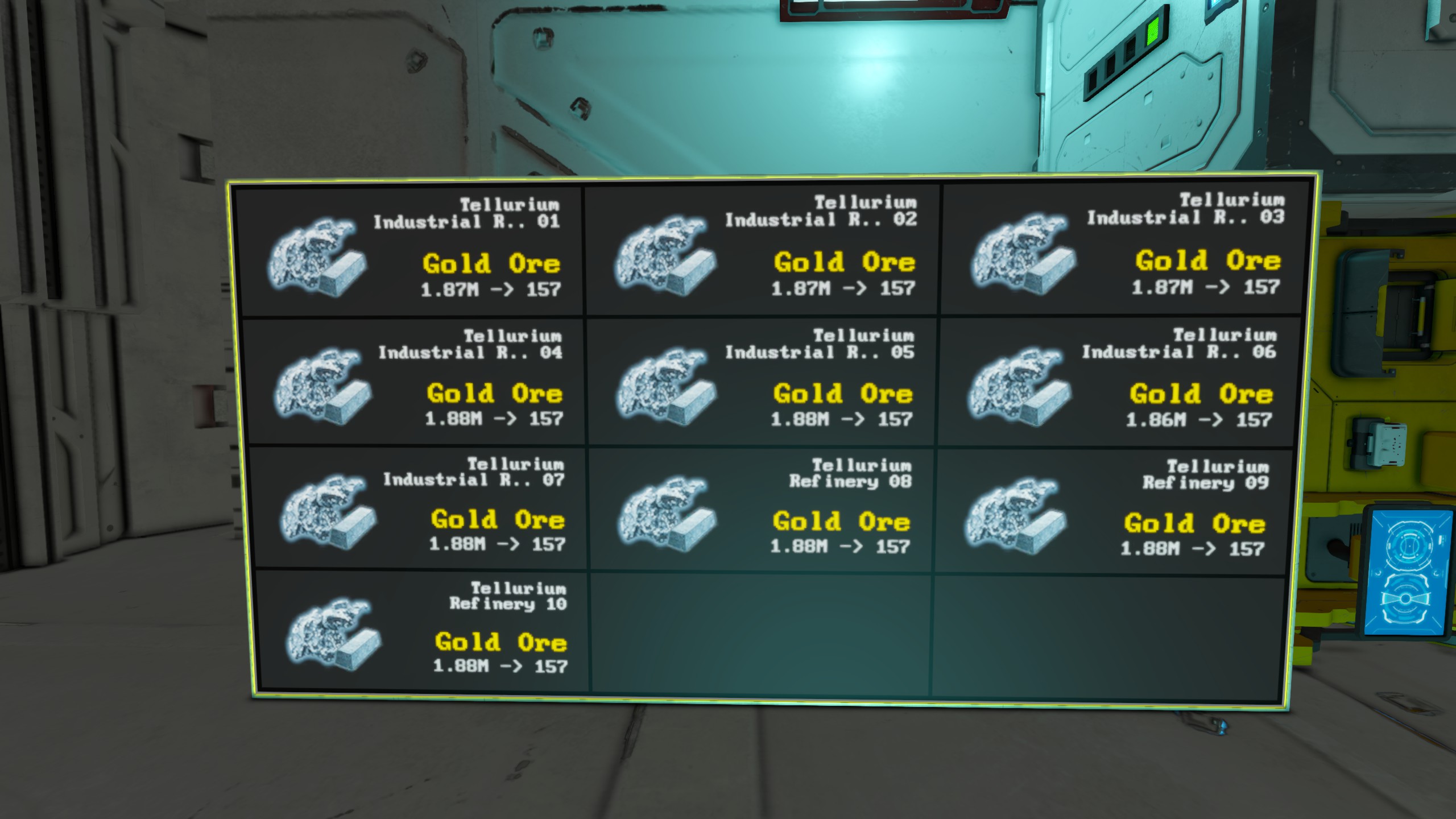
About HAM - LCD Monitor v3.0 (Refineries, Assemblers, Inventories, Tanks, Reactors, ect.)
From Steam WorkshopHAM-Monitor v3.0 Live status screens for your base or ship, drawn with the game's own icons. Refineries, assemblers, gas, power, cargo and every item in storage, on any LCD, cockpit or button panel.…
HAM-Monitor v3.0
Live status screens for your base or ship, drawn with the game's own icons. Refineries, assemblers, gas, power, cargo and every item in storage, on any LCD, cockpit or button panel.
Tag a screen, type one word in its Custom Data, and it's running. No setup in the script itself.
[hr][/hr]
Quick start
[olist] [*]Load the script into a programmable block and press Recompile. [*]Put [HAM-LCD] in a screen's name. [*]Open that screen's Custom Data. The [HAM-LCD] line is already there. Type a command under it, for example Production. [/olist] Not sure what to type? Write Help under [HAM-LCD] and the screen shows every command. Help Inventory, Help Power and so on show one topic.
New screens are picked up on their own within a few seconds. No need to run "refresh" any more.
Coming from v2?
v3.0 uses one tag and a command instead of the three old tags. After updating, rename your screens and add the command to their Custom Data: [table] [tr][th]v2 screen name[/th][th]v3.0: name has [HAM-LCD], Custom Data says[/th][/tr] [tr][td]assembler-status[/td][td]Assemblers[/td][/tr] [tr][td]refinery-status[/td][td]Refineries[/td][/tr] [tr][td]hybrid-status[/td][td]Production[/td][/tr] [tr][td]assembler-status 2 (page 2)[/td][td]Assemblers 11-20[/td][/tr] [/table] Note: a plain number now means how many slots, so Refineries 2 shows two refineries. For one machine per screen, use a range of one: Refineries 3-3.
[hr][/hr]
What it shows
- Machines - Refineries, Assemblers, Production (both). What each one is making, with its ore or item icon.
- Gas - Hydrogen, Oxygen, Tanks, Generators. "Hydrogen total" gives one summary tile.
- Power - Batteries (stored, max and charge rate), Reactors, Solar, Wind, Engines. "Power total" gives a tile per kind.
- Cargo - container fill bars that turn yellow at 75% and red at 90%. "Cargo all" covers every block with an inventory.
- Inventory - every item you have, or just ores, ingots, components, ammo, tools, bottles or survival items.
Make each screen your own
Add options on the same line as the command:
- Assemblers 1-3 on one screen, Assemblers 4-6 on the next
- Refineries 2-2 - one refinery per screen
- Refineries busy, idle or off - show machines by state
- Cargo group:Ore Storage - only a terminal group
- Inventory components min 1000 sort amount
- Inventory +Plate -Steel - include or leave out by name
- list or box, cols 3, size 1.5 - rows or tiles, and how big
- hideEmpty, page 2, cycle 15
Cockpits and blocks with several screens: [HAM-LCD @1] sets up the second screen, @2 the third, and so on.
Stock limits
Set a target per item and Inventory bar shows how close you are. Inventory below shows only what's running short.
- SteelPlate=50000 - keep at least 50,000
- SteelPlate=<50000 - keep at most 50,000
You don't have to type item names: run the programmable block with the argument list and it fills in every item on your grid for you. Names are added commented out with ; so you can rename anything (handy for modded items). Limits are added blank for you to fill in.
[hr][/hr]
Settings
Everything lives in the programmable block's Custom Data, so script updates never wipe your setup.
- tag=[HAM-LCD] - the word that marks a screen
- lockTag=[Locked] - blocks with this in their name are ignored
- countLocked=false - set true to still count items in ignored containers
- [Names] and [Limits] - your item names and stock targets
Arguments
- help - the command list in the terminal
- list - fill [Names] and [Limits] with every item on the grid
- stats - switch between the short readout and the full one
- rescan - look for new blocks straight away
[hr][/hr]
Light on your server
Built for servers with strict programmable block limits. HAM-Monitor spreads its work into small pieces, only re-reads a block when something about it changed, and slows itself down rather than going over the limit. A typical ship or base runs at a few hundredths of a millisecond per tick. The terminal shows the live figure.
It reads every block on your grid, including subgrids on rotors, pistons and hinges, that you own or that is unowned. Docked ships are left out.
Good to know
- Screens stay correct in multiplayer: every screen is fully refreshed regularly, so they don't get stuck half-drawn.
- Modded items work. If a name reads oddly, set your own in [Names].
- Inventory screens show a loading bar while the first scan finishes.
Questions or ideas? Leave a comment below.
Highlights
From source dataFootprint
Rated a light load on a server.
Last update
Its author last shipped an update 17d ago.
HAM - LCD Monitor v3.0 (Refineries, Assemblers, Inventories, Tanks, Reactors, ect.) on Nxeon
From our catalogue- One-click install
- Not available. One-click install isn't available for this game's mods yet. Download it and upload it to your server in Files.
- Server load
- light
- Smallest plan we suggest
- Space Engineers — 8 GB (8 GB RAM). This follows our own load rating above, not a benchmark.
- Latest build
- 2026-10-18, released 2026-10-18
Game versions by loader
| Loader | Game versions | Newest |
|---|---|---|
| Workshop |
From 1 recorded build of HAM - LCD Monitor v3.0 (Refineries, Assemblers, Inventories, Tanks, Reactors, ect.).
Deploy a server above, then upload the file in Files.
What kind of mod it is
From the catalogQuality of life & UI
Small conveniences, tweaks and interface improvements players notice straight away.
Compatibility
- Game
- Space Engineers
Verified at the source
- ✓Steam WorkshopOfficial listing, checked 2026-10-28Open ↗
- ✓AuthorHamonous, as published on Steam Workshop
- ✓LicenseNot published by the sourceFree













