






About Hide DLC Blocks (Configurable)
From Steam WorkshopHide DLC Blocks Don't own every DLC? This mod hides the cube blocks from DLCs you don't have from the G menu (build/toolbar block list), so your build menu only shows what you actually own instead of…
Hide DLC Blocks
Don't own every DLC? This mod hides the cube blocks from DLCs you don't have from the G menu (build/toolbar block list), so your build menu only shows what you actually own instead of a wall of greyed-out DLC blocks. Every DLC can be toggled individually through an in-game settings window, so you can show blocks for DLC you DO own while keeping the rest hidden.
Requirements
- Rich HUD Master (required dependency) - provides the settings window UI. It should be added automatically as a required item, but if it isn't installed/enabled for any reason, this mod will still hide DLC blocks using its default settings - you just won't be able to open the configuration window until it's active. Get it here: Rich HUD Master
- Experimental Mode must be enabled for your world (World Settings when creating/loading a save). This mod uses in-game scripts, and Space Engineers will not run any scripted mod - including this one - unless Experimental Mode is turned on.
- Script consent prompt - because this mod (and Rich HUD Master) contain in-game scripts, Space Engineers may show a one-time consent prompt asking you to allow mods to run code before the world loads. Accept this prompt or the mod will not function.
- Not available on Xbox. Xbox does not support in-game scripts, so this mod cannot run on console. PC only.
How to Use
- Make sure to enable HideDLCBlocks and RichHudFramework in your world modlist.
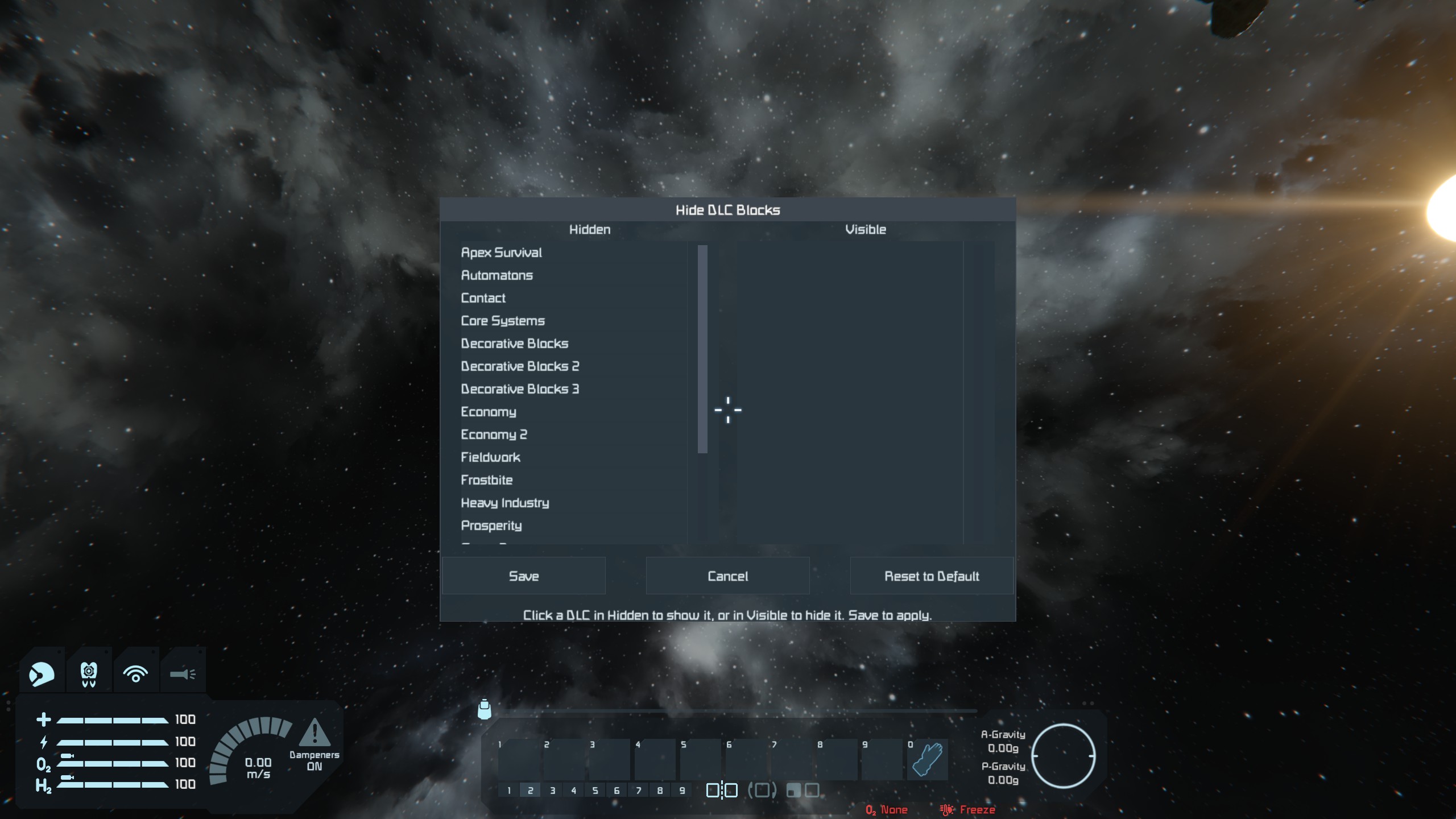
- Press the . (period) key in-game to open the Hide DLC Blocks window. Press it again to close it.
- The window shows two lists, Hidden and Visible. Click a DLC in either list to move it to the other.
- Click Save to apply your changes and hide/show the corresponding blocks in the G menu. Cancel discards any changes made since the last save.
- Reset to Default immediately hides every DLC (no need to press Save afterward) - use this to quickly get back to a fully decluttered menu.
- The window can be repositioned by dragging its title bar.
Notes
- Settings are saved per world/save file, not globally - if you play multiple saves you'll configure this mod separately for each one.
- This mod only affects whether a block appears in the block selection menu. It does not delete, disable, or otherwise affect blocks you've already placed on existing grids or blueprints.
- Hiding a DLC here does not require or grant ownership of that DLC - it's purely a menu visibility filter for blocks you can't (or don't want to) build with.
- The menu opens with the . (period) key by default. If it conflicts with another mod (such as Build Vision), you can rebind it: click the Keybinds button in the mod's window, or open the Rich HUD menu (Shift+F2) and go to Hide DLC Blocks → Keybinds. Your choice is saved and applies to all your worlds.
- The newsletter DLC is not hidden, it only contains one block and it is free. If you would like this configurable let me know in the comments.
Credits
Settings window built with Rich HUD Framework by Zach Hembree (MIT licensed).
Highlights
From source dataFootprint
Rated a light load on a server.
Last update
Its author last shipped an update 20d ago.
Hide DLC Blocks (Configurable) on Nxeon
From our catalogue- One-click install
- Not available. One-click install isn't available for this game's mods yet. Download it and upload it to your server in Files.
- Server load
- light
- Smallest plan we suggest
- Space Engineers — 8 GB (8 GB RAM). This follows our own load rating above, not a benchmark.
- Latest build
- 2026-10-14, released 2026-10-14
Game versions by loader
| Loader | Game versions | Newest |
|---|---|---|
| Workshop |
From 1 recorded build of Hide DLC Blocks (Configurable).
Dependencies
- Required: Rich HUD Master
Declared by the newest build that lists any. Required ones are installed with it on one-click installs.
Run Hide DLC Blocks (Configurable) on a Space Engineers server
Deploy a server above, then upload the file in Files.
What kind of mod it is
From the catalogBuilding & decoration
Blocks, furniture, decorations and building tools.
Compatibility
- Game
- Space Engineers
Verified at the source
- ✓Steam WorkshopOfficial listing, checked 2026-10-24Open ↗
- ✓AuthorMonostable, as published on Steam Workshop
- ✓LicenseNot published by the sourceFree












