
About Holographic Volumetric Display
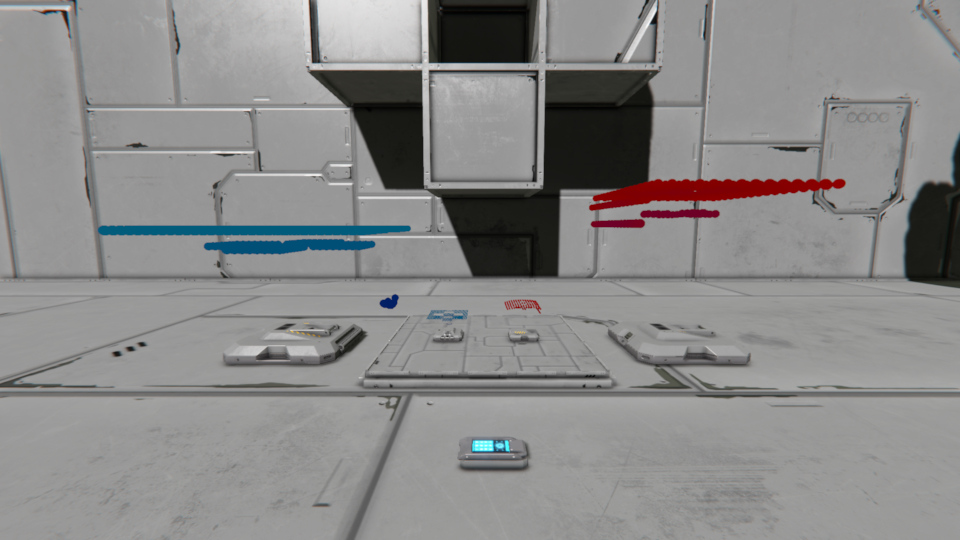
From mod.ioThis is a special type of display, it creates a point cloud based on a raycast based on cameras, effectively allowing you to make topographical holomap Displays. You know those SciFi shows where they have like, a holodeck map? This is that!
A Holo what-now display??
This is a special type of display, it creates a point cloud based on a raycast based on cameras, effectively allowing you to make topographical holomap Displays. You know those SciFi shows where they have like, a holodeck map? This is that!
A note is it does not actually use the cameras cast, and thus does not consume charge from the camera. It just uses the camera as a position. You should also be able to use camera on grids that can be accessed remotely/through antennas.
I saw the only other thing like this used a proprietary camera component and I didn't like that, so i made my own. I guess this still is its own implementation, but it uses cameras to effectively be a display for them.
What this mod adds:
Holographic display
Holographic Orthographic display
Both in 2 styles, as they have a base emitter block
-Conveyor cover, this one was an afterthought that was the closest i could thing of cause the nice ones a dlc block.
-Conveyor tube cover, this one looks aesthetically pleasing as a holographic emitter.
what do these do?...
Holographic display
This display makes a "cone" shaped projection, this is the original implementation i was working on based on a camera, it was made to work only with the camera, looking from its angles, and projecting exactly that on the holograph.
Holographic Orthographic display
This display makes a square cut out of space, in meters. This was made when i realized i didnt have to actually use the camera itself, as such, the rays dont fire from the camera, they fire in a square defined in meters.
Woah. How do i use them?
1.Place down a "Holographic display" or "holographic Orthographic display", the Orthographic display is better for large space scans, where the regular display works better for small, close things, like a mining drone.
2.Place (or have) a camera, the camera will just be an input field, so it can be any existing camera, even if its being usedby other systems, because i don't use the built in camera raycast, systems using that are also compatible.
3.Place a control panel near by, your going to need it to set your settings, and get ready, theres a lot of them, prepare yourself to [b]CONFIGURE YOUR HOLODECK.[/b]
Oh jeez... This sounds like a lot?
Yes, unfortunately its not going to be simple, its just the nature of the beast of having something so configurable. BUT I'M HERE TO HELP YOU THROUGH! most of the settings are pretty self explanatory, but nonetheless I'm going to break down what they do, and, in the cases that apply, how to use them.
THE SETTINGS!
The blocks share a lot of settings, we'll start with those. A few of their shared settings do different things on their respective projection, those will be covered with the seperate block settings.
Both of 'em
IsActive
If the block is on or not.
SelectedCameraEntityId
The dropdown for selecting the camera the display will view from.
ScanRange
The distance of the max extent of the displays raycast.
IgnoreMax
When on, removes dots at the max distance of their display, so you see only things on the display.
NearClipZ
Cuts the view to show only past this percent from the start of the range.
Intensity
Adjusts the alpha intensity of the dots.
[h3]RefreshSpeedPercent
The refresh percent is defined as how much of the resolution will refresh per frame, so no matter the size, 1.666% will be one fps 16.666% will be 10.
by default its at 10%, which should be 6 fps.
ColorHigh
The color when points are far away from the emitter.
ColorLow
The color when points are close to the emitter.
PointSize
The Size the display points will be.
ScaleXYZ
Three fields for scaling the projection "cube".
OffsetXYZ
Three fields for moving the projection "cube".
[h3]RotationXYZ
Three fields for rotating the projection "cube".
Jitter
A slider for adding an offset jitter to the points for a "holograph" effect, can be set 0 for disabling.
ShipColor
The color the following toggleable markers are.
ShowShipDot
A toggle which shows the root of the projection, the so the "ships location" in the projection.
ShowShipLine
A line that extends out from the root of the projection.
EnableSound
A non-functional toggle, i couldn't figure out how to make the sound work.
Holographic display
ScanResolution
These are separated as they act a little different, for the perspective display, the resolution is just as you set it, if you decrease the FOV on one range, it will squish the resolution.
Fov ClipX/Y
The FOV the scan has.
FarClipZ
A flat cut at the far distance, to cut a "cube" out of the spherical projection.
NearClipZ
A flat cut at the near distance, to cut a "cube" out of the spherical projection.
Holographic orthographic display
ScanResolution
These are separated as they act a little different, for the orthographic display, the resolution is based on the minimum scan width/height, making the resolution always a set grid.
ScanWidth/HeightMeters
The size of the scan in meters, as its orthographic this extends to the max range, so 1km x 1km will project a square kilometer to the display.
DynamicTopography
The only toggle that changes things based on incoming data, this toggle makes it so the nearest and furthest point are always the near and far plane. "IgnoreMax" must be true for the far plane to adjust.
And BAM, configuration done. Welcome to your holodeck.
Highlights
From source dataFootprint
Rated a light load on a server.
Last update
Its author last shipped an update 5 mo ago.
Holographic Volumetric Display on Nxeon
From our catalogue- One-click install
- Not available. One-click install isn't available for this game's mods yet. Download it and upload it to your server in Files.
- Server load
- light
- Smallest plan we suggest
- Space Engineers — 8 GB (8 GB RAM). This follows our own load rating above, not a benchmark.
- Latest build
- 32520-volumetricpointcloud-5jx4.zip, released 2026-06-03
Run Holographic Volumetric Display on a Space Engineers server
Deploy a server above, then upload the file in Files.
What kind of mod it is
From the catalogMaps & scenarios
Custom maps, arenas and scenarios to play on.
Compatibility
- Game
- Space Engineers
Verified at the source
- ✓mod.ioOfficial listing, checked 2026-10-30Open ↗
- ✓AuthorRavenTheSergal, as published on mod.io
- ✓LicenseNot published by the sourceFree