







About Hydro & Oxygen Status Script [Vanilla] - by Lightwolfs Adventures
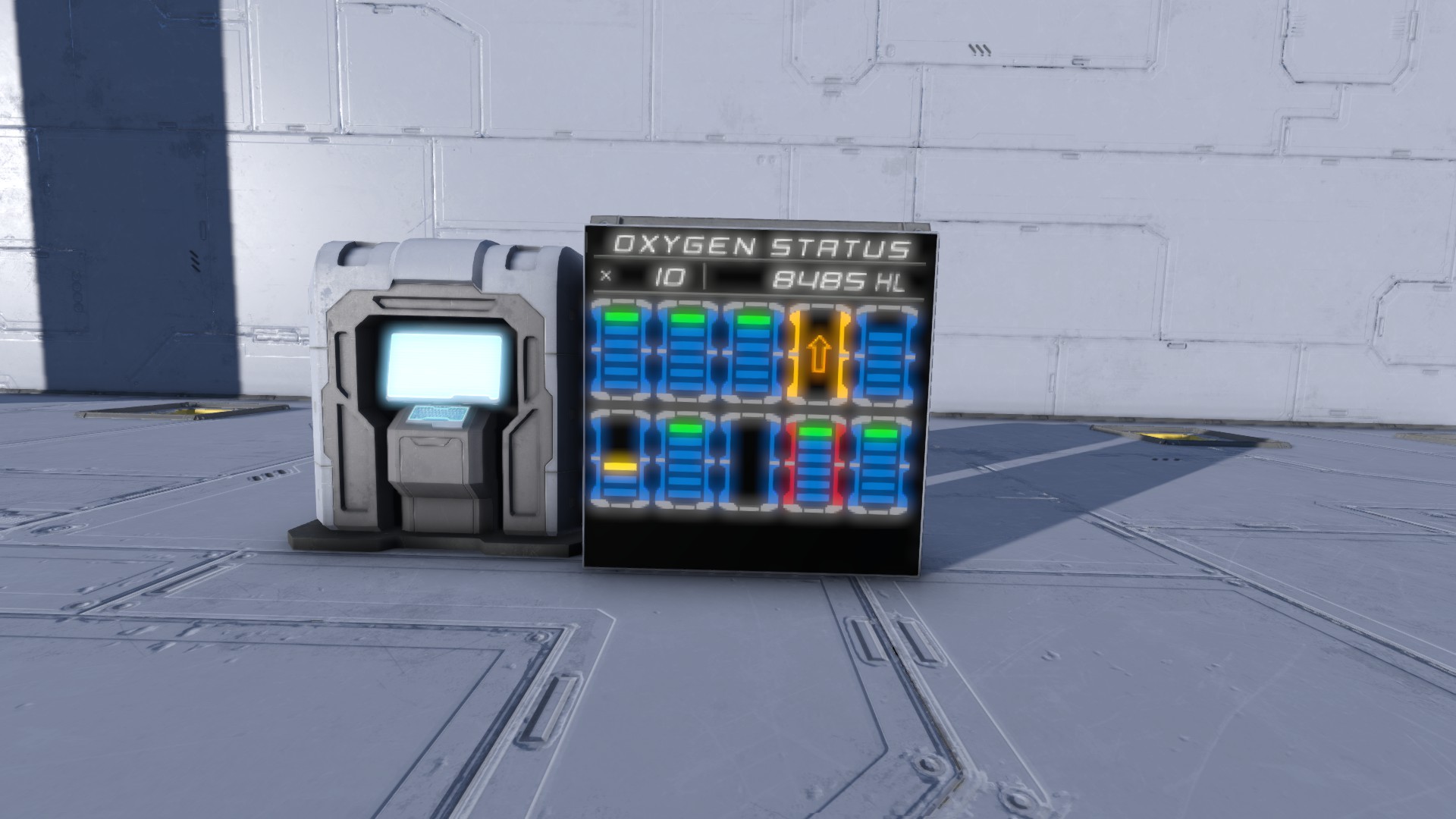
From Steam WorkshopThis script shows Filling amount and state of Hydrogen and Oxygentanks as digital symbols, on LCDs-, Wide LCD Panel or Text Panels. Installation: Just paste my script inside your Programmable Block,…
This script shows Filling amount and state of Hydrogen and Oxygentanks as digital symbols, on LCDs-, Wide LCD Panel or Text Panels. [Vanilla / No Mods needed]
Installation:
Just paste my script inside your Programmable Block, and edit your favorite Settings...
Here's my Tutorial how to edit Settings, or you watch my Video on YouTube. https://youtu.be/xr3XwEny3Q0
Only Hydrogen Status: ● bool SearchHydro = true; ● string LCD_NameTag = "[Hydrogen-Status LCD]"; // Input this keyword to the name of every LCD-Panels for Hydrogenstatus! - Show only Specific Hydrotanks: ● bool OnlyTanksWithNameTag = true; ● string SpecificNameTag = "[Hydro-Status]"; // Input this keyword to the name of every specific Hydrogentanks!
Only Oxygen Status: ● bool SearchHydro = false; ● string LCD_NameTag = "[Hydrogen-Status LCD]"; // Input this keyword to the name of every LCD-Panels for Oxygenstatus! - Show only Specific Oxygentanks: ● bool OnlyTanksWithNameTag = true; ● string SpecificNameTag = "[Hydro-Status]"; // Input this keyword to the name of every specific Oxygentank!
Switch between Hydrogen & Oxygen Mode: ● int AutoChangeInterval = 1; // 1 = Switch mode on every script activation, 2 every 2nd time etc. ● string LCD_NameTag = "[Hydrogen-Status LCD]"; // Input this keyword to the name of every LCD-Panels for status! - Show only Specific Hydro & Oxygentanks: ● bool OnlyTanksWithNameTag = true; ● string SpecificNameTag = "[Hydro-Status]"; // Input this keyword to the name of every specific Hydrogentanks! ● string SeperateSpecificNameTag ="[SepSpecfic-Status]"; // Input this keyword to the name of every specific Oxygentank!
Hydrogen & Oxygen on seperate LCD Panels: ● bool ShowOnSeperateLCD = true; ● string LCD_NameTag = "[Hydrogen-Status LCD]"; // Input this keyword to the name of every LCD-Panels for Hydrogenstatus! ● string SeperateLCD_NameTag = "[Seperate-Status LCD]"; // Input this keyword to the name of every LCD- Panels for Oxygenstatus! - Show only Specific Hydro & Oxygentanks: ● bool OnlyTanksWithNameTag = true; ● string SpecificNameTag = "[Hydro-Status]"; // Input this keyword to the name of every specific Hydrogentanks! ● string SeperateSpecificNameTag ="[SepSpecfic-Status]"; // Input this keyword to the name of every specific Oxygentank!
Global Settings: ● string Hydro_ident_String = "Hydro"; // This keyword, must be in every name of Hydrogentanks! ● bool WideLCD = true; // on wide LCD Panels, show up to 100 Tanks ● bool OnlySmallSigns_Enabled = true; // Show always small Symbols ● bool SelfUpdatingSys_Enabled = false; // deaktivate self-updatings-system ● int SelfUpSys_perSecond = 2; // Updating interval in seconds
Other Settings: ● bool StatusTitle_Enabled = false; // deactivate title "HYDROGEN STATUS" / "OXYGEN STATUS"
● lines: ● bool Underline_1_Enabled = false; // deactivate line under title ● bool BatSpaceline_Enabled = false; // deactivate line between total Amount and filling amount ● bool Underline_2_Enabled = false; // deactivate line under total Amount and filling amount
● bool TankAmountEnabled = false; // deactivate total amount ● bool TankAllStoredVolumeEnabled = false; // deactivate filling amount ● bool VolumeOnlyInM2 = true; // Show always units in cubicmeter (m²)
General Thanks to the Community, to all that share their knowledge, that helped me a lot to bring my scribts to life. Thanks for that.
Highlights
From source dataFootprint
Rated a light load on a server.
Last update
Its author last shipped an update 9 yr ago.
Hydro & Oxygen Status Script [Vanilla] - by Lightwolfs Adventures on Nxeon
From our catalogue- One-click install
- Not available. One-click install isn't available for this game's mods yet. Download it and upload it to your server in Files.
- Server load
- light
- Smallest plan we suggest
- Space Engineers — 8 GB (8 GB RAM). This follows our own load rating above, not a benchmark.
- Latest build
- 2018-01-07, released 2018-01-07
Game versions by loader
| Loader | Game versions | Newest |
|---|---|---|
| Workshop |
From 1 recorded build of Hydro & Oxygen Status Script [Vanilla] - by Lightwolfs Adventures.
Run Hydro & Oxygen Status Script [Vanilla] - by Lightwolfs Adventures on a Space Engineers server
Deploy a server above, then upload the file in Files.
What kind of mod it is
From the catalogTechnology & automation
Machines, power, logistics and automation.
Compatibility
- Game
- Space Engineers
Verified at the source
- ✓Steam WorkshopOfficial listing, checked 2026-11-01Open ↗
- ✓AuthorLightwolf, as published on Steam Workshop
- ✓LicenseNot published by the sourceFree












