







About Item Sorting
From Steam WorkshopThis should be working for version 01.123.007. Big thanks to vivalenta for helping fix it! I have also made a [url=http://steamcommunity.com/sharedfiles/filedetails/?id=372556667]Container Renaming…
This should be working for version 01.123.007. Big thanks to vivalenta for helping fix it!
I have also made a Container Renaming script to help rename all of your containers so they can be used with this script.
You can also check out my Selective Refining script, which will let specify the type of ores you want going into your refineries.
If your assembler is getting clogged with ingots, you should check out my Assembler Cleaning script.
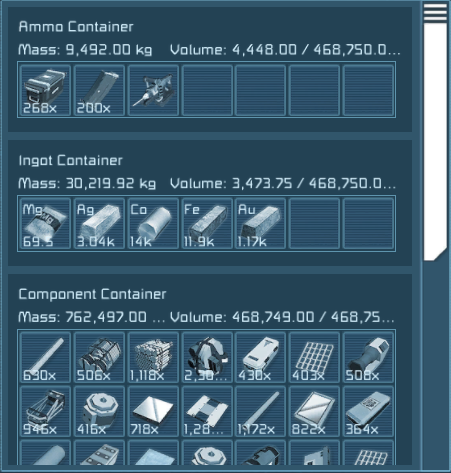
•This script sorts items into containers according to the item's type; Ore, Ingot, Component or Ammo.
•The items are sorted into containers with the default names Ore Container, Ingot Container, Component Container, and Ammo container. You can change the name of the containers the items are sorted into to whatever you'd like by simply changing the const string at the top of the script ("Ore Container", "Ingot Container", etc);
•When run, the script will move all ore to the ore containers, all ingots to the ingot containers etc. Tools, such as a grinder or a gun will be placed in the Ammo Containers.
•To get the block working correctly, be sure to attach it to a Timer Block. Simply build the Timer Block and setup its' action to run the script, and then start itself. A delay of 1-2 seconds seems to work perfectly fine.
•You can also sort just the item types you want and not all of them. Meaning if you only want to sort ingots and components, simply name containers "Ingot Container" and "Component Container", you don't need to use the other containers types for the script to work.
•You can also have multiple containers for the same type. The containers will be filled until there are no more empty containers for that type. The containers can have the same exact name or be numbered or any combination, as long as they contain with the same string. For example 3 containers named Component Container, or Component Container 1, Component Container 2, or My Ingot Container 01, My Ingot Container 02.
•You are also able to have a container that is ignored by the script and the items in it will be left alone by naming it "Locked Container" by default. Like the other containers, you can change this name at the top of the script if you want it to be something different.
•You are able to see the percentage of volume filled in your named containers as well. Just add a % symbol after the container's name, for example "Ore Container %", and the script will do the rest.
•If you have any suggestions or problems please let me know!
Highlights
From source dataFootprint
Rated a light load on a server.
Last update
Its author last shipped an update 10 yr ago.
Item Sorting on Nxeon
From our catalogue- One-click install
- Not available. One-click install isn't available for this game's mods yet. Download it and upload it to your server in Files.
- Server load
- light
- Smallest plan we suggest
- Space Engineers — 8 GB (8 GB RAM). This follows our own load rating above, not a benchmark.
- Latest build
- 2017-01-15, released 2017-01-15
Game versions by loader
| Loader | Game versions | Newest |
|---|---|---|
| Workshop |
From 1 recorded build of Item Sorting.
Run Item Sorting on a Space Engineers server
Deploy a server above, then upload the file in Files.
What kind of mod it is
From the catalogWeapons, items & crafting
New weapons, gear, items and the recipes to make them.
Compatibility
- Game
- Space Engineers
Verified at the source
- ✓Steam WorkshopOfficial listing, checked 2026-11-01Open ↗
- ✓AuthorReptar, as published on Steam Workshop
- ✓LicenseNot published by the sourceFree












