







About Midspace's exploration ship scan [EOL]
From Steam WorkshopEnd Of Life - not receiving any more updates. The "Random Encounters" mode features ship that can be quite hard to find. The scan will use the largest working antenna on your ship or station, and…
End Of Life - not receiving any more updates.
The "Random Encounters" mode features ship that can be quite hard to find.
The scan will use the largest working antenna on your ship or station, and look for any derelicts within range of your Radio Antenna. That is, ships and stations that are unpowered AND unowned. Unpowered means no active reactors. Solar panels are not considered as they cannot be turned off.
Powered ships will be ignored. Any ships with cubes that are owned will be ignored.
Requirements
- Pilot a ship or station with an active Radio Antenna with Broadcast On.
- You cannot be a passenger.
- The Radio Antenna must be under your control. Either you own it, or it is shared by your faction.
- The maximum scan range is restricted by the range of your Radio Antenna. If you wish to scan further you must either increase the range of your Radio Antenna, or get a bigger Radio Antenna.
Usage
In game, press Enter to open the Chat command. And type "/scan", and press Enter. Or type "/scan 5000", and press Enter, to specify a minimum scan radius. Anything closer than the specified value will not be displayed.
Commands
[table][tr][td]/scan <Min Range>[/td][td]Opens a new dialog with all results displayed. Results will be ordered by ascending distance. Min Range is optional.[/td][/tr] [tr][td]/scan2 <Min Range>[/td][td]The old method of scanning. Results will be displayed in the chat box on your HUD, and ordered by descending distance. Min Range is optional.[/td][/tr] [tr][td]/track #<number>[/td][td]Sets the objective at the top of the HUD, to track the specified exploration derelict. When you scan for derelicts, a number on the left hand side will be provided. Simply use that number to track it. ie., "/track #2" If a derelict is moving, tracking an object will lead you to the last known position that you scanned at. You will need to rescan and track it again to find it's new position. Tracking will automatically canel when you exit the cockpit.[/td][/tr] [tr][td]/ignore[/td][td]Ignores the specified mass type. Names can be abbreviated to the first few characters. usage: /ignore <Unknown|Junk|Tiny|Small|Large|Huge|Enormous|Ridiculous> <On|Off> ie. /ignore unkno on[/td][/tr] [tr][td]/scan3 <Min Range>[/td][td]Scan results will be added to player GPS coordinates. Results are cumulative, so old out of range results will not be removed. New derelicts will be added to existing GPS coordinates. GPS coordinates can be removed manually from your list however. Min Range is optional.[/td][/tr] [tr][td]/scanclear[/td][td]Clears all GPS scan results.[/td][/tr] [/table]
Programmable Block
Scan commands can be initiated via a Programmable Block. Simply add the following code into the Main function: [table][tr][td] public void Main(string argument, UpdateType updateSource) { Me.CustomData = argument; } [/td][/tr][/table] Chat Commands can then be passed through to the Scan Mod using the Programmable Block argument. Simply use the prefix "CHAT:" or "CHAT;" Any of these examples: "CHAT: /scan" "Chat; /scan2 500" "CHAT;/scan3" "chat: /scanclear"
Results
Results will be displayed in order of range, along with an estimated mass and heading.
[table][tr][td] #3: Rn:300.37m, El:61.97°, Az:-156.77° : Stationary Large #2: Rn:226.97m, El:78.01°, Az:96.01° : Stationary Large #1: Rn:208.41m, El:-87.14°, Az:-77.19° : Drifting Junk Scan range: 50000m : 3 derelict masses detected. [/td][/tr][/table]
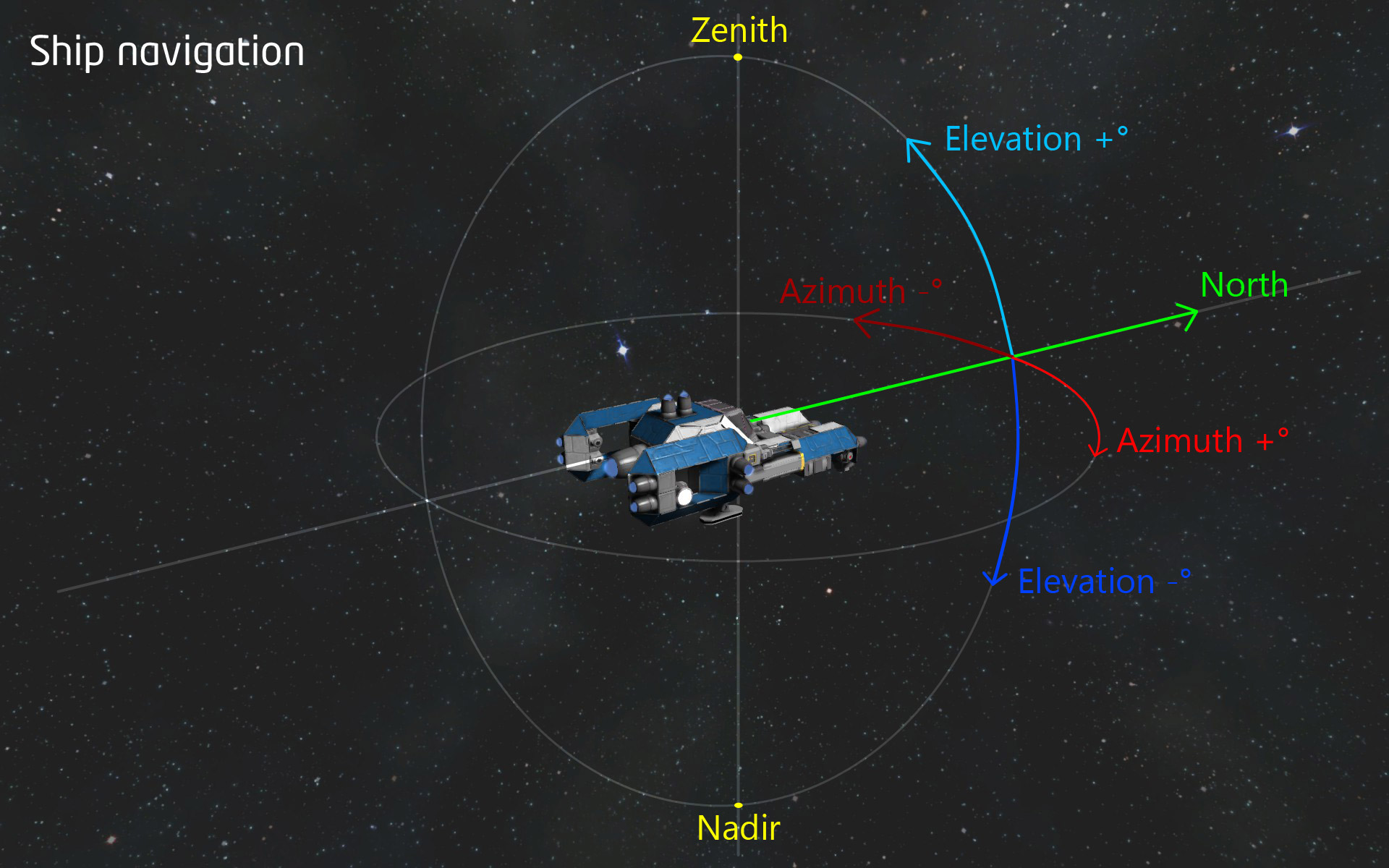
Range (rn) range is displayed in meters, distance to you the player (not the antenna). Elevation (el) is displayed in degrees. -pitch down, or +pitch up. Azimuth (az) is displayed in degrees. -yaw left, +yaw right.
Understanding Ship navigation
Azimuth and elevation are angles used to define the apparent position of an object in space, relative to a specific observation point. Usually the observer, in this case the player (and the player's crosshair).
The azimuth (az) angle is the compass bearing, relative to true north. In this case, the current direction that the player is facing. As seen from above the observer, compass bearings are measured clockwise in positive degrees from north. Azimuth angles can thus range from 0 degrees (north) through +90 (east), +/-180 (south), -90 (west). In aeronautics to turn a craft in this direction is commonly called Yaw. Ie., to Yaw your craft left and right.
The elevation (el) angle, also called the attitude, of an observed object is determined by first finding the compass bearing on the horizon relative to true north, and then measuring the angle between that point and the object, from the reference frame of the observer. Elevation angles for objects above the horizon range from 0 (on the horizon) up to 90 degrees (at the zenith). The range of the elevation coordinate is extended downward from the horizon to -90 degrees (the nadir). In aeronautics to turn a craft in this direction is commonly called Pitch. Ie., to Pitch your craft up and down.
Mod Compatibility
The "/track" command is not compatible with the GPS and Waypoints mod. You will need to turn off the GPS information by using the "/wp position" command twice.
Known Issues
The common issue is, the Visual range set for the game. Ships and stations are only dynamically generated when they are inside of the visual range which is at a default of 20Km. This significantly reduces the chances of spotting one visually or having the /scan detect it. If you computer can handle it, then I suggest increasing the Visual range, otherwise even if you increase your antenna range to 50Km, you will not detect any dynamically created ships within the 20km Visual range.
Adding mods to your game
Highlights
From source dataFootprint
A 176 KB download, rated a light load on a server.
Last update
Its author last shipped an update 8 yr ago.
Midspace's exploration ship scan [EOL] on Nxeon
From our catalogue- One-click install
- Not available. One-click install isn't available for this game's mods yet. Download it and upload it to your server in Files.
- Server load
- light
- Smallest plan we suggest
- Space Engineers — 8 GB (8 GB RAM). This follows our own load rating above, not a benchmark.
- Latest build
- 2018-05-24, released 2018-05-24, 176 KB
Game versions by loader
| Loader | Game versions | Newest |
|---|---|---|
| Workshop |
From 1 recorded build of Midspace's exploration ship scan [EOL].
Run Midspace's exploration ship scan [EOL] on a Space Engineers server
Deploy a server above, then upload the file in Files.
What kind of mod it is
From the catalogVehicles & ships
Cars, boats, aircraft, ships and other things to drive or fly.
Compatibility
- Game
- Space Engineers
- File size
- 176 KB
Verified at the source
- ✓Steam WorkshopOfficial listing, checked 2026-10-10Open ↗
- ✓AuthorScreaming Angels, as published on Steam Workshop
- ✓LicenseNot published by the sourceFree












