






About Mineral Survey
From Steam WorkshopMineral Survey WORK IN PROGRESS. This mod is under construction: blocks, values and behavior change between versions. If a version changes the size of a block, blocks already placed that no longer…
Mineral Survey
WORK IN PROGRESS. This mod is under construction: blocks, values and behavior change between versions. If a version changes the size of a block, blocks already placed that no longer fit are removed when the world loads.
Works best with: Mining Camera
Full guide: the launcher, the probes and the seismic survey
Bug reports and multiplayer feedback
Seismic prospecting for asteroids. The Prospecting Launcher fires a prospecting probe with the force you charge.
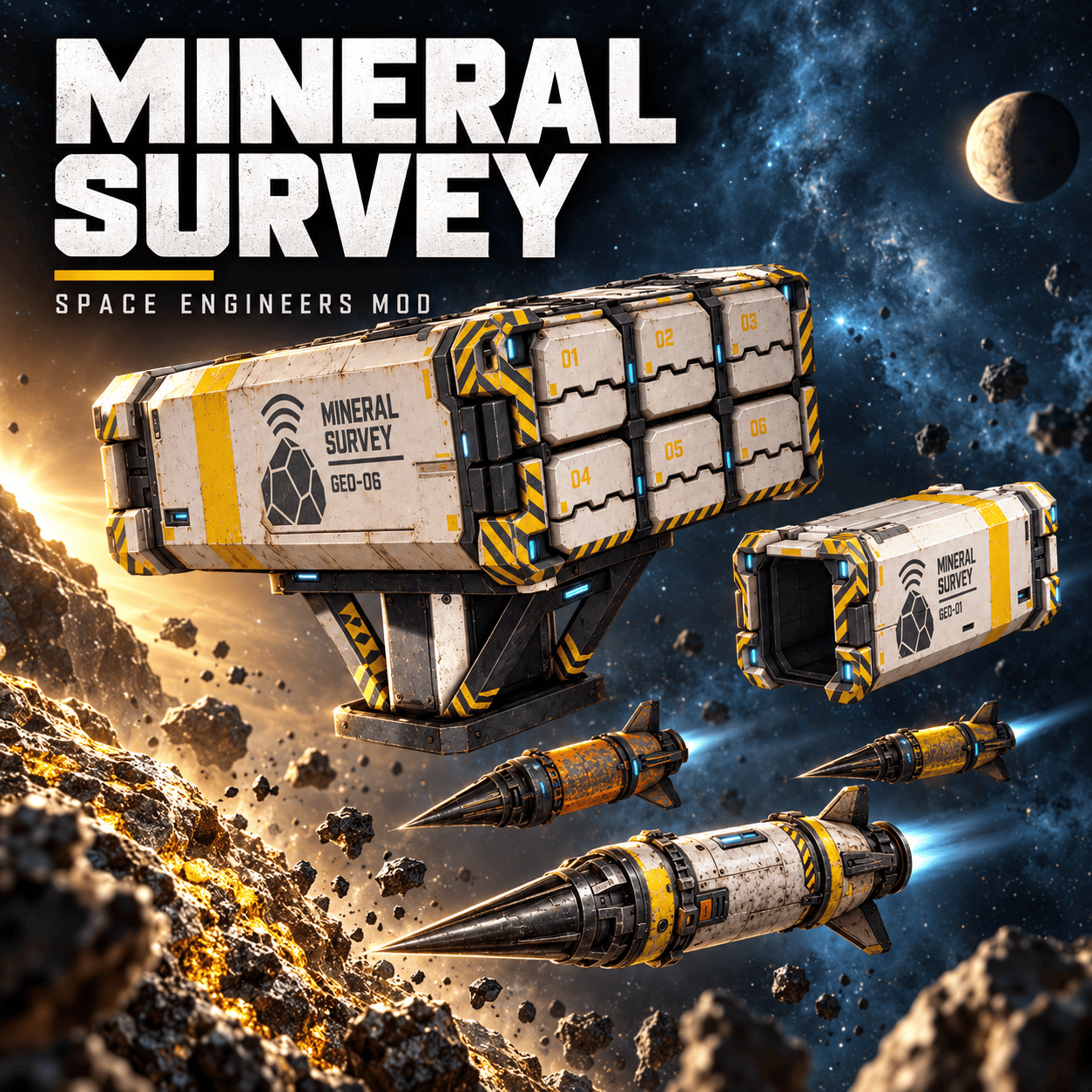
- Prospecting Launcher - the same launcher on small and large grid: 2.5 x 2.5 x 7.5 m (3 large blocks, 15 small blocks long), with a conveyor port on its side. Carries one probe and waits 20 s between launches. With Use Conveyor (on by default) it pulls probes from the conveyor system by itself (survival); you can also load it by hand at the port, from the cockpit terminal or with a sorter. On small grids the probe only travels through large conveyors, like the base game missile. Its covers split open and fly off when it fires.
- Prospecting Launcher GEO-06 - large grid only, six tubes, each with its own probe. Two versions: the side one (2 x 1 x 3 blocks, conveyor port on its side) and the central one on a support base (3 x 2 x 3 blocks, conveyor port underneath). Each click launches the next loaded tube, 01 to 06, and only that tube's covers fly off; that tube reloads after 20 s while the others keep firing. In its terminal: which probe types it accepts (all by default; unchecking one does not remove the probes already in the tubes) and a Fixed launch force for the action Launch at set force, which fires the next tube at once, without charging (toolbar, timer, button panel or script).
- Three probes, built in the Assembler from ingots (iron, nickel, silicon and magnesium; the T2 and T3 also take a little platinum and uranium). Same probe, different paint and different luck: each one adds a random extra to the force you charge.
The probes:
- Improvised Prospecting Probe (grey, taped): adds 0 to +15 force points at random. Cheap, but harder to land on target.
- Prospecting Probe T2 (yellow): adds 0 to +7. A well placed T2 always adds at least 9 % to the seismic survey bar.
- Prospecting Probe T3 (orange): no random extra, it flies with exactly the force you charge. A well placed T3 always adds at least 17 %: four of them, well apart, fill the goal on any asteroid. The most expensive.
The extra is a bell curve around half the max, but about 1 shot in 5 lands right at 0 or at the max. With Use Conveyor and several types on board, the launcher keeps using the last type while there is any, then takes the cheapest one available.
How to fire: select the launcher in the cockpit toolbar, hold fire to charge (a bar under the crosshair fills in 3 s and shows the loaded probe type), release to launch. A longer charge launches faster. Releasing too soon keeps the probe loaded.
- Several launchers on one ship fire one per click: the next one that is loaded and not waiting, in name order ('Launcher 2' before 'Launcher 10'). Rename them to choose the order.
- Each charge starts with a new click. If you keep holding while a launcher reloads, it does not fire by itself: release and press again. The game's red 'Out of ammo' just means one of the selected launchers is empty.
Aiming laser: right click shows where the probe hits (blue sticks, orange bounces; only the pilot sees it), double right click picks the next launcher. Keys: laser_range_m, laser_double_click_s.
In flight: the probe leaves the tube slowly and its rocket pushes it to full speed over the first 150 m, leaving a black smoke trail. With no target it veers at random after 1 km and blows up at 2 km.
On impact:
- The force that arrives is the charged force plus the probe's random extra. Closer than 300 m it hits harder; past 600 m it loses force. Under 150 m it may blow up at once.
- On an asteroid it sticks into the rock and glows light blue. Past 1 km, or on anything that is not an asteroid, it bounces and floats loose with an orange glow.
- A stuck probe left alone blows up after 5 minutes; a loose one after 30 seconds. Its glow blinks fast before it does, and turns red the last 5 seconds.
The blast (always the same): light damage within 10 m, a push up to 250 m that also switches off the inertial dampeners of pushed ships for 1.3 s, and resting probes within 50 m blow up 1.3 s later, in a chain. It makes no crater. A blast touching an asteroid (a stuck probe, or one resting on the rock) raises a gray dust fog that fills a 40 m sphere for 2 minutes: a probe that hits inside it bounces.
Highlights
From source dataFootprint
Rated a light load on a server.
Last update
Its author last shipped an update 7d ago.
Mineral Survey on Nxeon
From our catalogue- One-click install
- Not available. One-click install isn't available for this game's mods yet. Download it and upload it to your server in Files.
- Server load
- light
- Smallest plan we suggest
- Space Engineers — 8 GB (8 GB RAM). This follows our own load rating above, not a benchmark.
- Latest build
- 2026-10-28, released 2026-10-28
Game versions by loader
| Loader | Game versions | Newest |
|---|---|---|
| Workshop |
From 1 recorded build of Mineral Survey.
Run Mineral Survey on a Space Engineers server
Deploy a server above, then upload the file in Files.
What kind of mod it is
From the catalogBuilding & decoration
Blocks, furniture, decorations and building tools.
Compatibility
- Game
- Space Engineers
Verified at the source
- ✓Steam WorkshopOfficial listing, checked 2026-11-04Open ↗
- ✓Authormxm642, as published on Steam Workshop
- ✓LicenseNot published by the sourceFree












