






About ObsidianLensLCD
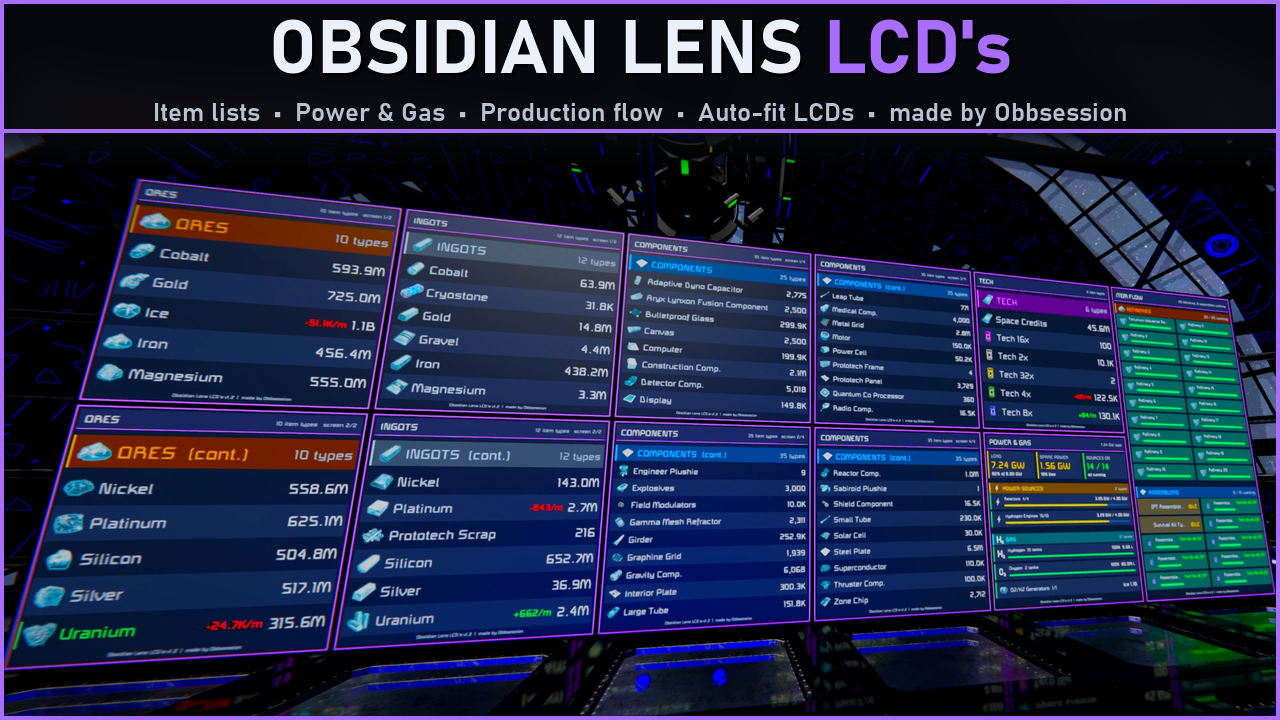
From Steam WorkshopObsidian Lens LCD's See your whole base at a glance. made by Obbsession Obsidian Lens counts every item on your base and puts it on your LCDs as clean, icon-rich lists that size themselves to any…
Obsidian Lens LCD's
See your whole base at a glance. made by Obbsession
Obsidian Lens counts every item on your base and puts it on your LCDs as clean, icon-rich lists that size themselves to any screen. Add live Power & Gas and production screens, and your control room is done - just by naming your LCDs.
[hr][/hr]
✦ Features
- Every item, with icons - grouped into Ores, Ingots, Components, Tech, Tools, Bottles, Ammo, Seeds, Foods, Consumables and Misc
- Live rates - watch ingots climb and ore get used up (+2.1K/m in green, -800/m in red)
- Refining markers - ores a refinery is working on light up green
- Power & Gas screen - load, battery charge with time to full or empty, every power source type, hydrogen and oxygen tanks, O2/H2 generators
- Flow screen - what every refinery is refining and every assembler is building, with progress bars and clear names
- Auto-fit - picks the columns and row size for any LCD: small, wide, tall or corner. Short lists become big item cards, long lists flip through pages
- Your own categories - give Prototech parts, plushies or any modded items their own heading and LCD
- Split screens - spread one long list over several LCDs just by numbering them
- Borders - a frame around every screen, in any colour, set for all LCDs or per LCD
- Performance screen - the programmable block's own screen shows run time, instructions and the cost of each step
- Your grid only - docked ships never mess up your totals (subgrids optional)
- Plays well with others - other scripts' tags can stay in the LCD name
- Server friendly - work is spread across ticks and kept inside the run-time and instruction limits you set
[hr][/hr]
✦ Quick start
[olist] [*]Place a programmable block on your base and load Obsidian Lens LCD's into it. [*]Add [Lens] to an LCD's name, followed by what it should show. [*]That's it - new LCDs are picked up on their own within 20 seconds. [/olist]
[table] [tr][th]LCD name[/th][th]What it shows[/th][/tr] [tr][td][Lens][/td][td]every category[/td][/tr] [tr][td][Lens] Ingots[/td][td]only ingots[/td][/tr] [tr][td][Lens] Ores Ingots[/td][td]ores and ingots together[/td][/tr] [tr][td][Lens] Tech[/td][td]Tech 2x - 32x components and Space Credits[/td][/tr] [tr][td][Lens] Components, Title=Parts[/td][td]components, with your own heading[/td][/tr] [tr][td][Lens] Tools Ammo Cols=2[/td][td]tools and ammo, forced to 2 columns[/td][/tr] [tr][td][Lens] Power[/td][td]power & gas screen[/td][/tr] [tr][td][Lens] Flow[/td][td]refineries and assemblers[/td][/tr] [/table]
Category words work singular or plural, in any case (ore, Ingots). Other scripts' tags can stay in the name: [LCD] [Lens] Ingots [Locked]
[hr][/hr]
✦ Split one list over several LCDs
Number LCDs that show the same thing and the list is shared evenly between them - number 1 always gets the start:
[Lens] Ores 1
[Lens] Ores 2
A category that carries on to the next screen gets a (cont.) heading. An LCD without a number always shows the whole list.
✦ Borders per LCD
Add a colour to the LCD's name - R,G,B with no spaces, a colour name, or off:
[Lens] Ingots Border=255,0,0
[Lens] Ores Border=orange
[Lens] Power Border=off
Colour names: red, orange, yellow, green, cyan, blue, purple, pink, white, grey.
✦ Your own categories
Want Prototech parts on their own LCD? Add them to the [Obsidian Lens Categories] section of the programmable block's Custom Data - Name=words found in the item names:
[Obsidian Lens Categories]
Prototech=Components:Prototech
Plushies=Plushie
Matching items move out of their normal category and get their own heading. Show them with [Lens] Prototech. Writing Components: in front of a word only takes items from that category - here it leaves Prototech Scrap with the ores. Up to 8 categories, one-word names.
[hr][/hr]
✦ Settings
Open the programmable block's Custom Data. The script writes this section on its first run - edit it and changes are picked up within 20 seconds (or right away with rescan):
[Obsidian Lens]
Tag=Lens
IncludeSubgrids=false
PageSeconds=8
SortByAmount=false
ShowEmptyCategories=false
ShowRates=true
RateWindowSeconds=60
ShowRefining=true
Tiles=true
PbScreen=true
Background=8,10,16
Accent=170,110,255
Border=true
BorderColor=170,110,255
BorderWidth=3
ServerLimitMs=1.0
InstructionLimit=50000
MaxSprites=150
RescanSeconds=20
UpdateSeconds=3
RefreshSeconds=10
On a server? Set ServerLimitMs and InstructionLimit to your server's programmable block limits - the script keeps every run well inside them.
✦ Commands
Run the programmable block with:
- rescan - look for new blocks, LCDs and settings right now
- redraw - redraw every LCD right now
[hr][/hr]
✦ Good to know
- Only blocks on the programmable block's own grid are counted. Turn on IncludeSubgrids to add rotor, piston and hinge parts of the same base.
- If the top of a very busy screen ever goes missing, lower MaxSprites - some servers limit how much one screen can draw.
- Any LCD panel works - small, wide, tall and corner LCDs.
Enjoy, and if you like it, a thumbs up helps other engineers find it! - Obbsession
Highlights
From source dataFootprint
Rated a light load on a server.
Last update
Its author last shipped an update 2d ago.
ObsidianLensLCD on Nxeon
From our catalogue- One-click install
- Not available. One-click install isn't available for this game's mods yet. Download it and upload it to your server in Files.
- Server load
- light
- Smallest plan we suggest
- Space Engineers — 8 GB (8 GB RAM). This follows our own load rating above, not a benchmark.
- Latest build
- 2026-11-03, released 2026-11-03
Game versions by loader
| Loader | Game versions | Newest |
|---|---|---|
| Workshop |
From 1 recorded build of ObsidianLensLCD.
Run ObsidianLensLCD on a Space Engineers server
Deploy a server above, then upload the file in Files.
What kind of mod it is
From the catalogQuality of life & UI
Small conveniences, tweaks and interface improvements players notice straight away.
Compatibility
- Game
- Space Engineers
Verified at the source
- ✓Steam WorkshopOfficial listing, checked 2026-11-04Open ↗
- ✓AuthorObbsession, as published on Steam Workshop
- ✓LicenseNot published by the sourceFree













