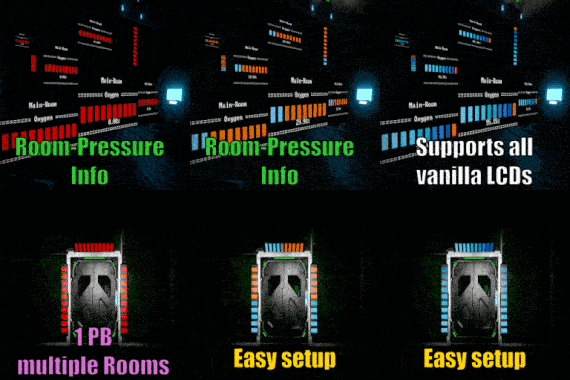
About Oxygen Status | Room-Pressure Info
From Steam WorkshopQUICK HOW TO For each room, make a group(called like you want to name your room) containing LCD/s & AirVent/s In the " Custom Data " of the Programmable Block, write each groupname in one line.…
QUICK HOW TO
[olist] [*]For each room, make a group(called like you want to name your room) containing LCD/s & AirVent/s
[*]In the "Custom Data" of the Programmable Block, write each groupname in one line.
[*] (OPTIONAL) Overview: Place a 1x1 LCD (should/must not be in any group) and name it something including the tag name, by default [OxyOv] and write the Room Names(line by line) you want to show on the overview LCD in it's custom data. (PS: A room needs to have it's own normal LCD like described in first step to use it in the overview LCD)
[*]Load this Script, optionally edit settings in the Settings Section and compile(Click "OK") it.
[*]Have Fun! [/olist]
ADDITIONAL INFO
- If you add new LCDs to a group, recompile the script
- The Script is only updating a Rooms LCDs when it's Pressure changed, with a small threshold.
- Should be pretty Server-Friendly. Maybe "infinite" Groups could be bad for Server-Admins. If you're running a Script-Whitelist on your server and need modification - Contact me :)
- Not functional Blocks getting ignored by the script, but also be used automatically again if you repair them. Just for performance.
- If all vents of a room are damaged, it will show 0%
- When removing a block, it get deleted automatically internally. Just for performance.
- If you find some bad bug, feel free to contact me, aswell you can rate this script on the workshop.
Leave me a comment :)
Updates:
- Update 19. Feb. 2024
- Changes:
- [list]
- Supporting all the DLC LCDs
- Added 2 Brightness Settings (one for normal LCDs and one for Holo/Transparent ones)
[/list]
- Update 18. Feb. 2024
- Changes:
- [list]
- Updated the Script to work with latest Game-Version
- For Wide Overview [OxyOv] LCDs, it now changes it's font size to fit the amount of Rooms (still max. 5 rooms per overview) in the Overview LCDs CustomData
[/list]
- Update 30. Oct. 2018
- Added:
- [list]
- (Optional) Custom Overview LCDs via Tags and Overview-LCDs Custom Data - see Settings in Script
Removed:
- Removed ability to read turned off vents through DetailedInfo "exploiting", because Detailed Info will be not updated server-side anymore with next Major Update - see https://forums.keenswh.com/threads/detailed-info-change-in-the-next-major.7402107
- Removed now unnecessary methods
Highlights
From source dataFootprint
Rated a light load on a server.
Last update
Its author last shipped an update 3 yr ago.
Oxygen Status | Room-Pressure Info on Nxeon
From our catalogue- One-click install
- Not available. One-click install isn't available for this game's mods yet. Download it and upload it to your server in Files.
- Server load
- light
- Smallest plan we suggest
- Space Engineers — 8 GB (8 GB RAM). This follows our own load rating above, not a benchmark.
- Latest build
- 2024-02-19, released 2024-02-19
Game versions by loader
| Loader | Game versions | Newest |
|---|---|---|
| Workshop |
From 1 recorded build of Oxygen Status | Room-Pressure Info.
Run Oxygen Status | Room-Pressure Info on a Space Engineers server
Deploy a server above, then upload the file in Files.
What kind of mod it is
From the catalogQuality of life & UI
Small conveniences, tweaks and interface improvements players notice straight away.
Compatibility
- Game
- Space Engineers
Verified at the source
- ✓Steam WorkshopOfficial listing, checked 2026-11-01Open ↗
- ✓AuthorㄥoㄥıʞɐꞱ, as published on Steam Workshop
- ✓LicenseNot published by the sourceFree