






About Personalized Flight Model
From Steam WorkshopPFM - Personalized Flight Model Fly your ship your way. PFM is a programmable block script that changes how your mouse and keyboard steer the ship, and adds a full flight display to your cockpit…
PFM - Personalized Flight Model
Fly your ship your way. PFM is a programmable block script that changes how your mouse and keyboard steer the ship, and adds a full flight display to your cockpit screens and LCDs.
It is made to ease your flight experience. Especially with those gigantic ships but can also present you different type of experience with small ships as well.
It is a script that contains different kinds of profiles which you can mix and match that edits how your ship reacts to inputs. Thats how i would describe it in a nutshell.. Check below!
[hr][/hr]
What it does
Flight controls
- Roll-Yaw swap: mouse left/right rolls the ship like a plane, Q/E yaws.
- Persistent stick: the mouse moves a virtual joystick that stays where you leave it, so you can hold a steady turn without dragging the mouse forever.
- Invert pitch: flip mouse up/down.
- Speed-aware steering: choose whether steering gets calmer at high speed (Damped), sharper (Agile, for fast and nimble fighters) or stays the same (Constant).
Cruise control
Elite Dangerous-style throttle. Turn it on and W/S set a target speed instead of pushing the ship directly. The ship holds that speed on its own. The target stops at 0: release the key and press again to go from forward to reverse (or back). Strafing and hovering still work normally.
One-button maneuvers
- Level: wings level, nose on the horizon.
- Prograde / Retrograde: point the nose along or against your direction of travel (great for braking in space).
The ship turns once and hands control back. Touching the mouse cancels it.
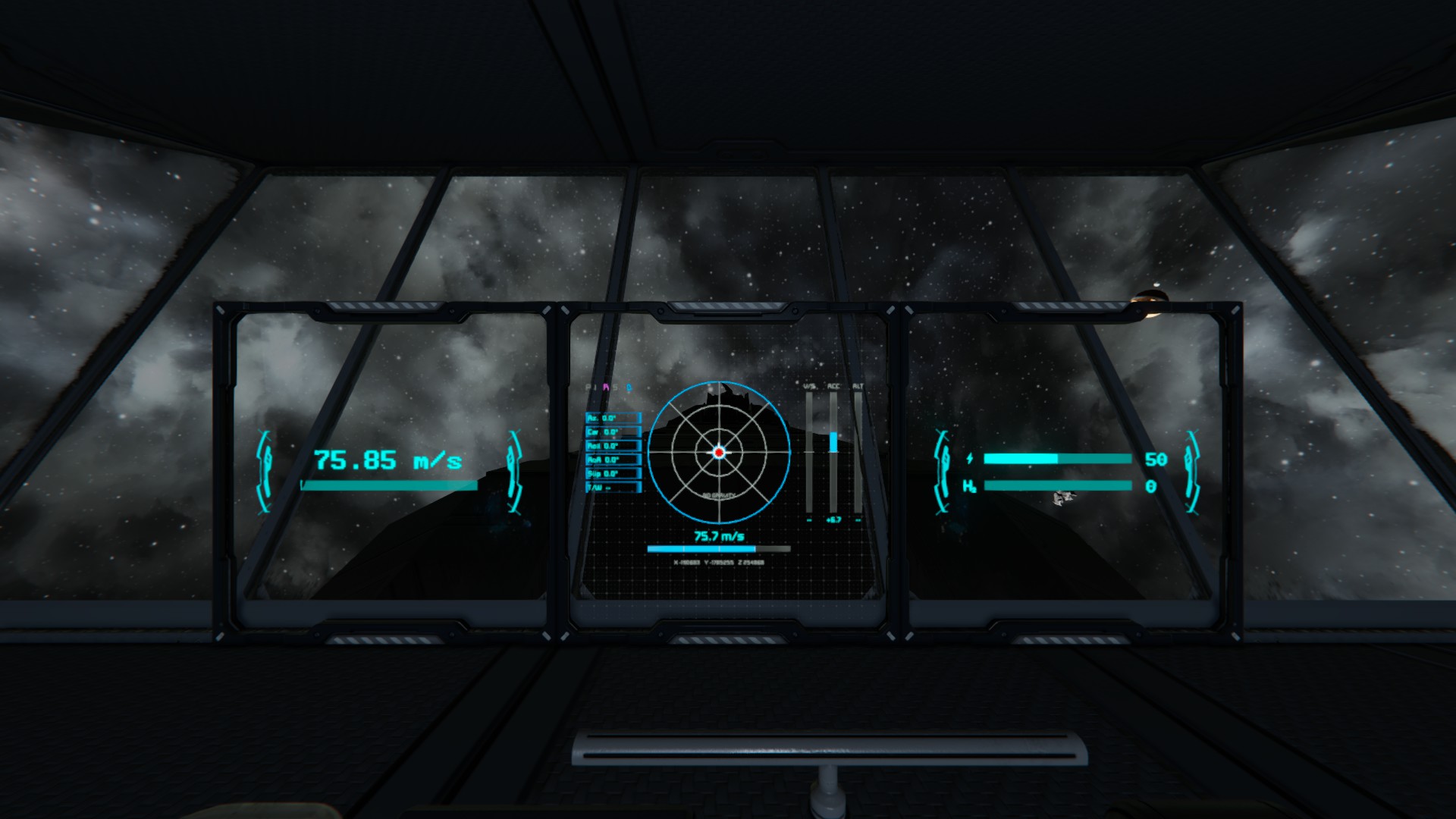
Flight display
- Artificial horizon with pitch ladder, bank scale and compass (in gravity)
- Flight path marker that shows where you are actually going (prograde/retrograde)
- Normal / anti-normal and radial in / out markers around the flight path (in gravity)
- Speed bar with your cruise target
- Vertical speed, acceleration and altitude gauges
- Angle of attack, sideslip and thrust-to-weight
- Ship coordinates (X Y Z) at the bottom, under the speed bar
- PULL UP warning when you are about to hit the ground, with optional alarm sound
- HARD DECK critical warning at the last altitude where your thrusters can still stop the fall, based on your descent speed, vertical acceleration and available upward thrust (also marked as a red line on the altitude gauge)
- Mode indicators and short on-screen messages when you change something
Three display layouts are available: full, compact for small cockpit screens, and horizon only.
[hr][/hr]
Setup
[olist] [*]Place a programmable block on your ship and load the script. [*]Add [noparse][PFM][/noparse] to the name of:
- the cockpit you fly from
- any screen block (LCD, cockpit) that should show the display
- (optional) a sound block for the ground warning. Pick a sound in the block and turn on looping.
[*]Make sure the cockpit has "Control gyroscopes" turned on, and "Control thrusters" too if you want cruise control. [*]Done. The display appears on the first screen of each tagged block. [/olist]
The script only touches its own ship. Docked ships are left alone, and it plays nicely with other scripts that use the same blocks.[/quote] [hr][/hr] [h2]Commands[/h2] Put these on your cockpit toolbar: drag the programmable block onto the toolbar, choose Run and type the command. [table] [tr][th]Command[/th][th]What it does[/th][/tr] [tr][td]rollyaw[/td][td]Mouse rolls / mouse yaws[/td][/tr] [tr][td]persistent[/td][td]Persistent stick on/off[/td][/tr] [tr][td]invertpitch[/td][td]Invert mouse up/down[/td][/tr] [tr][td]ratemode[/td][td]Cycle speed-aware steering: Damped > Agile > Constant[/td][/tr] [tr][td]cruise[/td][td]Cruise control on/off[/td][/tr] [tr][td]cruisezero[/td][td]Set cruise target to 0[/td][/tr] [tr][td]level[/td][td]Level the ship[/td][/tr] [tr][td]prograde[/td][td]Nose toward travel direction[/td][/tr] [tr][td]retrograde[/td][td]Nose against travel direction[/td][/tr] [tr][td]cancel[/td][td]Stop a running maneuver[/td][/tr] [tr][td]reset[/td][td]Center the persistent stick[/td][/tr] [/table] [hr][/hr] [h2]Customizing[/h2] Everything can be changed without editing the code. Settings live in the Custom Data of the block they belong to. They are written on the first run, grouped, with a short note on each line, and changes apply within a couple of seconds. [table] [tr][th]Block[/th][th]Section[/th][th]What you set there[/th][/tr] [tr][td]Programmable block[/td][td][noparse][PFM Settings][/noparse][/td][td]Tag, cruise, maneuvers, ground warning[/td][/tr] [tr][td]Each tagged cockpit[/td][td][noparse][PFM Controls][/noparse][/td][td]Flight modes and mouse feel for that seat[/td][/tr] [tr][td]Each tagged screen block[/td][td][noparse][PFM][/noparse][/td][td]Which screens (Surfaces=0,1), layout (full / compact / horizon), size, gauge ranges[/td][/tr] [tr][td][/td][td][noparse][PFM Colors][/noparse][/td][td]Colors of that block's screens[/td][/tr] [/table] So two seats can fly differently, and every screen can have its own look. [hr][/hr] [h2]Reading the display[/h2] [table] [tr][th]You see[/th][th]It means[/th][/tr] [tr][td]P I R S letters (top left)[/td][td]Persistent, Invert, Roll-Yaw, Cruise. Colored = on, gray = off[/td][/tr] [tr][td]D / A / C[/td][td]Current speed-aware steering mode[/td][/tr] [tr][td]White circle with wings[/td][td]Where you are heading[/td][/tr] [tr][td]Red circle with legs[/td][td]You are moving backwards; this is the opposite of your travel[/td][/tr]
Highlights
From source dataFootprint
Rated a light load on a server.
Last update
Its author last shipped an update today.
Personalized Flight Model on Nxeon
From our catalogue- One-click install
- Not available. One-click install isn't available for this game's mods yet. Download it and upload it to your server in Files.
- Server load
- light
- Smallest plan we suggest
- Space Engineers — 8 GB (8 GB RAM). This follows our own load rating above, not a benchmark.
- Latest build
- 2026-11-04, released 2026-11-04
Game versions by loader
| Loader | Game versions | Newest |
|---|---|---|
| Workshop |
From 3 recorded builds of Personalized Flight Model.
Recent builds
| Build | Released | Game versions | Loaders |
|---|---|---|---|
| 2026-11-04 | 2026-11-04 | n/a | Workshop |
| 2026-10-28 | 2026-10-28 | n/a | Workshop |
| 2026-10-28 | 2026-10-28 | n/a | Workshop |
Run Personalized Flight Model on a Space Engineers server
Deploy a server above, then upload the file in Files.
What kind of mod it is
From the catalogQuality of life & UI
Small conveniences, tweaks and interface improvements players notice straight away.
Compatibility
- Game
- Space Engineers
Verified at the source
- ✓Steam WorkshopOfficial listing, checked 2026-11-04Open ↗
- ✓AuthorLoloju, as published on Steam Workshop
- ✓LicenseNot published by the sourceFree













