






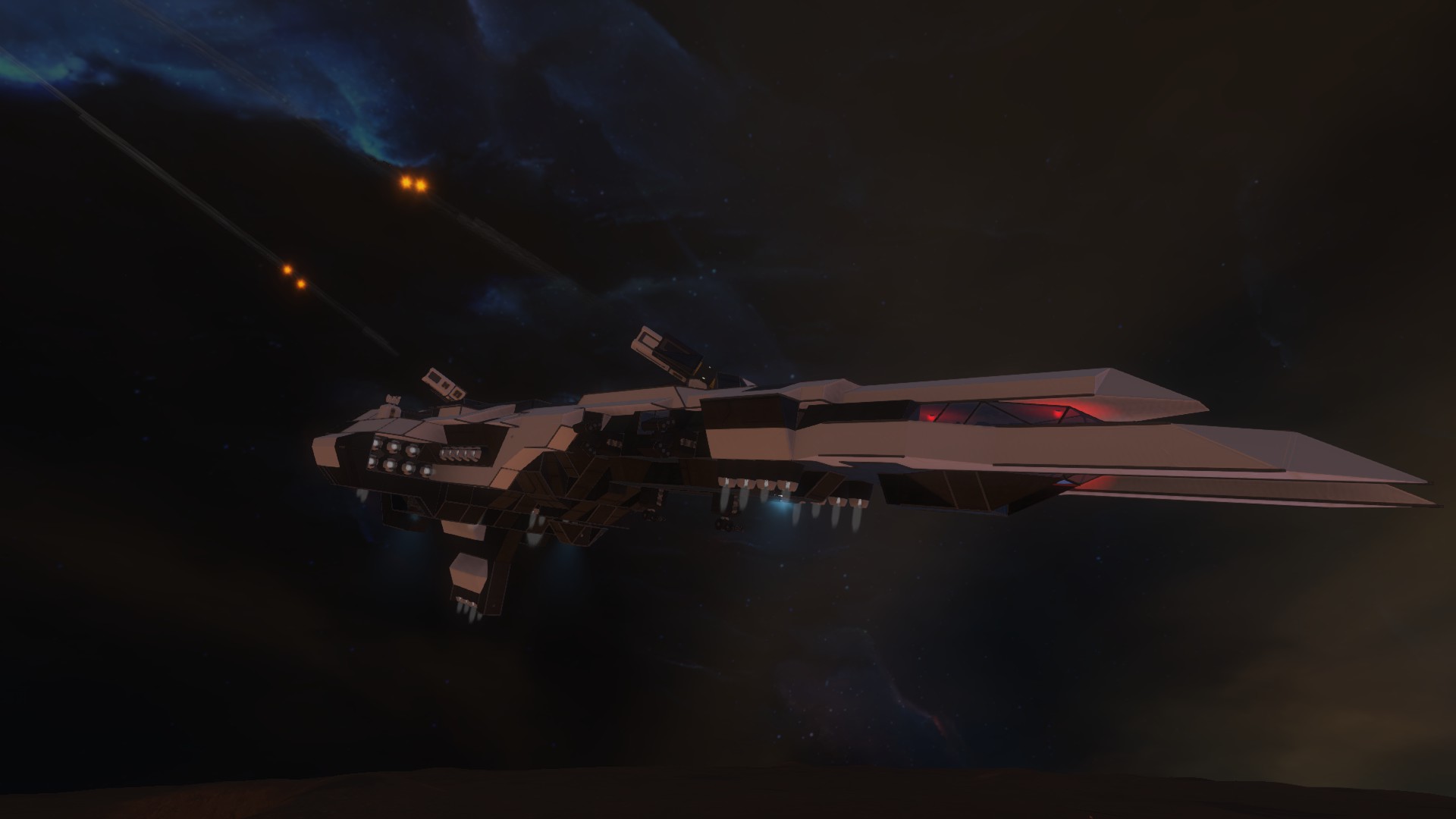

About PFS - ADD - Sabiroid II Atmospheric Destroyer
From Steam WorkshopVanilla, Survival Friendly Sabiroid II Destroyer Mass: 2,384,676 kg (empty) Length: 147.5 m Cargo: 1 Large Container, 16 Small Connectors: 1 (Dorsal) Reactors: 1 large Batteries: 18 Weapons: 4…
Vanilla, Survival Friendly
Sabiroid II Destroyer
Mass: 2,384,676 kg (empty) Length: 147.5 m Cargo: 1 Large Container, 16 Small Connectors: 1 (Dorsal) Reactors: 1 large Batteries: 18 Weapons: 4 Missile Turrets, 4 Gatling Turrets, 2 Rocket Turrets (2 Launchers Each) Oxygen: 14 Tanks, 11 Generators
Crew: 1 Pilot, 1 Copilot, 1 Gunnery, 1 Engineering, 1 Medical
Description
Although the original Sabiroid was successful in its design and intended purpose, it quickly began to fall prey to CEU's rapid response of the Cougar. The Carnifex was later produces to bring an end to CEU atmospheric dominance, but it still often lacked the agility to stop Cougars from getting to their targets.
In order to fill the gap between Frigate and Battleship, the Sabiroid Chassis was renovated into a Destroyer. While the original Sabiroid was tasked with attacking enemy ground forces and harrassing fortifications, the Sabiroid II was a full on ship hunter. Its rapid firing dorsal rocket turrets made short work of any enemy vessel, and it maintained an element of maneuverability to ensure that it could always bring these weapons to bear on the enemy.
In addition to the devastating weaponry, the Sabiroid II was given an enclosed CIC in the central area, a larger carrying capacity, and increased armor on its engines.
The Sabiroid II coninued to serve alongside its predecessor throughout the end of the Europa Conflict and beyond. Where the Mk. I offered drone and missile support, the Mk. II served as an effective escort to ward off or pursue any threats.
Towards the end of the war, there were several stories of CEU pilots who mistook the Mk. II for its predecessor, thinking they would have easy prey. Few such pilots survived their mistake.
User Manual
Controls - on the flight bridge, sit in a seat, hit K, go to the group labelled "**Control**" and hit "Control". Within the CIC, you can simply sit in one of the forward-facing flight seats and the controls will be preset for you.
Tab 1 - Flight Controls
[img=http://i.imgur.com/Pimj2DV.jpg] [olist] [*] View Main Camera [*] View Port Camera [*] View Starboard Camera [*] View Rear Camera [*] Emergency Hydrogen Boosters On/Off [*] Reverse Thrusters On/Off [*] Proximity Sensor On/Off [*] Proximity Warning On/Off [/olist]
Tab 2 - Rotating Camera
[img=http://i.imgur.com/mQfGuNu.jpg] [olist] [*] View Rotating Camera [*] Rotate Camera Left [*] Stop Rotation [*] Rotate Camera Right [/olist]
Weapons Make sure to set ALL blocks as owned by you. The turret will automatically fire at targets within the 800m range.
Keep in mind that the turrets cannot rotate 180 degrees to face each other. This was done to prevent accidental friendly fire. However, this means that the turrets may get stuck if you go beyond their limits, not rotating the other way to face your enemy. To prevent this, simply be mindful of where you and your turrets are facing, and rotate your ship to compensate.
Flight Remember that the most powerful thrust is below. Therefore, bank when turning and pull up the nose when trying to stop for better results when maneuvering. The ship is also fairly maneuverable, so to stop it is much easier to simply turn the ship around and use the forward thrusters, should you choose to not do the option of pulling the nose up.
If you find yourself falling towards the surface too quickly, you can activate the emergency boosters (hydrogen fueled) to help slow your descent. There is also a proximity sensor to warn you when the ventral fin is within 25m of the ground, giving you a good idea as to when to activate this.
You can also turn reverse thrust off to be able to cruise forward without having to hold down W.
Scripts
MMaster - Automatic Configurable LCD Whiplash141 - Rotor Turret Control System, Auto Door & Airlock Script Pennywise - Compass
Misc
Highlights
From source dataFootprint
Rated a light load on a server.
Last update
Its author last shipped an update 10 yr ago.
PFS - ADD - Sabiroid II Atmospheric Destroyer on Nxeon
From our catalogue- One-click install
- Not available. One-click install isn't available for this game's mods yet. Download it and upload it to your server in Files.
- Server load
- light
- Smallest plan we suggest
- Space Engineers — 8 GB (8 GB RAM). This follows our own load rating above, not a benchmark.
- Latest build
- 2017-03-24, released 2017-03-24
Game versions by loader
| Loader | Game versions | Newest |
|---|---|---|
| Workshop |
From 1 recorded build of PFS - ADD - Sabiroid II Atmospheric Destroyer.
Run PFS - ADD - Sabiroid II Atmospheric Destroyer on a Space Engineers server
Deploy a server above, then upload the file in Files.
What kind of mod it is
From the catalogWeapons, items & crafting
New weapons, gear, items and the recipes to make them.
Compatibility
- Game
- Space Engineers
Verified at the source
- ✓Steam WorkshopOfficial listing, checked 2026-11-01Open ↗
- ✓AuthorLord Commissar, as published on Steam Workshop
- ✓LicenseNot published by the sourceFree












