






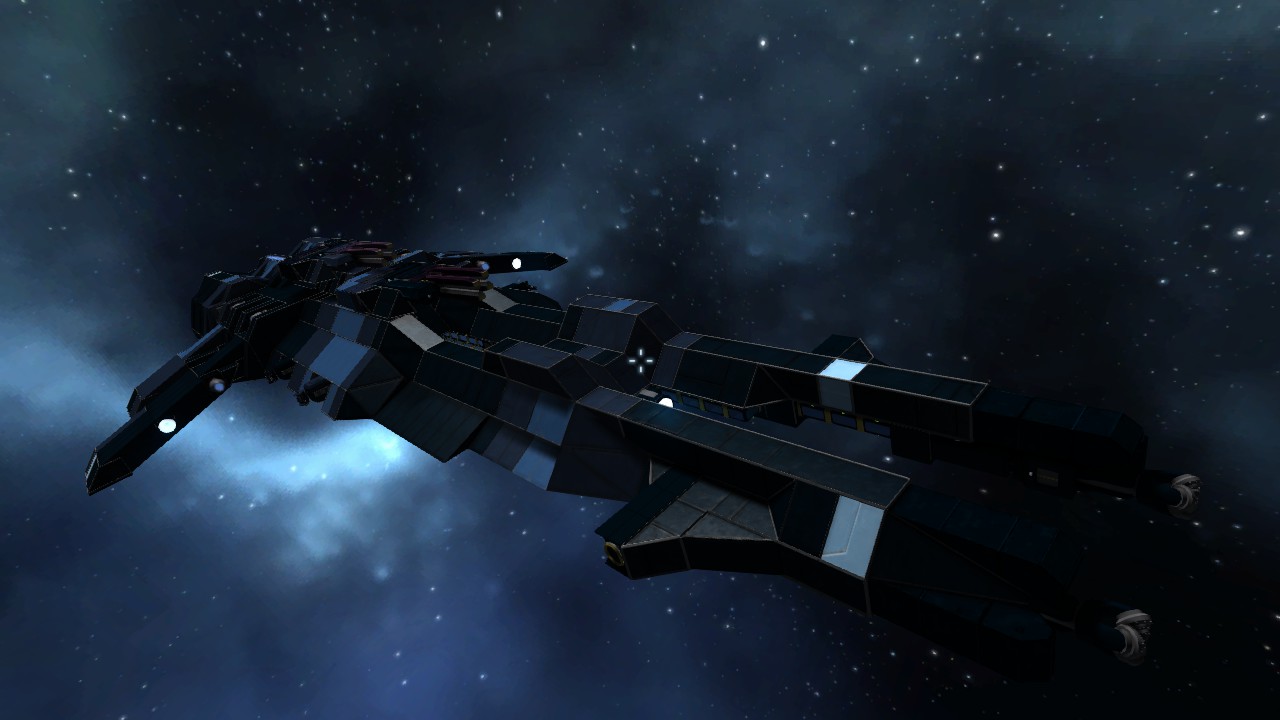

About PFS - DDH - Jaculus Artillery Destroyer
From Steam WorkshopUpdate 11/28/14 - Reworked the turret controls to use remotes instead of rotor velocity, allowing greater precision for turret aiming (be sure to read the turret control guide below) Mass: 2,338,734…
Update 11/28/14 - Reworked the turret controls to use remotes instead of rotor velocity, allowing greater precision for turret aiming (be sure to read the turret control guide below)
Mass: 2,338,734 kg Acceleration: 6.21 m/s^2 Weapons: 4 gatling turrets, 2 Railgun turrets (2 Railguns per turret) Storage: 1 large container, 3 Small containers per Railgun turret Connectors: 2 Refineries: 2 Assemblers: 6 Drills: 2
The Jaculus is designed to be a sleeper ship. It is capable of being fully self-sustaining though its ability to mine, refine, and assemble its own ammo. It is also capable of operating off minimal power using batteries, thereby lowering its emissions and remaining invisible to enemy sensors. If need be, it also features several solar panels to allow it to recharge its batteries without the use of its reactor. Finally, it features a camouflage pattern to help it to blend in visually with its surroundings (blends with Caldari skybox)
All these systems allow the Jaculus to wait behind enemy territory and remain hidden until it is time to strike. When the target is in range, packs of Jaculi can ambush enemies and disable ships with their long range railguns, ensuring that they never get the chance nor the range to fire back.
The ship is lightly armored, preferring to use its speed and range to defeat an enemy.
Turret Control Guide -----------------------------------------------------------------------------------------------
IMPORTANT! failure to follow these guidelines will result in turret explosions
the turrets controls are preset to the consoles to the left (rear turret) and right (front turret) of the primary console on the bridge (bridge lower level)
to set up a console for the turret, these are the necessary controls:
1 - turn the respective turret's railguns (on/off) - labelled as "front turret railguns" or "rear turret railguns" in the interface - this is very important as, unfortunately in current SE, you cannot fire individual weapons. firing the railguns will fire both turrets, which could cause collateral damage if you do not have both turrets aimed at your intended target.
2 - fire railgun control - you need to use your dakka, after all, right?
3 - remote control for the respective turret (control) - this will be labelled as "front turret control" or "rear turret control" in the interface
4 - camera (view) for the respective turret - labelled "front turret camera" or "rear turret camera" in the interface
5 - VERY IMPORTANT - you need the rotor controls for the respective turret - labelled "front turret rotors" or "rear turret rotors" (decrease rotor torque & increase rotor torque). The Ability to control your rotor's torque quickly and easily is essential for operating the turret effectively. A decrease in torque will cause the turret to become more sensitive to your commands, and a increase in torque will do the opposite. This gives you added precision by giving you a sensitivity level that you find comfortable. However, you should not decrease the torque too much, at the risk of moving the turret too quickly and cause damage. All turret commands MUST be made carefully! DO NOT OPERATE AGGRESSIVELY OR EXPLOSIONS WILL OCCUR!
Finally, it is ABSOLUTELY IMPERATIVE that you maximize rotor torque when the turret is not in use. If you fail to do so, the turrets will move freely while the ship itself is maneuvering, which can cause collision damage, as well as thruster damage (on the rear turret).
For convenience, it has already been added to the primary flight console (and it is suggested you add it should you choose to control the ship from anywhere else) - the ability to control all turret rotor's torques so as to lock them down before manuevering, or release them quickly for your gunners
the control of all rotors is simply labelled as "Turret Rotors" in your interface, and you will need (Decrease Torque & Increase Torque) on your toolbar
Some have asked about donations. Obviously you needn't feel obliged, but anything is greatly appreciated and you have my thanks! [url=https://www.paypal.com/cgi-bin/webscr?cmd=_s-xclick&hosted_button_id=9LSL72A775HBJ][img=https://www.paypalobjects.com/en_US/i/btn/btn_donate_SM.gif]
Highlights
From source dataFootprint
Rated a light load on a server.
Last update
Its author last shipped an update 12 yr ago.
PFS - DDH - Jaculus Artillery Destroyer on Nxeon
From our catalogue- One-click install
- Not available. One-click install isn't available for this game's mods yet. Download it and upload it to your server in Files.
- Server load
- light
- Smallest plan we suggest
- Space Engineers — 8 GB (8 GB RAM). This follows our own load rating above, not a benchmark.
- Latest build
- 2014-11-29, released 2014-11-29
Game versions by loader
| Loader | Game versions | Newest |
|---|---|---|
| Workshop |
From 1 recorded build of PFS - DDH - Jaculus Artillery Destroyer.
Run PFS - DDH - Jaculus Artillery Destroyer on a Space Engineers server
Deploy a server above, then upload the file in Files.
What kind of mod it is
From the catalogTechnology & automation
Machines, power, logistics and automation.
Compatibility
- Game
- Space Engineers
Verified at the source
- ✓Steam WorkshopOfficial listing, checked 2026-11-01Open ↗
- ✓AuthorLord Commissar, as published on Steam Workshop
- ✓LicenseNot published by the sourceFree












