






About Phils_Ship_Diagnostics
From Steam WorkshopNOTE: Some modded blocks will cause this script to break. Second note: This script has been in a pretty stable place for a while, and I really want to write it again from scratch (since I was still…
NOTE: Some modded blocks will cause this script to break.
Second note: This script has been in a pretty stable place for a while, and I really want to write it again from scratch (since I was still learning C# when I wrote this). That said, I am going to wait until the game is feature complete to do another interation, because I think there are a lot of tools on the way that will make this easier to use, more efficient, and more functional. I appreciate everyone's interest and support in this project and I will continue to answer questions and fix bugs to the best of my ability as they come up.
Instructions/Setup
This overview will tell you everything you need to know about running this script
FIRST and at all points henceforth - make sure all blocks are set to be owned by you.
Required blocks: 1. Programming Block The programming block needs to be loaded with "phil's ship diagnostics", checked (compiled), and remembered (saved)
2. Timer Block The timer block needs to be set to run the programming block when it triggers. Also the timer block needs to be set to "trigger now" itself.
3. LCD panel or text panel The tex panel should be set to display public text on screen. You amy also need to adjust the font size so that the ship fits properly on the screen. The text panel must also be named in a specific way to work with this script. The name will consist of a prefx, two numbers, and an optional modifier. See the section below for more details on naming.
Naming your LCD panel
All screens shuld have a name of the general form : screen_diagnostic_X_Y
The default prefix for naming text displays is "screen_diagnostic_". All screens should start with this name. You can change this prefix by editing the values at the top of the script.
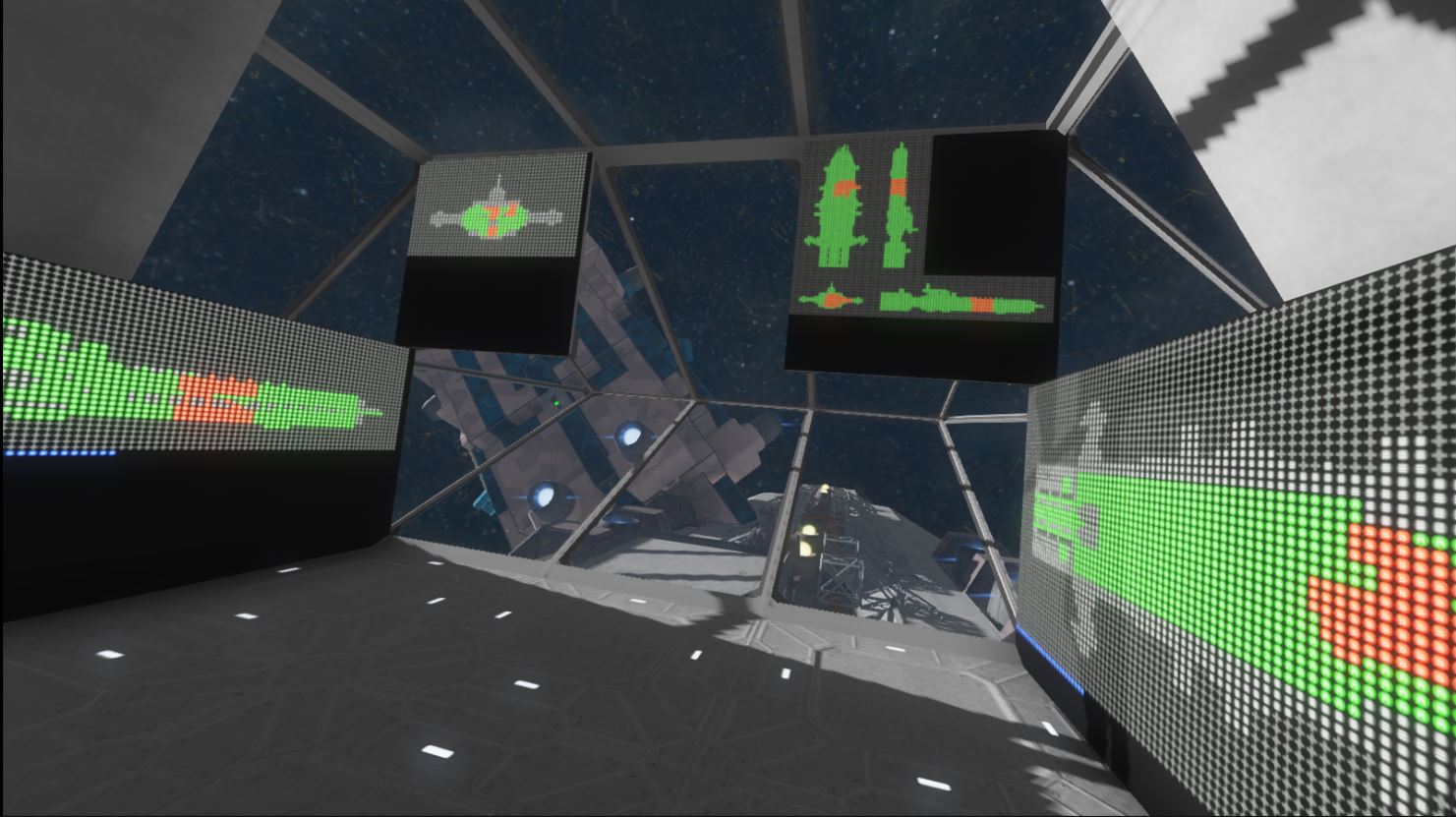
After the prefix you will need two numbers separated by an underscore (X_Y). The first number (X) is the rotation setting. This can be set anywhere from 0-5 0=top 1=side 2=front 3=top (rotated) 4=side (rotated) 5=front (rotated)
After the rotation number, you will need an underscore and then a display mode number. This can be either 0 or 1 where 0 = scan display mode 1 = flat display mode
Finally, if you want to have multiple views on one screen, you can add a modifier to the end of the screen name. _h will put two views side by side _v will put two views top to bottom _hv will put four views in a grid on the screen
There are two special names you can give your displays screen_diagnostic_main is a special view controlled by buttons you can press. Discussed later screen_diagnostic_report is a health percentage and health bar display showing your system/hull health.
screen_diagnostic_main
screen_diagnostic_main can be controlled by the player using buttons. It can also have the _h, _v, and _hv modifiers placed at the end of its name to display multiple views at once. To set up a button or toolbar slot that controls screen_diagnostic_main, simply set up the button or tool slot with the programming block. The block will need to be run with one of the following arguments: rotate : This rotates the view to the next angle (same 0-5 views described earlier) mode : This switches between scanning display mode and flat display mode
screen_diagnostic_report
This screen will show you the health percentages of : Hull : All blocks in the ship including armor and functional blocks (weighted by the size of the block) System: The health of all the functional blocks on your ship including screens, lights, thrusters, gyros, etc. Gyros: The health of all gyros on the ship Thrusters: The health of all thrusters on the ship Power : The health of all power generation blocks on the ship Weapon: The health of all primary weapons and turrets on the ship These health percentages can be used to trigger timers by setting alarms (discussed later).
Adding blocks / resetting
If you add blocks to your ship or need to reset the program, run the program once with the following argument: reset This will cause the block to totally reset itself, clearing all stored data and treating the ship as brand new in its current state. If you don't do this, the screen may show damage where you have made changes, or may not show parts of the ship you have built recently. Note: Damaged terminal blocks will still show as damaged/yellow until they are repaired.
Alarms
You can set alarms to go off when your ship reaches a certain health in a certain category or categories. In order for a timer block to work as an alarm trigger, it must have a special name. The name would start with diag_alarm_ and then would be followed by a keyword and the percent at which you want the alarm to trigger. Here are some examples: diag_alarm_hull_90 - goes off when hull is at or below 90% health diag_alarm_weapon_90 - same thing, but for weapons diag_alarm_gyro_50 - goes off when 50% of your gyros are gone diag_alarm_thrust_45 - goes off when only 45% of your thrusters are left diag_alarm_power_85 - goes off when onlf 85% of your power generating blocks are left diag_alarm_system_30 - goes off when only 30% of your functional blocks are left
You can also set up a timer to go off with multiple parameters. diag_alarm_weapon_90_gyro_50 will go off if either of the conditions are true. These timers can trigger anything: Other programs, lights, sounds, other timers, explosives, etc. You just have set up the timer to do whatever you want it to do, and then give it an appropriate name. alarm_refresh_rate within the script itself will change how often the timers are triggered and checked.
Performance Tweaks
Highlights
From source dataFootprint
A 8 KB download, rated a light load on a server.
Last update
Its author last shipped an update 10 yr ago.
Phils_Ship_Diagnostics on Nxeon
From our catalogue- One-click install
- Not available. One-click install isn't available for this game's mods yet. Download it and upload it to your server in Files.
- Server load
- light
- Smallest plan we suggest
- Space Engineers — 8 GB (8 GB RAM). This follows our own load rating above, not a benchmark.
- Latest build
- 2016-09-02, released 2016-09-02, 8 KB
Game versions by loader
| Loader | Game versions | Newest |
|---|---|---|
| Workshop |
From 1 recorded build of Phils_Ship_Diagnostics.
Run Phils_Ship_Diagnostics on a Space Engineers server
Deploy a server above, then upload the file in Files.
What kind of mod it is
From the catalogTechnology & automation
Machines, power, logistics and automation.
Compatibility
- Game
- Space Engineers
- File size
- 8 KB
Verified at the source
- ✓Steam WorkshopOfficial listing, checked 2026-10-10Open ↗
- ✓AuthorPH1L1P, as published on Steam Workshop
- ✓LicenseNot published by the sourceFree












