






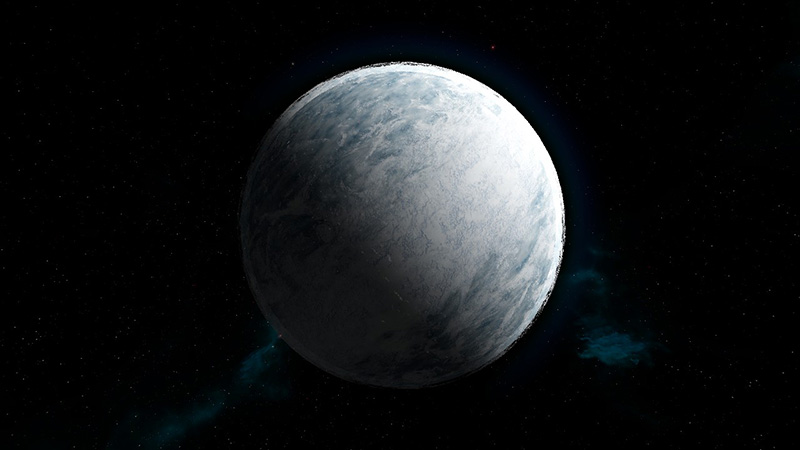

About Planet LV-426
From Steam WorkshopSince Space Mining Universal's incursioning in comercial space ship design, the company has been settling new horizons for the industry. SMU has established an exploration division with the sole…
Since Space Mining Universal's incursioning in comercial space ship design, the company has been settling new horizons for the industry. SMU has established an exploration division with the sole purpose of finding planets, plausible for huge mining operations, for our clients.
Planet LV-426 is located in the Zeta2 Reticuli Star System, in the southern constellation of Reticulumthe. It is a near Earth sized planet orbiting around the gas giant "Calpamos".
The SMU SATCOM data we have gathered for this planet is one of the best ones yet. We have very promising prospects for LV-426 but due to its very hazardous nature, unstable tectonics with eternal windstorms, only companies with the needed infrastructure will succeed.
Most of the mining deposits have already been leased to Weyland Yutani Corporation, but there are still some resourceful areas left for lease. Weyland has the intention to build "Atmospheric Processors" in the future to make this hell live-able.
LV-426's surface is filled with ores, but also keep an eye out for the extreme Platinium and Uranitite deposits. Don't get distracted, danger is lurking around every corner. Beware when night arrives, your standard lights won't be very useful. ------------------------------------------------------------------------------------------------------------------------------ IMPORTANT: From now on clouds come bundled with the planet. But you still have to install them. Here's how:
a) Go to C:\Program Files (x86)\Steam\steamapps\workshop\content\244850 (SE Subscribed content folder) b) In there look for a folder with this mod's workshop ID number: 923806295 c) Within the 923806295 folder, go to the Textures folder, where you'll find the custom clouds folder: "LV426Clouds" d) Cut the "LV426Clouds" folder and paste it into:
C:\Program Files(x86)\Steam\steamapps\common\SpaceEngineers\Content\Textures\Models\Environment\Sky\
e) Now start your game and clouds should work for the planet. ------------------------------------------------------------------------------------------------------------------------------
\\\\\\\\\\\\\\ PLANET LV-426 //////////////
Gravity: 0.86 Gs Climate: Eternal Windstorms Lifeforms: None Temperature: Day: 40°C / Night: -20°C
Cloud Layers: Various Stratosphere: N/A Mesosphere: N/A Atmosphere Range: N/A Atmosphere Density: 1.0 Earth
Ore Scans: Iron, Magnesium, Silicon, Platinum, Uraninite
Custom Hightmap Custom Textures Custom Clouds Custom Ore Deposits
RECOMMENDED PLANET SIZE: 115 km ( this will perfectly match with the heightmap for best rendering ) ------------------------------------------------------------------------------------------------------------------------------ SPAWNING PLANET a) Load the Subscribed planet in the Mods menu. b) Start a new or an old game in "Creative" mode c) Once within the game press SHIFT + F10 to bring up the spawn menu d) From the first pull down menu select "Planets" e) Next move the slider to pick the diameter of the planet (115 km for this planet is recommended) f) Then from the second pull down menu select LV426 g) Click on the button "Spawn Asteroid/Planet" h) Finally to position your planet you can either rotate to select the heading, and you can move it close or farther away from you with CTRL and Mouse Wheel. ------------------------------------------------------------------------------------------------------------------------------ PLEASE DON'T FORGET TO RATE IT, THANKS!
Highlights
From source dataFootprint
Rated a light load on a server.
Last update
Its author last shipped an update 8 yr ago.
Planet LV-426 on Nxeon
From our catalogue- One-click install
- Not available. One-click install isn't available for this game's mods yet. Download it and upload it to your server in Files.
- Server load
- light
- Smallest plan we suggest
- Space Engineers — 8 GB (8 GB RAM). This follows our own load rating above, not a benchmark.
- Latest build
- 2019-05-08, released 2019-05-08
Game versions by loader
| Loader | Game versions | Newest |
|---|---|---|
| Workshop |
From 1 recorded build of Planet LV-426.
Run Planet LV-426 on a Space Engineers server
Deploy a server above, then upload the file in Files.
What kind of mod it is
From the catalogWorld generation
Changes or adds to how new terrain, biomes and structures are created.
Compatibility
- Game
- Space Engineers
Verified at the source
- ✓Steam WorkshopOfficial listing, checked 2026-11-01Open ↗
- ✓AuthorSMU-AMC, as published on Steam Workshop
- ✓LicenseNot published by the sourceFree












