






About Power Control 2.0
From Steam Workshop]Power Control 2.0 Watches and manages the power on your ship or base: batteries, solar panels, wind turbines, H2 engines and reactors. Based on Power Control Program v1.13 by AlfRomeo80 -…
]Power Control 2.0 Watches and manages the power on your ship or base: batteries, solar panels, wind turbines, H2 engines and reactors.
Based on Power Control Program v1.13 by AlfRomeo80 - original script. All credit for the original idea and design goes to them. AlfRomeo80 publishes the source as AlfaAlfMedia on GitHub under the MIT License: AlfaAlfMedia/SpaceEngineers. Unofficial rebuild, not made or endorsed by AlfRomeo80.
What it does
- When your batteries get low, it turns on backup power (H2 engines or reactors). When they're full enough, it turns the backups off.
- Backups only start if they have fuel.
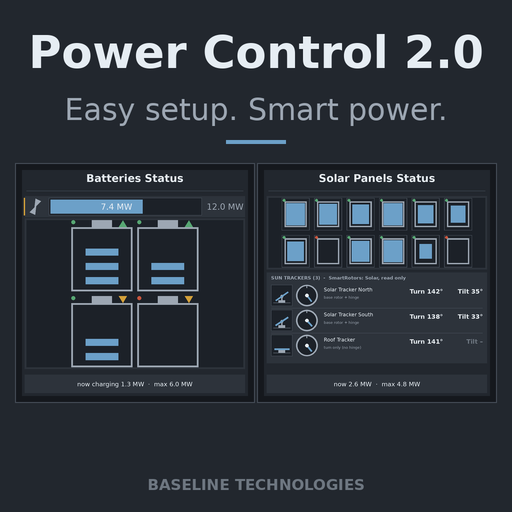
- Shows your power on LCD screens with pictures that move.
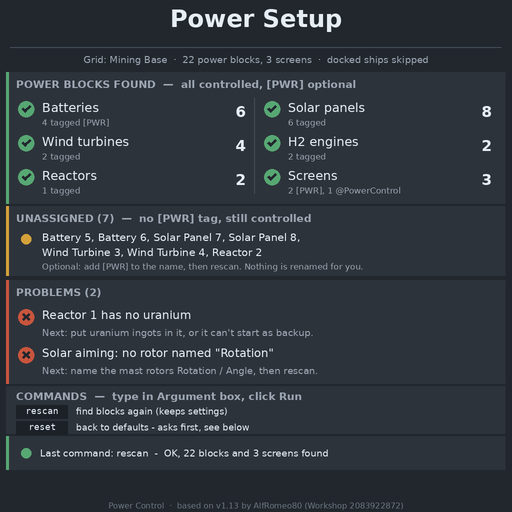
- A SETUP screen tells you what it found and what needs fixing.
- Looks for your blocks again by itself about every 30 seconds. Run rescan to do it right away.
- Only controls your own grid. Docked ships are skipped.
- Shows the angles of up to 3 SmartRotors: Solar sun trackers on the Solar screen (optional mod, see below).
Quick setup
- Subscribe to this script.
- Build a Programmable Block on the grid you want to control.
- Open its terminal, click Edit, then Browse Scripts. Pick Power Control 2.0 and click OK.
- Click Check Code, then OK. After about 5 seconds the block's detail panel shows "== POWER CONTROL 2.0 - SETUP ==" with your block counts.
- Add [PWR] to the name of any LCD, cockpit, seat, console or programmable block you want to use as a screen. Wait about 30 seconds, or run rescan.
- Auto power starts OFF. Run changeStatus=manualControl to turn it on. Backups then start at 20% battery and stop at 60%.
Your Custom Data is never overwritten. If it's empty, the script fills it in once. To get the default text again, clear the Custom Data and run rescan.
The screens
In a [PWR] block's Custom Data, change the word after = on the Screen= line (or Screen1=, Screen2= on blocks with more screens). Big or small letters both work.
Screen=Battery[/code]
[list]
[*][b]Setup[/b] - setup report: blocks found, unassigned blocks, problems, commands
[*][b]Status[/b] - power overview
[*][b]Menu[/b] - menu page picked with menu=1 to menu=6; pick blocks and turn them on or off
[*][b]Auto[/b] - auto power settings (battery marks show when auto power is ON)
[*][b]Battery[/b] - batteries
[*][b]Solar[/b] - solar panels and SmartRotors: Solar trackers
[*][b]Wind[/b] - wind turbines
[*][b]Hydrogen[/b] - H2 engines and their hydrogen fill
[*][b]Reactor[/b] - reactors and their uranium
[*][b]Help[/b] - what each button does on the current menu page
[*][b]Log[/b] - short script messages
[*][b]Off[/b] - the script stops drawing on this screen
[/list]

[h1]Commands[/h1]
Type in the programmable block's Argument box and click Run, or put them on a button panel or toolbar slot (Run action).
[list]
[*][b]rescan[/b] - look for blocks again now
[*][b]reset[/b], then [b]reset confirm[/b] within 30 s - back to starting settings
[*][b]changeStatus=manualControl[/b] - auto power on/off
[*][b]changeStatus=hydrogen[/b] / [b]uranium[/b] - H2 engines or reactors first as backup
[*][b]changeStatus=switchUseAll[/b] - start all backups at once, or one by one
[*][b]changeStatus=lowerBattery-[/b] / [b]lowerBattery+[/b] / [b]upperBattery-[/b] / [b]upperBattery+[/b] - move the low and high marks 5%
[*][b]changeStatus=BatteryBlock[/b] - change the charge mode of all batteries
[*][b]menu=1[/b] to [b]menu=6[/b] - Menu page: 1 auto power controls, 2 batteries, 3 solar, 4 wind, 5 H2 engines, 6 reactors
[*][b]selection=1[/b] / [b]-1[/b] / [b]0[/b] / [b]100[/b] / [b]-100[/b] - next / previous / change mode or auto refill / turn on / turn off
[*][b]selection=7[/b] - Battery page: mode for all; Reactor page: auto refill for all
[/list]

[h1]SmartRotors: Solar (optional)[/h1]
This script does not turn any rotors. If you want sun tracking, use [url=https://steamcommunity.com/sharedfiles/filedetails/?id=1728457223]SmartRotors: Solar[/url]. The Solar screen only reads the trackers (up to 3) and shows their Turn and Tilt angles. No [PWR] tag is needed on them.

[h1]License[/h1]
[code]MIT License

Copyright (c) 2025 AlfaAlfMedia

Permission is hereby granted, free of charge, to any person obtaining a copy
of this software and associated documentation files (the "Software"), to deal
in the Software without restriction, including without limitation the rights
to use, copy, modify, merge, publish, distribute, sublicense, and/or sell
copies of the Software, and to permit persons to whom the Software is
furnished to do so, subject to the following conditions:

The above copyright notice and this permission notice shall be included in all
copies or substantial portions of the Software.

THE SOFTWARE IS PROVIDED "AS IS", WITHOUT WARRANTY OF ANY KIND, EXPRESS OR
IMPLIED, INCLUDING BUT NOT LIMITED TO THE WARRANTIES OF MERCHANTABILITY,
FITNESS FOR A PARTICULAR PURPOSE AND NONINFRINGEMENT. IN NO EVENT SHALL THE
AUTHORS OR COPYRIGHT HOLDERS BE LIABLE FOR ANY CLAIM, DAMAGES OR OTHER
LIABILITY, WHETHER IN AN ACTION OF CONTRACT, TORT OR OTHERWISE, ARISING FROM,
OUT OF OR IN CONNECTION WITH THE SOFTWARE OR THE USE OR OTHER DEALINGS IN THE
SOFTWARE.Highlights
From source dataFootprint
Rated a light load on a server.
Last update
Its author last shipped an update 17d ago.
Power Control 2.0 on Nxeon
From our catalogue- One-click install
- Not available. One-click install isn't available for this game's mods yet. Download it and upload it to your server in Files.
- Server load
- light
- Smallest plan we suggest
- Space Engineers — 8 GB (8 GB RAM). This follows our own load rating above, not a benchmark.
- Latest build
- 2026-10-18, released 2026-10-18
Game versions by loader
| Loader | Game versions | Newest |
|---|---|---|
| Workshop |
From 1 recorded build of Power Control 2.0.
Dependencies
- Required: SmartRotors: Solar
Declared by the newest build that lists any. Required ones are installed with it on one-click installs.
Run Power Control 2.0 on a Space Engineers server
Deploy a server above, then upload the file in Files.
What kind of mod it is
From the catalogTechnology & automation
Machines, power, logistics and automation.
Compatibility
- Game
- Space Engineers
Verified at the source
- ✓Steam WorkshopOfficial listing, checked 2026-10-28Open ↗
- ✓AuthorBudahsmoka, as published on Steam Workshop
- ✓LicenseNot published by the sourceFree












