






About Projector2LCD
From Steam WorkshopShow info about missing components, ingots and ores for your blueprint. ----------- Projector2LCD by Juggernaut93 With some code by nihilus from here:…
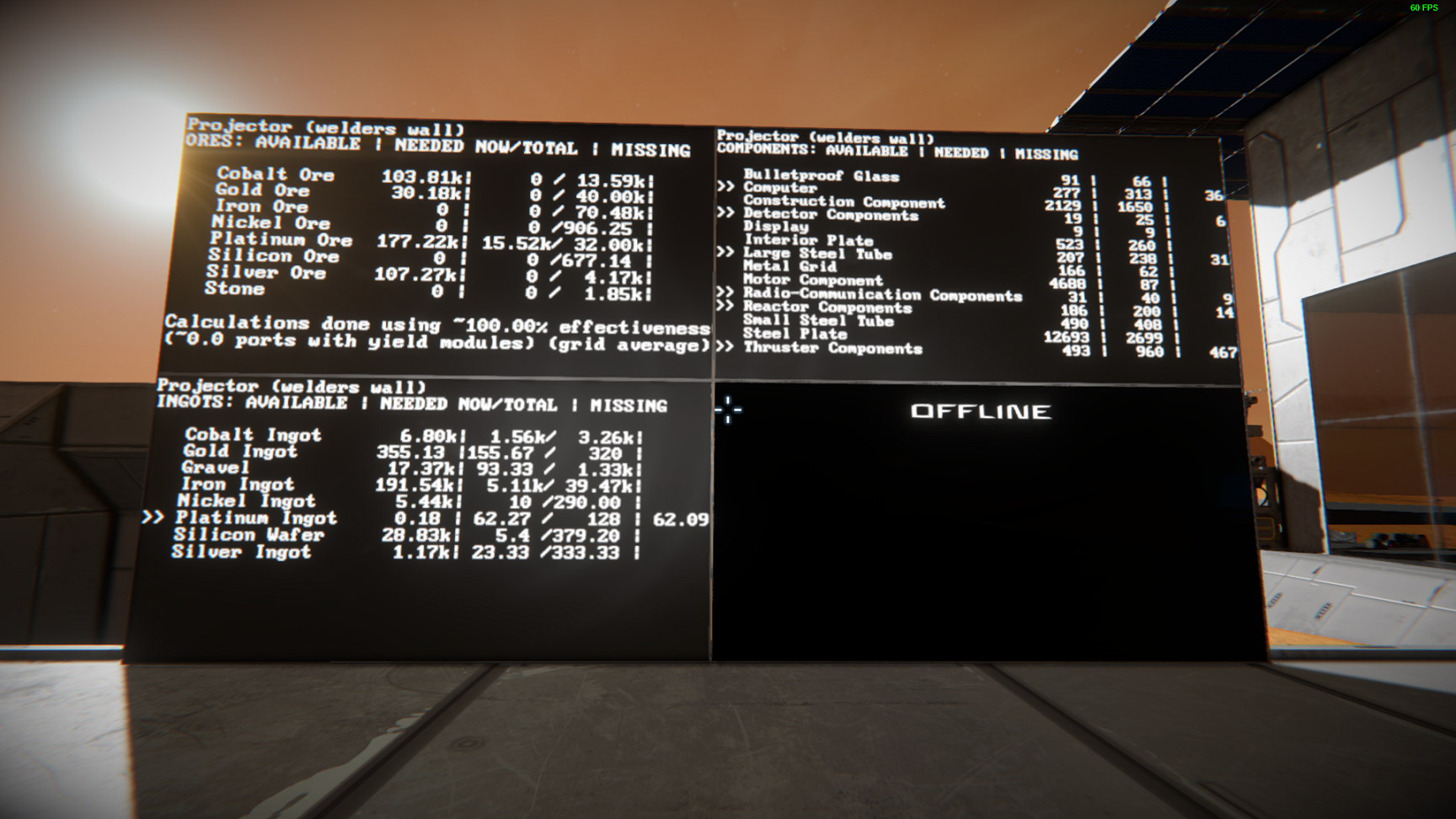
Show info about missing components, ingots and ores for your blueprint.
-----------
Projector2LCD by Juggernaut93
With some code by nihilus from here: https://forum.keenswh.com/threads/adding-needed-projector-bp-components-to-assembler.7396730/#post-1287067721
CHECK ALSO: Projector2Assembler to queue blueprint components to an assembler. Link: https://steamcommunity.com/sharedfiles/filedetails/?id=1488278599
AND Assembler Needs Calculator to show info about missing materials for assemblers. Link: https://steamcommunity.com/sharedfiles/filedetails/?id=1501171322
MODS COMPATIBILITY
- The script can be made compatible with mods that modify or add new block definitions (but without adding new kinds of components to be assembled in an Assembler) running the following app: https://github.com/Juggernaut93/Projector2Assembler/releases
- Run the .exe file and follow the instructions on screen. A file will be created with the line of text that needs to be added to the script.
- The app should be runnable on Windows 10 without additional dependencies.
- On older versions of Windows this package might be needed: https://www.microsoft.com/en-US/download/details.aspx?id=48145
- If you have problems running the .exe app, you can run the .py executable using Python on the command line.
- The script will ignore non-vanilla types of ores/ingots too and these won't be shown on the LCDs.
SETUP
- You need a programming block, a projector and up to 3 LCD screens. Text panels, small and wide LCD panels are supported. The use of Monospace font is RECOMMENDED (but not mandatory).
- Run the script with this argument: ProjectorName;LCDName1;LCDName2;LCDName3;lightArmor;yieldPorts
- [list]
- All parameters are optional and can be left empty.
- ProjectorName is the name of the projector with the blueprint you want to show info about. If you don't specify a projector, the script will continuously search for a currently active projector and show the related info
- LCDName1 is the name of the LCD that will show info about which components are needed to build the blueprint (see HOW IT WORKS)
- LCDName2 is the name of the LCD that will show info about which ingots/refined ores are needed to build the blueprint (see HOW IT WORKS)
- LCDName3 is the name of the LCD that will show info about which ores are needed to build the blueprint (see HOW IT WORKS). If no valid third LCD is specified, the script will try to fit the info on the second LCD (if specified) (see ADDITIONAL CONFIGURATION)
- lightArmor is true (default) or false and tells the script to assume all the armor blocks listed by the projector are respectively Light Armor Blocks or Heavy Armor Blocks
- yieldPorts is an integer between 0 and 8 and specifies how many ports of your refineries should be considered as covered by a Yield Module. This value will affect calculations regarding how much of each ore is needed for your blueprint. If you don't specify yieldPorts, the script will use the average effectiveness of the ENABLED refineries on your grid. Note that the script will also account for available Basic Refineries if there are no Refineries available.
[*] IMPORTANT: you HAVE to set the ASSEMBLER_EFFICIENCY variable at the top of the script according to your world settings: if you have set the assembler efficiency to realistic, set the variable to 1; if you have set it to 3x, then set the variable to 3; if you have set it to 10x, then set the variable to 10; [*] The script will run indefinitely with the specified settings. To change settings, just re-run the script with the different parameters. [/list]
ADDITIONAL CONFIGURATION
The script has a number of hardcoded parameters that you can change. The parameters are in the section "CONFIGURATION" at the top of the script and control various settings: text auto-resize and formatting, whether to use blocks on subgrids, and so on. For an explanation of such parameters, refer to the in-game script Readme section (Steam description field limits the number of characters and this section of the readme can't be posted here).
HOW IT WORKS
- The script gets from the projector the remaining blocks to build. Unfortunately, the projector is not precise about the type of armor blocks to build and only gives a generic "armor blocks". You can then specify if you want to assume all the blocks are light or heavy armor blocks, but keep in mind that the script will overproduce if you specify heavy blocks but not all your blocks are full cubes and/or you also have light blocks; it will (probably) underproduce if you specify light blocks but you have many heavy armor blocks.
- The script then checks if the specified projector is available, otherwise it will search for one that is currently projecting.
- The script then proceeds to compute the various components, ingots and ore needed, using the average refinery effectiveness at transforming ores to ingots (or the one you have manually specified with the yieldPorts parameter).
- The computed info are then shown on the available LCDs. If one of the LCDs is not found or is not specified, the script will simply ignore it, except for when fitOn2IfPossible is true: as explained before, in this case the content of the third LCD can be shown on the second one, if the third LCD is not available and the second one is. Each LCD will show the name of the chosen projector. Also, each LCD will highlight with a ">>" the missing materials.
- COMPONENT LCD CONTENT:
- [list]
- AVAILABLE column: the amount of each component that is currently in inventory
Highlights
From source dataFootprint
Rated a light load on a server.
Last update
Its author last shipped an update 2 mo ago.
Projector2LCD on Nxeon
From our catalogue- One-click install
- Not available. One-click install isn't available for this game's mods yet. Download it and upload it to your server in Files.
- Server load
- light
- Smallest plan we suggest
- Space Engineers — 8 GB (8 GB RAM). This follows our own load rating above, not a benchmark.
- Latest build
- 2026-08-24, released 2026-08-24
Game versions by loader
| Loader | Game versions | Newest |
|---|---|---|
| Workshop |
From 1 recorded build of Projector2LCD.
Run Projector2LCD on a Space Engineers server
Deploy a server above, then upload the file in Files.
What kind of mod it is
From the catalogWorld generation
Changes or adds to how new terrain, biomes and structures are created.
Compatibility
- Game
- Space Engineers
Verified at the source
- ✓Steam WorkshopOfficial listing, checked 2026-11-01Open ↗
- ✓AuthorJuggernaut93, as published on Steam Workshop
- ✓LicenseNot published by the sourceFree












