








About Rdavs Easy Auto Turret Script
From Steam WorkshopThis script automates and provides effective tracking and weapons firing to player made rotor turrets. With a self-searching automatic setup that means all rotor turrets are found automatically with…
This script automates and provides effective tracking and weapons firing to player made rotor turrets. With a self-searching automatic setup that means all rotor turrets are found automatically with no renaming or grouping needed.

About The Script
Easy Auto Turret is a script designed to replace and vastly improve on my previous turret scripts, with an exceptionally rapid survival friendly installation taking less than 15 seconds (check the gif!) along with a powerful and effective tracking algorithm to suit point defence, flak and heavy batteries, this script combines effectiveness with user friendliness. This script is for the every-man out there that wants to mess around and experiment with rotor turrets to add some spice and variety to vanilla combat without spending hours setting things up.
Feature Set:
~ Easily installed system with integrated instructions and useful diagnostics, ~ Exceptionally performance friendly script ~ Self Searching algorithm automatically finds rotor turrets without any naming or grouping required! ~ Multi armed turrets supported ~ Returns to intermediate resting position after finished targeting ~ Easy customisation of various options such as projectile velocity, and turn rate of turrets ~ Survival ready and friendly, with built in diagnostics ~ Resistant to damage and will not break if parts of a turret are destroyed in combat ~ Uses every vanilla turret it can on the ship for spotting targets, even if one or more are destroyed

Installation Of The Script Into The Programmable Block (PB)
To install a workshop script do the following (there is an image below that shows these steps) - Open the pb's terminal - Press 'Edit' - Press 'Browse Scripts' - Find This script and click OK - Click OK again
The scripts runtime indicator ( a small moving indicator) will now be seen along with the version number and a few other bits of useful information. the PB is now set up and will give further instructions if you are missing any key blocks.
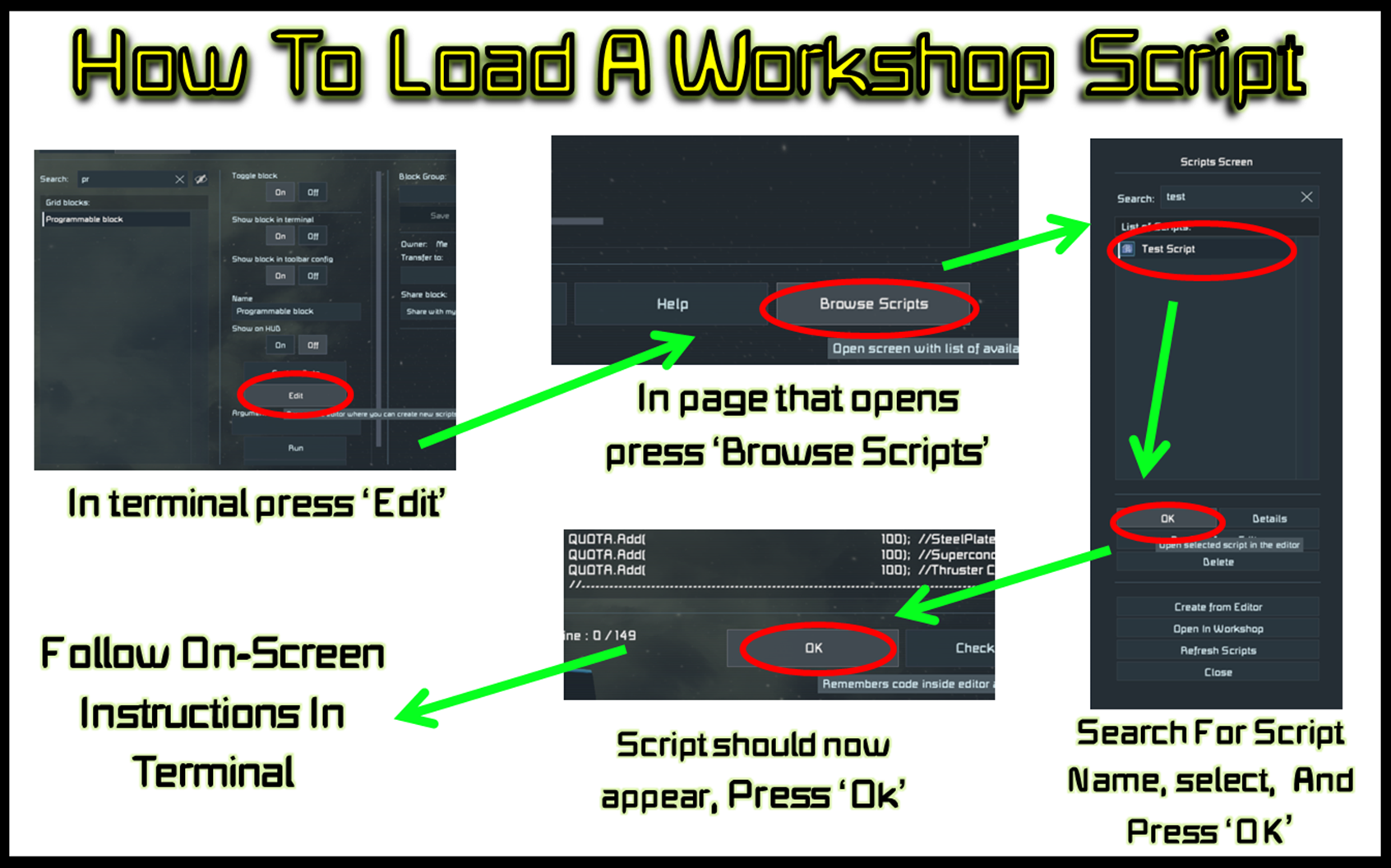
Basic Installation Of The Script
To set up the the script the code will help you as best it can, and will tell you if you have any blocks missing. However every grid needs:
~ 1 or more vanilla turrets for spotting targets ~ 1 or more control blocks/ cockpit/flight seat/ remote control etc ~ The programmable block with the code installed ~ 1 or more rotor turrets with the elevation rotor facing right (refer pictures/gifs)
Upon recompilation the program will automatically find, detect and set up all the rotor turrets it can find! Once a target comes into range of any of the turrets on the grid the script will try and guide all turrets towards that location and fire at it converging on the target.

In Addition To Remember:
~ If the turret elevation rotor is built in a way where you want it facing left add #LEFT# to the elevation rotors name ~ If you want multi armed turrets build your turret and add #LEFT# to the turrets left arm elevation rotor ~ A turret when it cannot aim correctly at the target will sort of wiggle, this indicates incorrect setup ~ If you are using mods or primarily missile based weapons you can change the projectile velocity in the custom data options to improve the turrets tracking
Bonus Features:
~ In the scripts custom data there is not only installation instructions but also some options which can be edited to tune the script to your pleasing in here are things such as changing the projectile velocity, options for only using named blocks
~ If you set the upper/lower limits for the turrets rotors, the turret will return to the middle intermediate position after they have finished firing.
~ Multi armed turrets (ie 2 rotors) can be set up by calling the left arms elevation rotor (or including in the name) #LEFT# the same goes for turrets where you intentionally want their single rotor arm facing left.
~ If a turret is destroyed in action it will be logged by the script as a 'disabled turret', the script will try and continue aiming and firing with all remaining turrets and thus the script will try to continue fighting to the bitter last. Same goes for seeker turrets.
*I intentionally didn't create a sea of features to make setting up more straightforwards and was also easier to keep performance friendly, if you're looking out for some more advanced tuning and features than what's in this script, check out Whiplashes slaving script, I can vouch for the quality of his work : Whips Turret Slaver
Thanks And Acknowledgements
Many thanks to my beta-testing team and discord who gave continuous support and testing along the way, if you'd like to be a part of the discussion you can join in at: https://discord.gg/MXz8Gkj
Bugs and Issues
Please get in touch with me (via the discord is best) with any bugs and issues you have with the script, I've put aside some time over the next few days for any emergency bugfixes and tweaks so the code works well, this one has been a in development for sometime now so had been tested quite thoroughly but stuff might still exist, if you do encounter anything, let me know!
Highlights
From source dataFootprint
Rated a light load on a server.
Last update
Its author last shipped an update 7 yr ago.
Rdavs Easy Auto Turret Script on Nxeon
From our catalogue- One-click install
- Not available. One-click install isn't available for this game's mods yet. Download it and upload it to your server in Files.
- Server load
- light
- Smallest plan we suggest
- Space Engineers — 8 GB (8 GB RAM). This follows our own load rating above, not a benchmark.
- Latest build
- 2019-08-15, released 2019-08-15
Game versions by loader
| Loader | Game versions | Newest |
|---|---|---|
| Workshop |
From 1 recorded build of Rdavs Easy Auto Turret Script.
Run Rdavs Easy Auto Turret Script on a Space Engineers server
Deploy a server above, then upload the file in Files.
What kind of mod it is
From the catalogTechnology & automation
Machines, power, logistics and automation.
Compatibility
- Game
- Space Engineers
Verified at the source
- ✓Steam WorkshopOfficial listing, checked 2026-11-01Open ↗
- ✓AuthorRdav, as published on Steam Workshop
- ✓LicenseNot published by the sourceFree












