






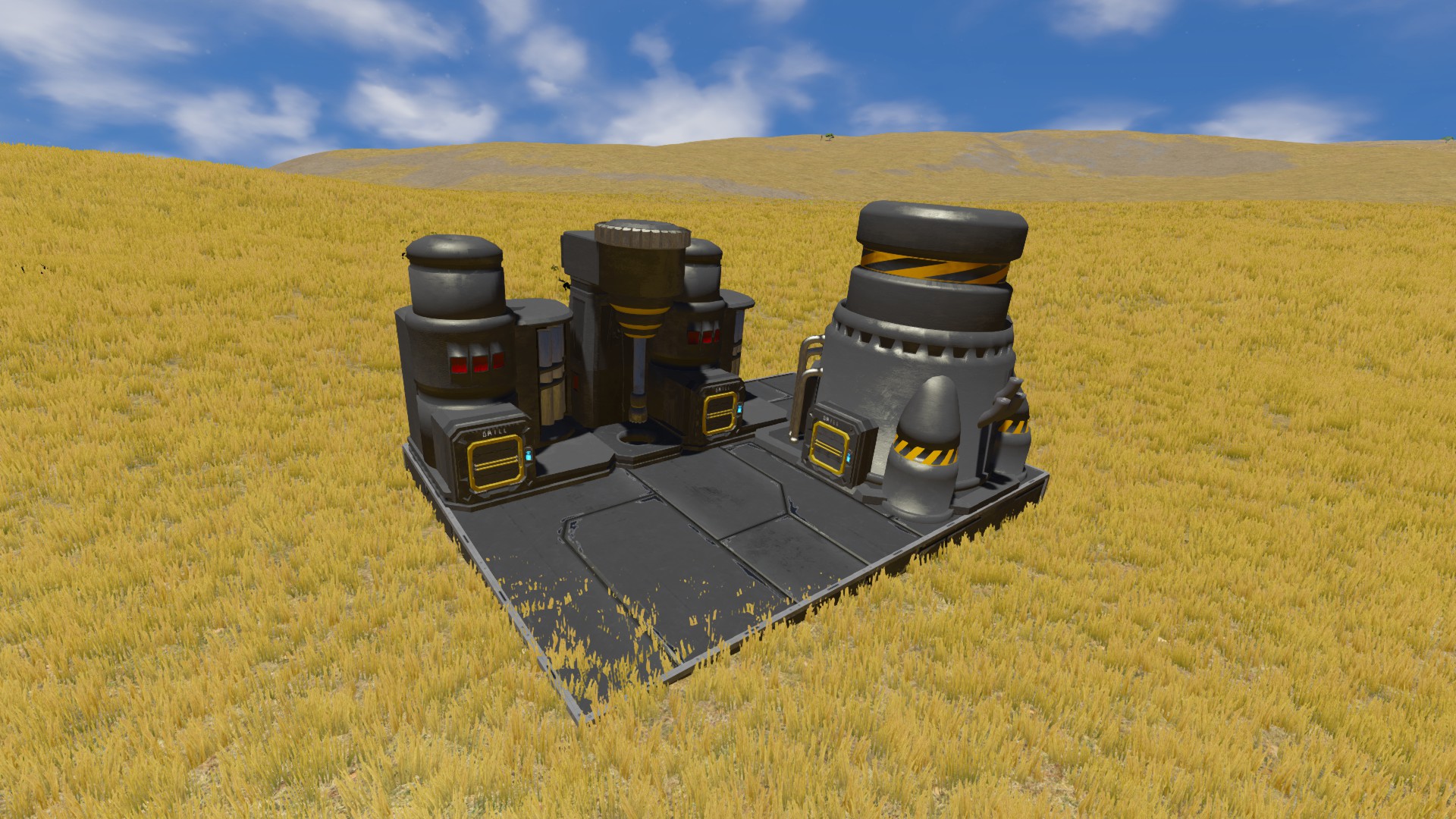
About Resource Nodes Filters
From Steam WorkshopResource Nodes Filters Static drills for your bases, stations and outposts. Place one down, pick what ores you want, and it keeps mining forever. The deposits never run out, so it's good for big…
Resource Nodes Filters
Static drills for your bases, stations and outposts. Place one down, pick what ores you want, and it keeps mining forever. The deposits never run out, so it's good for big builds where you need a steady supply of materials.
Features
- Infinite ore, deposits never deplete
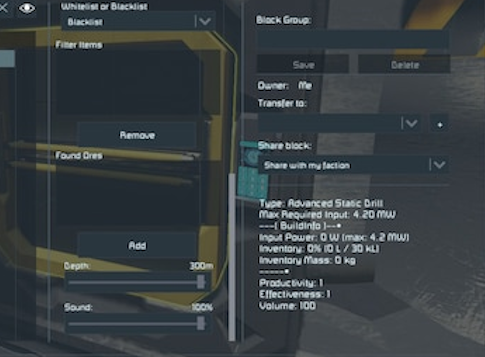
- Scan range from 30m to 300m, adjustable with a slider
- Power use scales with range, so bigger range costs more power
- Ore filter, pick exactly which ores the drill will mine
- Drill volume slider if the sound gets annoying
- Only works while the grid is stationary, made for bases and stations
- Works on dedicated servers and is built to stay light on performance
- Good fit for PvE, economy and industrial worlds
World Config
There's a config file in the world storage so server owners can change how the drills work.
<BaseSpeed>500</BaseSpeed>
Lower = Faster | Higher = Slower

<InventoryVolume>0.5</InventoryVolume>
0.5 = 500L | 1.0 = 1000L

<GatherAmount>2</GatherAmount>

<BasePowerDraw>0.01</BasePowerDraw>

<MaxPowerDraw>0.1</MaxPowerDraw>
0.1 = 100kW

<MaxPerFaction>-1</MaxPerFaction>
-1 = No limit

<DisableDrillsOnRestart>false</DisableDrillsOnRestart>
- BaseSpeed: how fast ore is gathered
- InventoryVolume: size of the drill's inventory
- GatherAmount: how much ore is made each cycle
- BasePowerDraw: lowest power use
- MaxPowerDraw: power use at max range
- MaxPerFaction: max drills a faction can have of each drill type
- DisableDrillsOnRestart: turns all drills off when the server restarts
Admin Commands
/ReloadDrills Reloads the config and applies your changes without restarting the world.
/ResetDrills Resets the config back to the default values.
Bug Reports
Found a bug or something not working right? Please post it in the Discussions tab, not the comments. Comments get buried fast and it's a lot easier for me to track and fix things in Discussions.
If you're not sure if it's a bug, post it anyway. Your SpaceEngineers.log helps a lot if you have it.
Custom Build Costs
Want to change what blocks cost to build? Check out Custom Build Costs. It lets you change the build cost of any block, modded blocks included. You're free to reupload that one with your own edits.
Update - 10/26/26
Fixed
- Fixed a multiplayer error ("Collection was modified") that could stop drill settings from syncing to other players. Mostly happened on player hosted servers. Thanks to aantono for tracking this one down and posting the fix.
- Fixed a small networking bug where one of the send options was being ignored.
- Packets are only built once per update now instead of once per player, so it's a bit lighter on busy servers.
If you were getting "Malformed packet" spam in your logs, this should fix it.
Previous Updates
9/20/26
- Added a config option for max drills per faction
- Added a config option to turn drills off after a restart
- Added the /ResetDrills command
Before that
- Added the Small Grid Stone Drill
- Drills now only run while the grid is stationary
- Fixed audio issues on all drill types
- More config options for inventory size and drill performance
Permissions
Do not reupload, redistribute or republish this mod or any of its code.
Credits
Based on the original Resource Nodes mod, heavily modified and expanded.
Highlights
From source dataFootprint
Rated a light load on a server.
Last update
Its author last shipped an update 11d ago.
Resource Nodes Filters on Nxeon
From our catalogue- One-click install
- Not available. One-click install isn't available for this game's mods yet. Download it and upload it to your server in Files.
- Server load
- light
- Smallest plan we suggest
- Space Engineers — 8 GB (8 GB RAM). This follows our own load rating above, not a benchmark.
- Latest build
- 2026-10-26, released 2026-10-26
Game versions by loader
| Loader | Game versions | Newest |
|---|---|---|
| Workshop |
From 2 recorded builds of Resource Nodes Filters.
Recent builds
| Build | Released | Game versions | Loaders |
|---|---|---|---|
| 2026-10-26 | 2026-10-26 | n/a | Workshop |
| 2026-10-07 | 2026-10-07 | n/a | Workshop |
Run Resource Nodes Filters on a Space Engineers server
Deploy a server above, then upload the file in Files.
What kind of mod it is
From the catalogWorld generation
Changes or adds to how new terrain, biomes and structures are created.
Compatibility
- Game
- Space Engineers
Verified at the source
- ✓Steam WorkshopOfficial listing, checked 2026-11-04Open ↗
- ✓Author❤Alexis(Mssun21)❤, as published on Steam Workshop
- ✓LicenseNot published by the sourceFree












