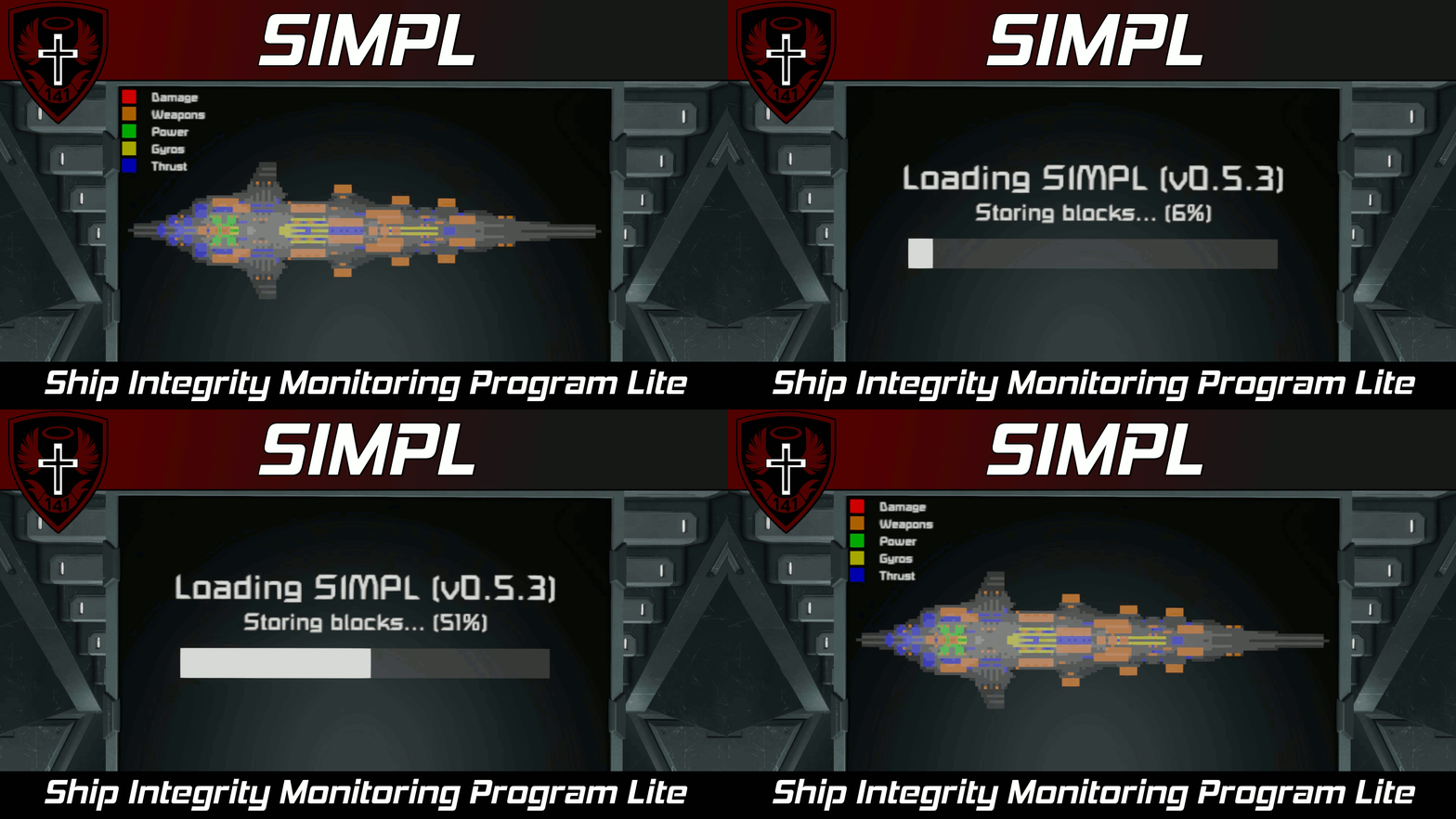
About SIMPL | Ship Integrity Monitoring Program Lite (A sprite-based ship layout/floor plan script)
From Steam WorkshopFeatures (NEW) Can draw multiple views onto a single display! Can draw across multiple LCD panels Displays cross-sections of your ship and can display destroyed blocks Highlights ship subsystems like…
[img=https://i.imgur.com/iHy45ds.png]
Features
- (NEW) Can draw multiple views onto a single display!
- Can draw across multiple LCD panels
- Displays cross-sections of your ship and can display destroyed blocks
- Highlights ship subsystems like thrust, gyros, and power
- Built in legend
- Customizable colors
- Works with screen rotation
- Cross-section views can be rotated and manually scaled
- Works with multi-screen blocks like cockpits and consoles
- Uses sprites for drawing
- Low performance impact
[img=https://i.imgur.com/iHy45ds.png]
Description
Howdy!
This script draws a sprite-based 2D cross-section of your ship and will display destroyed blocks and highlight important ship systems. This script is designed to be as lightweight as possible (hence the name) while still retaining a decent amount of utility.
Larger ships will take longer to scan than smaller ships because the script is designed to only go through a few blocks per run to keep the performance impact low.
[img=https://i.imgur.com/iHy45ds.png]
Setup Instructions
[olist] [*] Place this script in a programmable block on the grid that you want to display. [*] Add text panels, LCD screens, and multi-screen blocks to a group named "SIMPL". [*] Run the program with the argument refresh to process any new screens or Custom Data changes. [*] Configure the custom data of the programmable block and the blocks with screens to your liking (see below). [/olist]
If you wish to reset the script for damage or display newly placed blocks, you must recompile the script.
[img=https://i.imgur.com/iHy45ds.png]
Configuration
Display Config
You can configure the appearance of the ship view for each display screen in the Custom Data of each block with display screens. For blocks with only one display, the custom data will look like this:
[SIMPL - Text Surface Config]
Number of views=1

[SIMPL - Display Config - View 1]
; View axis values: X, Y, Z, NegativeX, NegativeY, NegativeZ
View axis=X
Rotation (deg)=0
Scale=auto
; Elements should range from -1 to 1 where 0 indicates centered
Position={X:0 Y:0}

[SIMPL - Legend Config]
Legend Scale=1
; Elements should range from -1 to 1 where 0 indicates centered
Position={X:-1 Y:-1}
For blocks with multiple screens, the custom data will look like this:
[SIMPL - Text Surface Config]
Number of views for screen 0=1
Number of views for screen 1=0
Number of views for screen 2=0
Number of views for screen 3=0

[SIMPL - Display Config - Screen 0 - View 1]
; View axis values: X, Y, Z, NegativeX, NegativeY, NegativeZ
View axis=X
Rotation (deg)=0
Scale=auto
; Elements should range from -1 to 1 where 0 indicates centered
Position={X:0 Y:0}

[SIMPL - Legend Config - Screen 0]
Legend Scale=1
; Elements should range from -1 to 1 where 0 indicates centered
Position={X:-1 Y:-1}
For multi-screen blocks, you must set "Number of views for screen X" to 1 or larger, then run the argument refresh. After that, the block's Custom Data will be populated with new section(s) where you can configure views for that particular screen, "X".
General Config and Colors
You can configure the colors and general settings used by SIMPL in the Custom Data of the Programmable Block that this script runs from. The Custom Data should look like the following:
[SIMPL - General Config]
Group name=SIMPL
Auto scan=true

; Colors are in the format: Red, Green, Blue, Alpha.
; If you do not want to see a particular subsystem color
; simply set the Alpha value to 0 and it will be
; omitted from the legend.
[SIMPL - Colors]
Max block density=50, 50, 50, 255
Min block density=10, 10, 10, 255
Missing block=100, 0, 0, 200
Background=0, 0, 0, 255
Power=0, 100, 0, 100
Gyro=100, 100, 0, 100
Thrust=0, 0, 100, 100
Weapons=100, 50, 0, 100
As mentioned in the comment above, you can omit a certain subsystem from special highlighting and the legend by setting the Alpha of the color to 0.
[img=https://i.imgur.com/iHy45ds.png]
Multiscreen Display
You can also combine multiple LCD panels together to create larger surfaces to draw sprites on.
In order to create a multiscreen display: [olist] [*] Make a wall of LCD panels (They must all be the same type of LCD). [*] Add only the top left LCD panel to the SIMPL group. [*] Add the following to the custom data of that top left LCD panel:
[SIMPL - Multiscreen Config]
Screen rows=1
Screen cols=1
- Change "Screen rows" and "Screen cols" to match the shape of your screen wall.
[*] Recompile (if you added new blocks) or run the argument refresh (if no new blocks were added) to process changes. [/olist] This will now be treated as one massive LCD screen! [img=https://imgur.com/dzN68OC.png]
[img=https://i.imgur.com/iHy45ds.png]
Arguments
Arguments are not case sensitive. [table] [tr] [th]Argument[/th] [th]Description[/th] [/tr] [tr] [td]refresh[/td] [td]Reacquires all display screens and reprocesses any Custom Data changes.[/td] [/tr] [tr] [td]scan[/td] [td]Initiates a manual scan for any destroyed blocks. This is only valid when "Auto scan" is set to false in SIMPL - General Config.[/td] [/tr] [tr] [td]force_draw[/td] [td]Forces a redraw of all sprites to clients within sync range. This has a 30 second timeout to reduce the possibility of using this to grief server networking[/td] [/tr] [/table]
[img=https://i.imgur.com/iHy45ds.png]
Author's Notes
Highlights
From source dataFootprint
A 845 KB download, rated a light load on a server.
Last update
Its author last shipped an update 24 mo ago.
SIMPL | Ship Integrity Monitoring Program Lite (A sprite-based ship layout/floor plan script) on Nxeon
From our catalogue- One-click install
- Not available. One-click install isn't available for this game's mods yet. Download it and upload it to your server in Files.
- Server load
- light
- Smallest plan we suggest
- Space Engineers — 8 GB (8 GB RAM). This follows our own load rating above, not a benchmark.
- Latest build
- 2024-10-23, released 2024-10-23, 845 KB
Game versions by loader
| Loader | Game versions | Newest |
|---|---|---|
| Workshop |
From 1 recorded build of SIMPL | Ship Integrity Monitoring Program Lite (A sprite-based ship layout/floor plan script).
Deploy a server above, then upload the file in Files.
What kind of mod it is
From the catalogQuality of life & UI
Small conveniences, tweaks and interface improvements players notice straight away.
Compatibility
- Game
- Space Engineers
- File size
- 845 KB
Verified at the source
- ✓Steam WorkshopOfficial listing, checked 2026-10-10Open ↗
- ✓AuthorWhiplash141, as published on Steam Workshop
- ✓LicenseNot published by the sourceFree