







About Simple cruise control
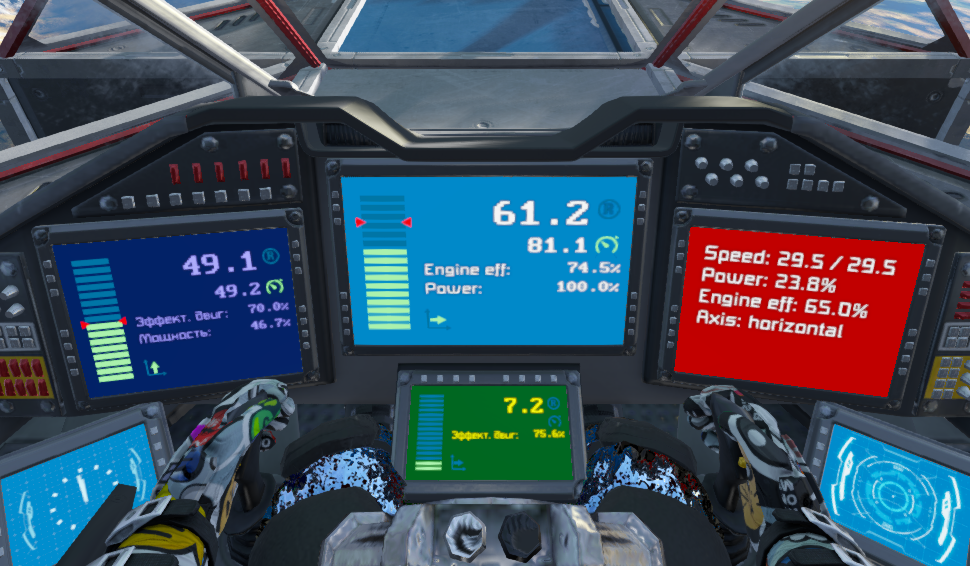
From Steam WorkshopSimple cruise control v 2.1.1 The script allows you to maintain a given longitudinal or vertical speed of the aircraft, controlling the engines in the corresponding axis. Displays speed information…
[h1]Simple cruise control[/h1] v 2.1.1 The script allows you to maintain a given longitudinal or vertical speed of the aircraft, controlling the engines in the corresponding axis. Displays speed information on the display. The W (or Spacebar) button no longer needs to be held permanently. Saves energy and fuel, spending it only to maintain speed.
To fly in cruise control mode, you need to turn on the mode and gain the desired speed. After releasing the buttons, the set speed on the selected axis will be maintained automatically, with gravity compensation. In this case, the speeds along the remaining axes are parried standardly by the inertia damper.
The mode can be switched on by quick triple pressing W or Spacebar, the desired speed will be set to 100 m/s and acceleration will begin. At any time, you can stop acceleration by pressing any button once - the gained speed will be maintained. To disable the mode, you can use a quick triple press S or C, while the standard inertia damper will turn on in the selected axis.
The arguments of the program block:
- cc_on - enable mode
- cc_off - off mode
- cc_onoff - mode switching
- axis_v - select vertical axis
- axis_l - select the longitudinal axis (by default)
- axis_switch - switching axis
- setspeed NNN - sets the desired speed, where NNN is a number
By default, the mode is disabled.
The script can be controlled without running the PB with arguments at all, the PB can not be displayed on the function panel:
- triple pressing W switches on the cruise control in the longitudinal axis and sets the desired speed to 100m/s
- triple pressing S disables cruise control in the longitudinal axis
- triple pressing Spacebar turns on the cruise control in the vertical axis and sets the desired speed to 100m/s vertically
- triple pressing C turns off cruise control in the vertical axis
At the same time, the script works only in one axis.
Script settings are made through user PB data (the button "Custom data"). When you first start the script will generate the default settings. You will need to specify the name of the cockpit and display. After changing the settings, you must recompile the script. At first, go to Custom Data, change language and recompile, then continue setup.
Realized features:
Russian, English and German are supported, including in the comments to the settings. Display in text or graphic mode. There is a setting for the frequency of updating engines and graphics. Saved state between gaming sessions. When the W, S, Spacebat or C buttons are pressed, the engines are controlled as standard, without intercepting control, developing maximum power. If the maximum possible desired speed is set (100m/s) and the ship’s speed exceeds it, braking will not be applied. You can switch control between the longitudinal and vertical axes. You can prohibit the use of longitudinal or vertical axes in the settings. You can disable the use of quick triple-click in the settings, and manage the script through the launch of PB with arguments. You can set the desired speed with the "setspeed" command.
In the plans:
- graphics adaptation for non-standard format displays
- automatic detection of the current cockpit
- separate control of atmospheric, hydrogen and ion engines, with the ability to enable or disable various groups of engines
- wheel equipment management, wheels as a separate group of engines
Thanks Gamitech for translating the interface to German!
Highlights
From source dataFootprint
Rated a light load on a server.
Last update
Its author last shipped an update 7 yr ago.
Simple cruise control on Nxeon
From our catalogue- One-click install
- Not available. One-click install isn't available for this game's mods yet. Download it and upload it to your server in Files.
- Server load
- light
- Smallest plan we suggest
- Space Engineers — 8 GB (8 GB RAM). This follows our own load rating above, not a benchmark.
- Latest build
- 2019-06-08, released 2019-06-08
Game versions by loader
| Loader | Game versions | Newest |
|---|---|---|
| Workshop |
From 1 recorded build of Simple cruise control.
Run Simple cruise control on a Space Engineers server
Deploy a server above, then upload the file in Files.
What kind of mod it is
From the catalogVehicles & ships
Cars, boats, aircraft, ships and other things to drive or fly.
Compatibility
- Game
- Space Engineers
Verified at the source
- ✓Steam WorkshopOfficial listing, checked 2026-11-01Open ↗
- ✓AuthorAndrew, as published on Steam Workshop
- ✓LicenseNot published by the sourceFree












