






About SkyLink OS -Touch Screen PC & Navigation
From Steam WorkshopSkyLink OS A touch screen computer for your ships and bases. Look at any SkyLink screen and click. No programmable block, no scripts to paste, no setup files. Works in single player, multiplayer and…
SkyLink OS
A touch screen computer for your ships and bases. Look at any SkyLink screen and click. No programmable block, no scripts to paste, no setup files. Works in single player, multiplayer and on dedicated servers.
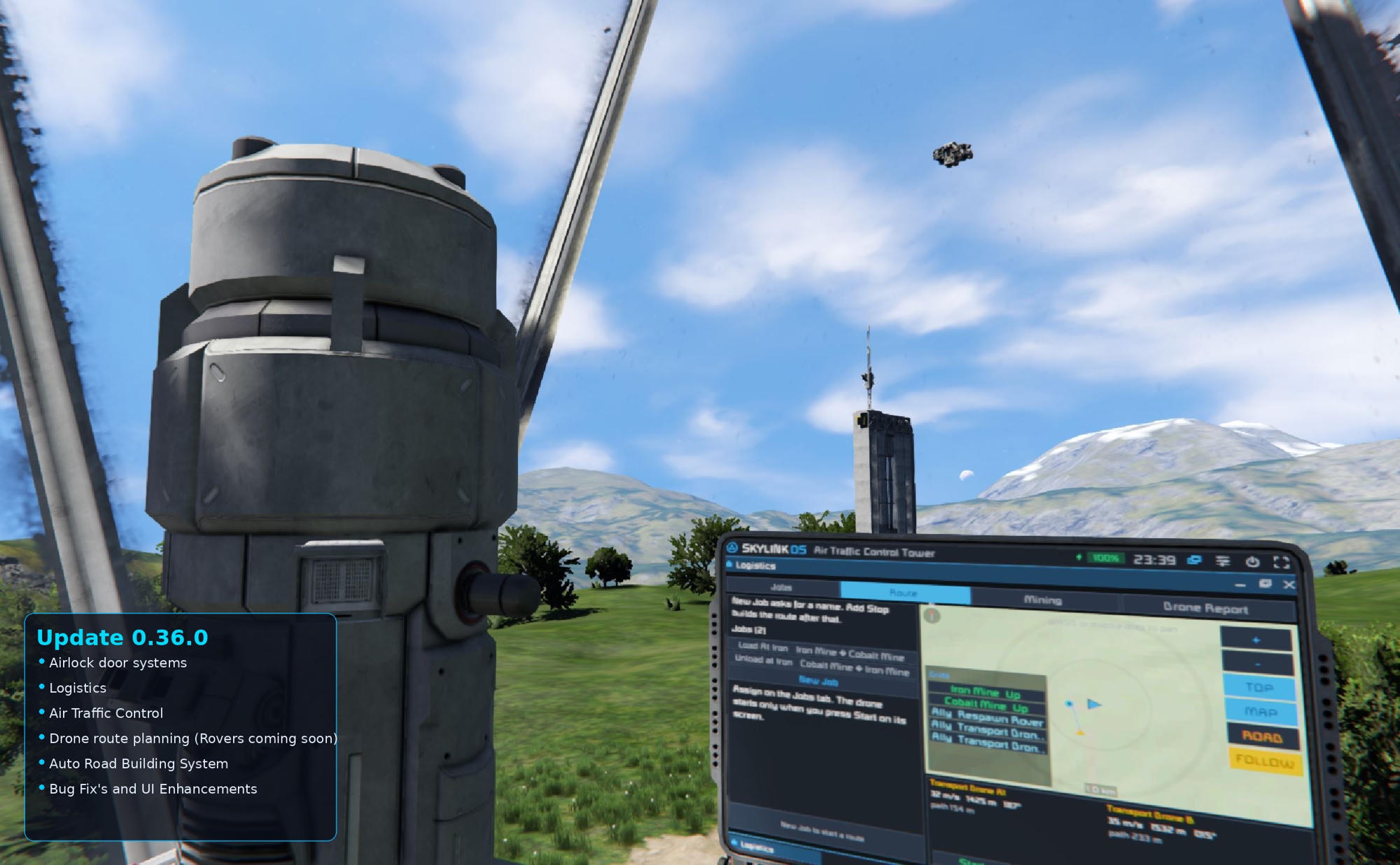
[b] UPDATE 0.36.0 IS OUT!
[hr][/hr]
Update 0.36.0: Drones, ATC, Machines, Airlocks, Paved Roads
- Drones haul cargo between your bases on their own. Take one over and fly it from its camera, or change how fast it flies and lands.
- Air traffic control with radar and a live map of every drone and station.
- A machine builder for drill rigs, landing gear, elevators and more, with G-code.
- Real airlocks that never lose air, and let you out if you get stuck inside.
- Paved roads, plus safe speeds on steep roads and your own speed zones for rovers.
Running a server? Restart it after every update, then check with /skylink version. Every change is listed in game under SkyLink OS > Updates.
[hr][/hr]
Full guide
Every app, screen and setting is explained step by step: >> Open the SkyLink OS guide
What it does
- Touch screen OS: apps for power, gas, cargo, production, maps, faction, weather and threats, with a Start button and window mode.
- Desktop: faction wallpaper, folders, windows and user accounts, plus Solitaire, Tetris, Battleship, Paint, Notepad, Calculator and Word.
- SkyLink Mobile: a phone for every player with texts, calls, contacts, a map and remote access to your grids. Antennas named [5G] are cell towers.
- System Diagnostics: checks your whole grid, gives it a health score, and offers to fix what it finds.
- Maps and navigation: terrain maps up to the whole planet, GPS, turn by turn directions and off road routes around mountains. Press M in a seat.
- Autopilot: rovers and aircraft drive or fly the route by themselves. One Sensor block lets it see obstacles, holes, people and other vehicles.
- Automatic docking: lands on any connector, on any side, even on a moving grid.
- Roads: draw them on the map, pave them in asphalt or gravel, tunnel through hills and build ring roads round your stations.
- Drones and ATC: drones land on free [DLP] pads, wait their turn and charge when they need to.
- Machines: pistons, rotors, hinges and tools with poses and routines. Start them by hand, by a sensor, when cargo is full or on a timer.
- Automation: power manager, keep in stock, refinery priority and cruise control, all running on the server.
- Driving help: flight HUD, throttle, a docking computer that brakes for you, and a backup camera with parking sensors.
- Alerts: damage, unfinished blocks, stuck production, low fuel, weather and hostiles. Click one to mark it on your HUD.
Getting started
[olist] [*]Place an LCD, or sit in a cockpit. [*]Set its Content to Script and pick SkyLink OS or any SkyLink screen. [*]Walk up with empty hands and click. In a cockpit, hold Alt to look at the screen and click. [/olist] Cursor not lining up? Run the SkyLink Screen Calibrator script once.
Servers
Screens are drawn on each player's PC, so they don't cost server performance. The autopilot, drones, airlocks and machines run on the server and keep going when you log off.
[hr][/hr] Found a bug or have an idea? Leave a comment below.
Highlights
From source dataFootprint
Rated a light load on a server.
Last update
Its author last shipped an update today.
SkyLink OS -Touch Screen PC & Navigation on Nxeon
From our catalogue- One-click install
- Not available. One-click install isn't available for this game's mods yet. Download it and upload it to your server in Files.
- Server load
- light
- Smallest plan we suggest
- Space Engineers — 8 GB (8 GB RAM). This follows our own load rating above, not a benchmark.
- Latest build
- 2026-11-05, released 2026-11-05
Game versions by loader
| Loader | Game versions | Newest |
|---|---|---|
| Workshop |
From 6 recorded builds of SkyLink OS -Touch Screen PC & Navigation.
Recent builds
| Build | Released | Game versions | Loaders |
|---|---|---|---|
| 2026-11-05 | 2026-11-05 | n/a | Workshop |
| 2026-11-01 | 2026-11-01 | n/a | Workshop |
| 2026-10-30 | 2026-10-30 | n/a | Workshop |
| 2026-10-30 | 2026-10-30 | n/a | Workshop |
| 2026-10-29 | 2026-10-29 | n/a | Workshop |
| 2026-10-28 | 2026-10-28 | n/a | Workshop |
Run SkyLink OS -Touch Screen PC & Navigation on a Space Engineers server
Deploy a server above, then upload the file in Files.
What kind of mod it is
From the catalogVehicles & ships
Cars, boats, aircraft, ships and other things to drive or fly.
Compatibility
- Game
- Space Engineers
Verified at the source
- ✓Steam WorkshopOfficial listing, checked 2026-11-05Open ↗
- ✓AuthorStringy Beef, as published on Steam Workshop
- ✓LicenseNot published by the sourceFree












