







About [STABLE/DEV] Advanced FTL Jump Drive/Interdictor
From Steam WorkshopPSA 17 Aug 2017 This mod isn't dead, I'm just taking a break. I'll keep this up to date, but I'm working on another porject, then I'll be back to optimize this. Yes, I know about the profiler now in…
PSA 17 Aug 2017
This mod isn't dead, I'm just taking a break. I'll keep this up to date, but I'm working on another porject, then I'll be back to optimize this. Yes, I know about the profiler now in the game as of 1.183. I will be profiling this mod and fixing any issues I can.
Summary
Phoenix Manufacturing now has competitors! Other organizations have developed their own Jump Drive technology. Of course, no one can truly compete with us. This is why we have introduced the Advanced FTL Jump Drive!
The next generation FTL Jump Drive has been redesigned with the following features:
- Enter manual coordinates, or use GPS waypoints
- Can control lights and sounds
- Can be controlled by automated means
- Customize improvements via a dynamic upgrade system
- Complete visual feedback system via HUD, LCD, and terminal system
- Jump Capacitors
- Jump Inhibitor that blocks all FTL jumps up to 100km!
- Jumps all ships, floating objects, and players in the vicinity. Being seated is not required!
- NEW: Now runs timer and programmable blocks with state information (idle, spooling, jumped, cooldown, error)
Timers
Timers can be called at different times during the FTL process. The following events are supported: Spooling Jumped Cooldown Error Idle If not specified, the default event is Jumped. To have the FTL trigger a timer block at a specific FTL event, simply place the event name in bracket anywhere in the block name. See screenshot. For example: Timer Block [cooldown] When set this way, the timer block will be triggered when the cooldown state begins. Be wary of using Idle events, they will trigger more frequently than you’d expect.
Programmable Block
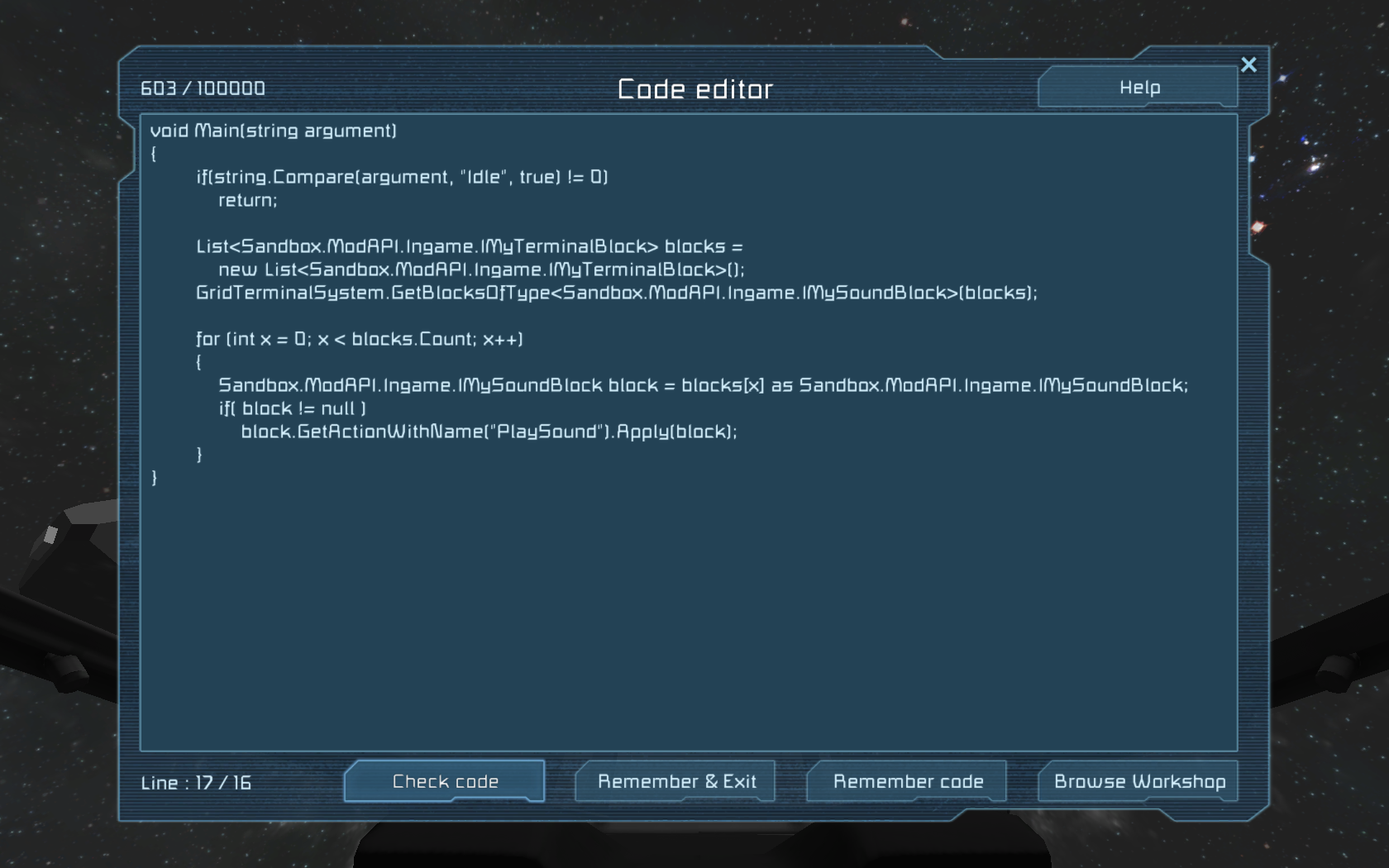
The programmable block supports the same events as the Timer. However instead of placing them in the block name, the programming block is executed with the event passed as an argument. Parse the argument string to determine the action to take. See screenshot. Also support now are controlling the jump drive jump action, and location/distance. See the sample in-game script for details: http://steamcommunity.com/sharedfiles/filedetails/?id=714651334
Admin Commands
Server admin commands are now supported. This lets you not only turn certain features on or off, but also tweak base and upgrade values. Enter /ftl help in in-game chat to see help.
Examples: To disable inhibiting of the stock jump drive, use: /ftl inhibitstockjump off To disable jumping inside of a gravity well, use: /ftl gravitywelljump off To enable custom LCD font sizes, use: /ftl fixedfont off To double the range of the FTL, use: /ftl base range 2.0 This is a work-in-progress, and more commands will be added in the future. Please leave feedback on what you want to see. Documentation is sparse, I know. I'll work on documenting it better. FYI: When updating FTL stats (range, accuracy, etc...), if values don't update properly, just do a /ftl save and reload the map. Alternatively you can toggle all the upgrade blocks off and on again (all at once for each FTL, not one at a time).
Disclaimer:
Phoenix Manufacturing is not responsible for loss of life, ships, stations, or other property resulting from the use of this jump drive.
WARNING! Ships can mysteriously vanish! The further you jump, the more likelihood it will happen.
This is a game bug, please exercise caution when using the mod! Change the world size either to be under 50km or unlimited to reduce likelihood of problems. This has been reported on the Keen forums
Please look at the Known Bugs before reporting a bug.
Don’t forget to check the videos and instructions above, and FAQs below.
Differences from previous version
If you used the FTL Jump Drive before 12 Jul 2015, here’s what has changed:
- Slave mode is gone. Use upgrades instead.
- Full LCD and multi-block interaction. Turn on multiple lights and sound blocks while jumping. Show FTL status in LCD panels.
- Power production is now verified and consumed.
- Related to above, power is now managed automatically. No need to adjust the power slider ever again!
- Also related, jump capacitors. Add a capacitor to augment power supply during jump. They will automatically activate when needed and deactivate when no longer needed. There is no limit to the number of capacitors.
- All jump logic is now executed on the server side. The client only receives location information when it needs to jump, and shows HUD messages.
FAQs
Q: How do I use this? A: There is too much information to list in the Workshop description. Check out the images and videos attached to this workshop page and, if they aren't enough, please refer to the Complete Description for full details and advanced options.
Q: Can you make it smaller? A: Yes! Small models are now available, see Small Advanced FTL Jump Drive Add-on.
Q: How do I have the FTL Jump Drive control other blocks, eg. flash lights, provide feedback to LCD panels? A: Just group them! Group all the blocks together with the FTL, and it’ll take care of the rest!
Q: How do I tell the FTL which way is forward in my ship? A: Either group a correctly facing cockpit with the FTL, or set it as the Main cockpit are the easiest ways.
Highlights
From source dataFootprint
A 55 MB download, rated a light load on a server.
Last update
Its author last shipped an update 3 yr ago.
[STABLE/DEV] Advanced FTL Jump Drive/Interdictor on Nxeon
From our catalogue- One-click install
- Not available. One-click install isn't available for this game's mods yet. Download it and upload it to your server in Files.
- Server load
- light
- Smallest plan we suggest
- Space Engineers — 8 GB (8 GB RAM). This follows our own load rating above, not a benchmark.
- Latest build
- 2023-10-27, released 2023-10-27, 55 MB
Game versions by loader
| Loader | Game versions | Newest |
|---|---|---|
| Workshop |
From 1 recorded build of [STABLE/DEV] Advanced FTL Jump Drive/Interdictor.
Run [STABLE/DEV] Advanced FTL Jump Drive/Interdictor on a Space Engineers server
Deploy a server above, then upload the file in Files.
What kind of mod it is
From the catalogPerformance
Makes the game or server run faster or lighter without changing how it plays.
Compatibility
- Game
- Space Engineers
- File size
- 55 MB
Verified at the source
- ✓Steam WorkshopOfficial listing, checked 2026-10-10Open ↗
- ✓AuthorGwindalmir, as published on Steam Workshop
- ✓LicenseNot published by the sourceFree












