






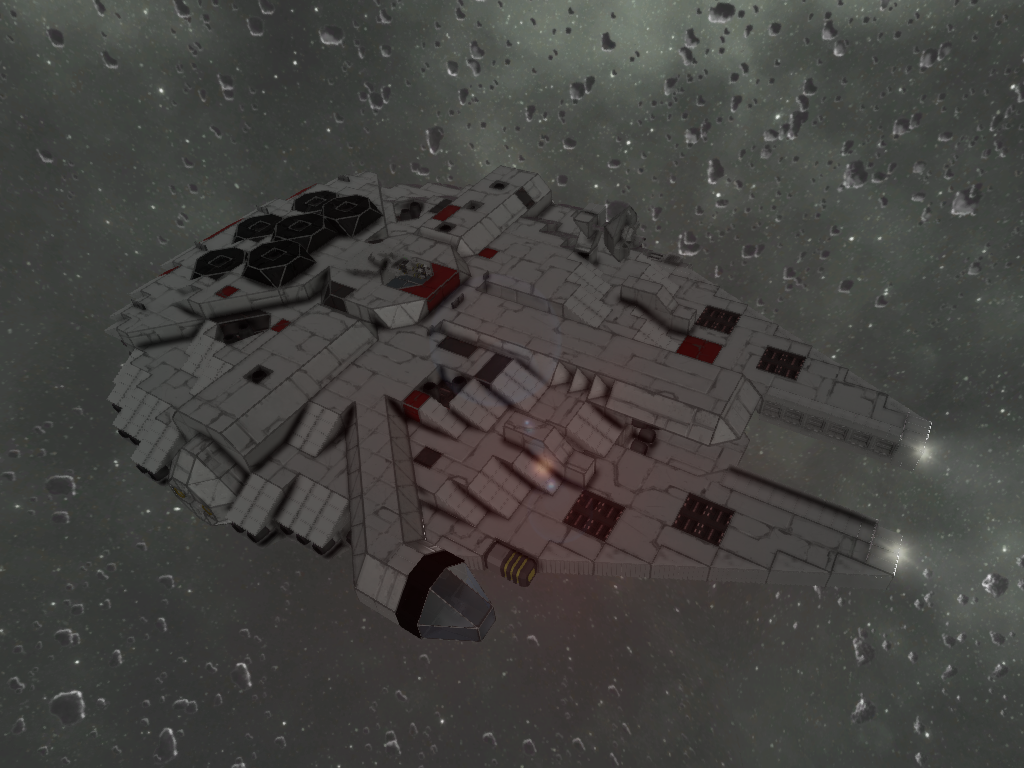

About Star Wars Millennium Falcon (Outdated)
From Steam WorkshopBy Breeze Space Workshop. (Ver.14081901) 3:1 Scale. Fully connected one piece ship. Full interior and functional. Thruster damage friendly.Armed and fueld for survival mode. OUTDATED : IT MAY NOT…
By Breeze Space Workshop. (Ver.14081901)
3:1 Scale. Fully connected one piece ship. Full interior and functional. Thruster damage friendly.Armed and fueld for survival mode.
OUTDATED : IT MAY NOT WORK PROPERLY
[ I'v lost accidently my own save files, so I can't keep updating this one anymore. Cockpit Toolbar Setting all disappeared since new update out. Feel free to modificate this one for any use !! let me know if you guys have any question about this stuff. Thanks! :) ]
[ What's New ! ]
- Full Retractable Landing Gear - Mortorized Turret / Rotating Seat in Gun Well - All Small Parts(even toilet) fully connected with ship. - Symmetric Ramp Door with instant button control - Re-tuned for overall. ( check change note for detail )
[ Features ]
* Size : 44L x 31W x 10H (Large Blocks) , 110L x 77.5W x 25H (Meters) 1 : 3.20 x 3.02 x 3.02 Scale with (34.37L x 25.61W x 8.27H Meters - Wiki)
* Mass : 2811tons (2,811,301kg)
* Armament : 2 x Quad Gattling Gun Turrets, 2 x Rocket Launchers
* Gyroscropes : 14
* Full Interior and Functional - Inside ship is fully interiored according to original one as much as possible without using any mod. all major system wired by conveyor properly. major features are full functional.
* Hyper Drive - Straight forward fast travel device. instant acceleration from zero to maxium speed. no need to turn off dampeners. it's powerful enough to ignore it. dont forget to turn it off before moving around. DO NOT TURN WHILE IT'S ON.! (Cockpit Toolbar Set 1 - 6)
* Emergency Brake - Fast braking down to -10m/s backward.dampener is supposed to be on preventing endless acceleration to minus speed. make sure that Hyper Drive is off before engaging it. (Cockpit Toolbar Set 1 - 7)
* Self Destroy Function - One click detonation to destroy almost every parts of ship except Cockpit Room. all bombs inside ship is reachable thru maintainance floor. if you dont want accidental explosion causing by internal or external impact, remove red colored bombs inside. (Cockpit Toolbar Set 4 - 9)
* Retractable Landing Gear - All landing gears are fully retractable into the ship. it may not work properly at maximum speed. .(Cockpit Toolbar Set 2 - 2,3,4)
* Ramp Door - Small block parts , fully connected with ship. full symmetric using two rotors on both side to up and down. lockable for flight. instant button control available at the end of ramp door, also you can control in cockpit (Cockpit Toolbar Set 2 - 5,6,7)
* Quad Gatling Gun Turret - Small block parts. fully connected with ship. using same mechanism with original one. full symmetric design. lockable for flight. you can control both turrets in gun well seat. seat turns 180degree (Toolbar Set 1 or 2 - 9). Toolbar Set 1 for Top turret. Set 2 is for Bottom one. turn off gatling guns before using opposite side one. Angle of Limit : 0~135 degree vertical / -90 ~ +90 horizontal
* Radar Dish - Actually working radar with antenna. you can rotate and angle up/down . Angle of Limit : 0~359degree horizontal, 0~45degree vertical. (Cockpit Toolbar Set 3 - 2,3,4,5,6)
* Maintenance Floor - Every device is reachable thru the maintenance floor . easily can remove or add stuff. still plenty of rooms remains.stairs and ladders well placed, able to walk around without jetpack under the internal gravity.
[ Start Up Procedure On Ground ] (Toobarset has gone since new update out)
1. Get into the ship thru ramp door. 2. Go into the cockpit room. 3. Turn on Main Power (Toolbar Set 1 - 1). 4. Turn on Thrusters (Toolbar Set 1 - 4). 5. Turn on Gyroscopes (Toolbar Set 1 - 5). 6. Close Ramp Door (Toolbar Set 2 - 7). 7. Lock up Ramp Door (Toolbar Set 2 - 6). 8. Turn off Ramp Door Lights (Toolbar Set 2 - 5). 9. Unlock Landing Gears (Toolbar Set 2 - 4). 10. Ascend to clear area. 11. Retract Landing Gears (Toolbar Set 2 - 3). 12. Turn off Landing Gear Lights (Toolbar Set 2 - 2). 13. Turn on Headlights (Toolbar Set 2 - 1). 14. Align ship to destination. 15. Check if there's any other gravity around ship except ship's own. 16. Activate Hyper Drive (Toolbar Set 1 - 6). !! DO NOT TURN WHILE IT'S On !! 17. Turn off Hyper Drive before getting too close to destination. (Toolbar Set 1 - 6). 18. (Optional) If you want quick speed down, engage Emergency Brake. (Toolbar Set 1 - 7). make sure to turn off Hyper Drive before engaging it.
* When you're trying to dock with platform or other ship, Turn off side thrusters close to docking pod to prevent thruster damage. (Toolbar Set 3 - 7).
Thank you all :). let me know if you have any question or opinion about this. and please rate up if you like it. cheers! XD
Highlights
From source dataFootprint
Rated a light load on a server.
Last update
Its author last shipped an update 12 yr ago.
Star Wars Millennium Falcon (Outdated) on Nxeon
From our catalogue- One-click install
- Not available. One-click install isn't available for this game's mods yet. Download it and upload it to your server in Files.
- Server load
- light
- Smallest plan we suggest
- Space Engineers — 8 GB (8 GB RAM). This follows our own load rating above, not a benchmark.
- Latest build
- 2014-08-19, released 2014-08-19
Game versions by loader
| Loader | Game versions | Newest |
|---|---|---|
| Workshop |
From 1 recorded build of Star Wars Millennium Falcon (Outdated).
Run Star Wars Millennium Falcon (Outdated) on a Space Engineers server
Deploy a server above, then upload the file in Files.
What kind of mod it is
From the catalogVehicles & ships
Cars, boats, aircraft, ships and other things to drive or fly.
Compatibility
- Game
- Space Engineers
Verified at the source
- ✓Steam WorkshopOfficial listing, checked 2026-11-01Open ↗
- ✓AuthorBreezeRider, as published on Steam Workshop
- ✓LicenseNot published by the sourceFree












