






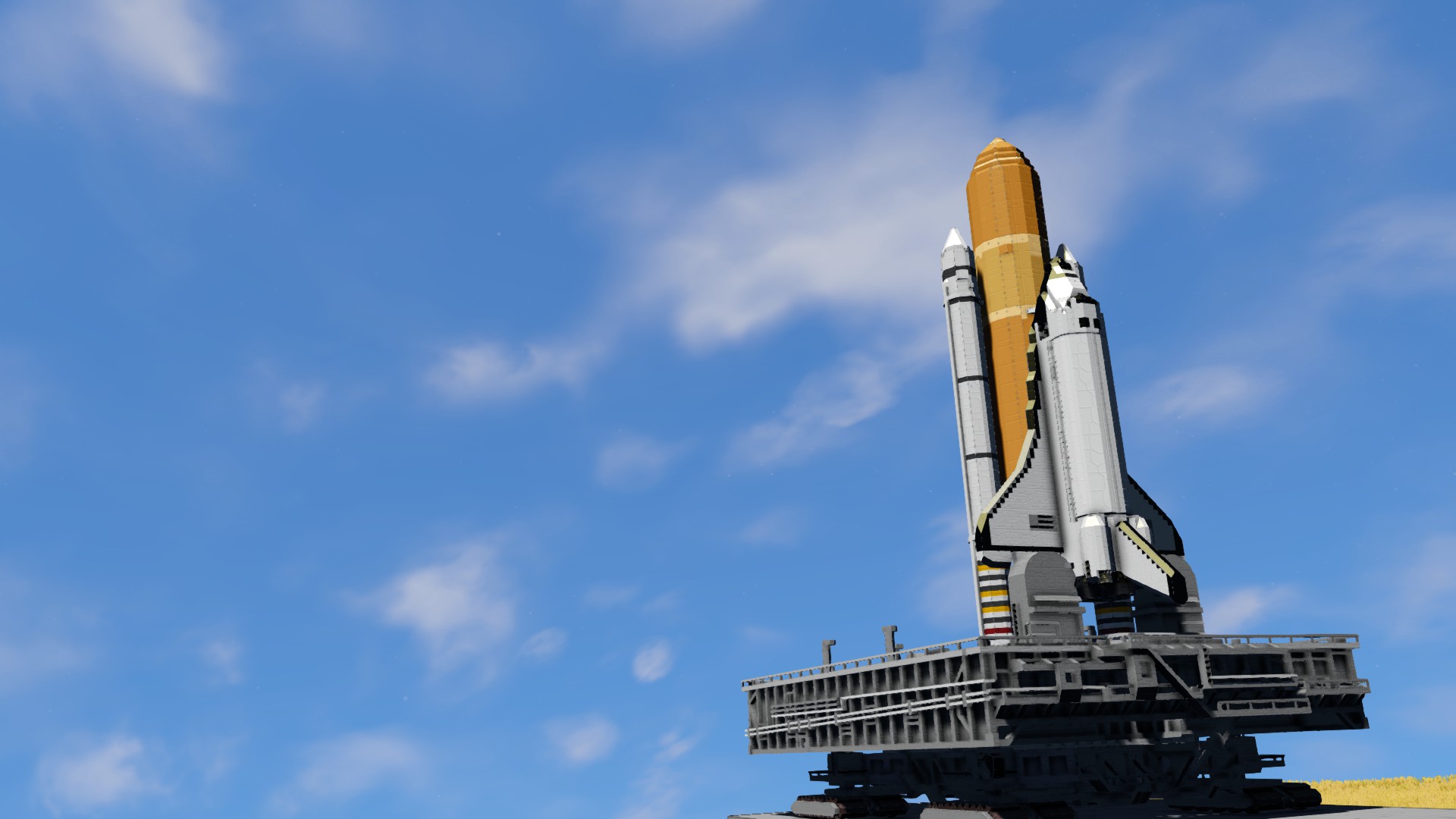

About STS-31 Space Shuttle Discovery (VANILLA)
From Steam WorkshopSpace Transportation System More Commonly known as the Space Shuttle Program. Missions flew from 1981 all the way until 2011. This specific model kit is based on the 35th mission known as STS-31,…
Space Transportation System
More Commonly known as the Space Shuttle Program. Missions flew from 1981 all the way until 2011. This specific model kit is based on the 35th mission known as STS-31, where the space shuttle Discovery transported the Hubble space telescope into orbit.
Don't be alarmed by my long description, this is much simpler than the description makes it seem! Made sure to make the shuttle user friendly :) Skip to "User guide" if you don't want additional info!
ATTENTION!!!!!
Most up-to-date version of the shuttle can be found in the All-In-One kit!!! I am unable to update this standalone kit. Recommend you download the AIO and cut away the MLP/CRAWLER and make your own BP of the new shuttle version!!! It's got wheels and windows and much improved geometry!
The Shuttle in Space Engineers
Near perfect 1:1 scale using NASA's drawings as reference for all components. Almost all key points are within 0.5m x 0.5m (1 small block) I tried using as much reference as I could, but turning the interior 100% accurate would make moving in it a pain within SE, so the interior is a close approximation.
Included in this blueprint file are fully functional 1:1 Scale reproductions of --The Space Shuttle (Orbiter, OV) --External Tank (ET) --Left Solid Rocket Booster (SRB) --Right Solid Rocket Booster (SRB) --Hubble Space Telescope (HST)
Kept rotor usage to minimum, therefore we have no arm unfortunately. Doing my best to avoid unnecessary clang. Despite its block count, it doesn't cause any slowdown on my computer, hopefully it will run fine on your end too :)
Features
General info: --"Survival ready" should you paste it in a survival world to test out your fuel management skills. Obviously not airtight so use the seats to recharge your personal O and H2 tanks. --Packed with just enough fuel for you to reach 0G, perform a few maneuvers and get back. --Nose has its own RCS fuel supply and rear has its own. Uranium fueled reactors located in the nose. Both front and rear systems are easy to access from the medium cargo containers on the walls should you need to fuel the orbiter. --SRB and ET do not have feedline ports.
Solid Rocket Boosters --Fulfills its role as a much needed booster. --Realistic separation behaviour --Recoverable! Soft landing with parachutes.
External fuel Tank --Looks like a fuel tank, but works in the same manner as an SRB in my build. --"Gives" orbiter fuel by giving thrust so you don't need to keep the shuttle's main engines on as high of a throttle allowing it to burn longer. (Simulation enough for me, without it you'll run out of fuel)
Orbiter --Full interior and Payload bay --Fully functional cockpit. Works so well you don't ever need to bring up your HUD! Full mission can be completed from 1st person view! Simulate the mission! Built around Whip's Artificial horizon which is crucial for landing sequence. --Status indicators on the dash make things easy to know without needing to go to external view. --Opening Payload Bay doors with no clang danger in SP! (Untested in MP) --Approach system and atmo drag/lifting body "simulation"!
Hubble Space Telescope --Realistic-ish interior structure. --Camera and Antenna fueled by a loaded nuclear reactor lasting for years.
USER GUIDE
This is a fair bit of steps, but if you read it carefully it comes out as a MUCH SIMPLER process than it first seems. These manuals are included inside the Orbiter on the right hand wall and are enough for a survival mission. For creative mode you can ignore takeoff just put pedal to the medal. Landing guide applies to both gamemodes.
Entry via Payload Bay, button to open on the side. To take control find REMOTE CONTROL from the menu. We have no cockpit blocks here.
Take-OFF. Needed keybind in ( )
1. Turn on main thrusters (1) ---Increase main throttle Override to max. (2) ---Detach umbilical (releases from MLP, you must retake remote control due to grid changing too much) (7) ---Increase speed until at MAX ---Decrease thrust override until SPD starts to drop. (3) ---Continue this thrust reduction process until 0.1G
2. 0.5G, separate Solid Rocket Boosters. (8)
3. 0.1G, separate External fuel Tank. (9) ---Turn on Orbital maneuvering System (4) ---Manual flight until 0G, Dampeners OFF
4. At 0.G ---Open Payload bay doors (Tab 2, 7) ---Full stop (dampeners on/off) ---Detach your payload (Tab 2, 9) and take the shuttle down some 20m ---EVA to the Payload ---Hit button aft of Hubble to "deploy" ( Need to manually weld the parts shown )
Landing Guide.
Starts at gravity capture. On the artificial horizon the chevron represents your nose, and the yellow marker your direction, aka it is the velocity vector.
1. Disable RCS/OMS (Tab 1, 4) --Enable dampeners --Bottom down from 20K to 10K (Nose is level with horizon, mimics re-entry) --Monitor power rise until 40% happens after you're below 9000
2. At 40% Aim nose down~30deg above vector. --slowly raise nose and "drag" vector up --Aim to be level at 1500.
3.When level, enable Approach mode (tab 2, 1) --At 50m open brake chute (Tab 2, 3) --On touchdown turn off dampeners to stop you from floating weirdly.
Hints / Notes Maintain your speed until glide stage! And preferably during glide as well. Approach Mode works by slightly reducing upward lift so that you will softly descend when normally you would either use "c" or turn off dampening which results in jerky motion. Don't be afraid to toggle approach mode on/off if it looks like you descend or slow down too fast.
Known issues: For some reason the gyros lock up if you're not moving. All that is needed to restore free movement is to give a tiny nudge in any direction. Can't figure out what is causing it.
Skybox is "Space Just got Real". https://steamcommunity.com/sharedfiles/filedetails/?id=1136188499
Highlights
From source dataFootprint
Rated a light load on a server.
Last update
Its author last shipped an update 7 yr ago.
STS-31 Space Shuttle Discovery (VANILLA) on Nxeon
From our catalogue- One-click install
- Not available. One-click install isn't available for this game's mods yet. Download it and upload it to your server in Files.
- Server load
- light
- Smallest plan we suggest
- Space Engineers — 8 GB (8 GB RAM). This follows our own load rating above, not a benchmark.
- Latest build
- 2019-08-23, released 2019-08-23
Game versions by loader
| Loader | Game versions | Newest |
|---|---|---|
| Workshop |
From 1 recorded build of STS-31 Space Shuttle Discovery (VANILLA).
Run STS-31 Space Shuttle Discovery (VANILLA) on a Space Engineers server
Deploy a server above, then upload the file in Files.
What kind of mod it is
From the catalogTechnology & automation
Machines, power, logistics and automation.
Compatibility
- Game
- Space Engineers
Verified at the source
- ✓Steam WorkshopOfficial listing, checked 2026-11-01Open ↗
- ✓AuthorOctoSnooze, as published on Steam Workshop
- ✓LicenseNot published by the sourceFree












