






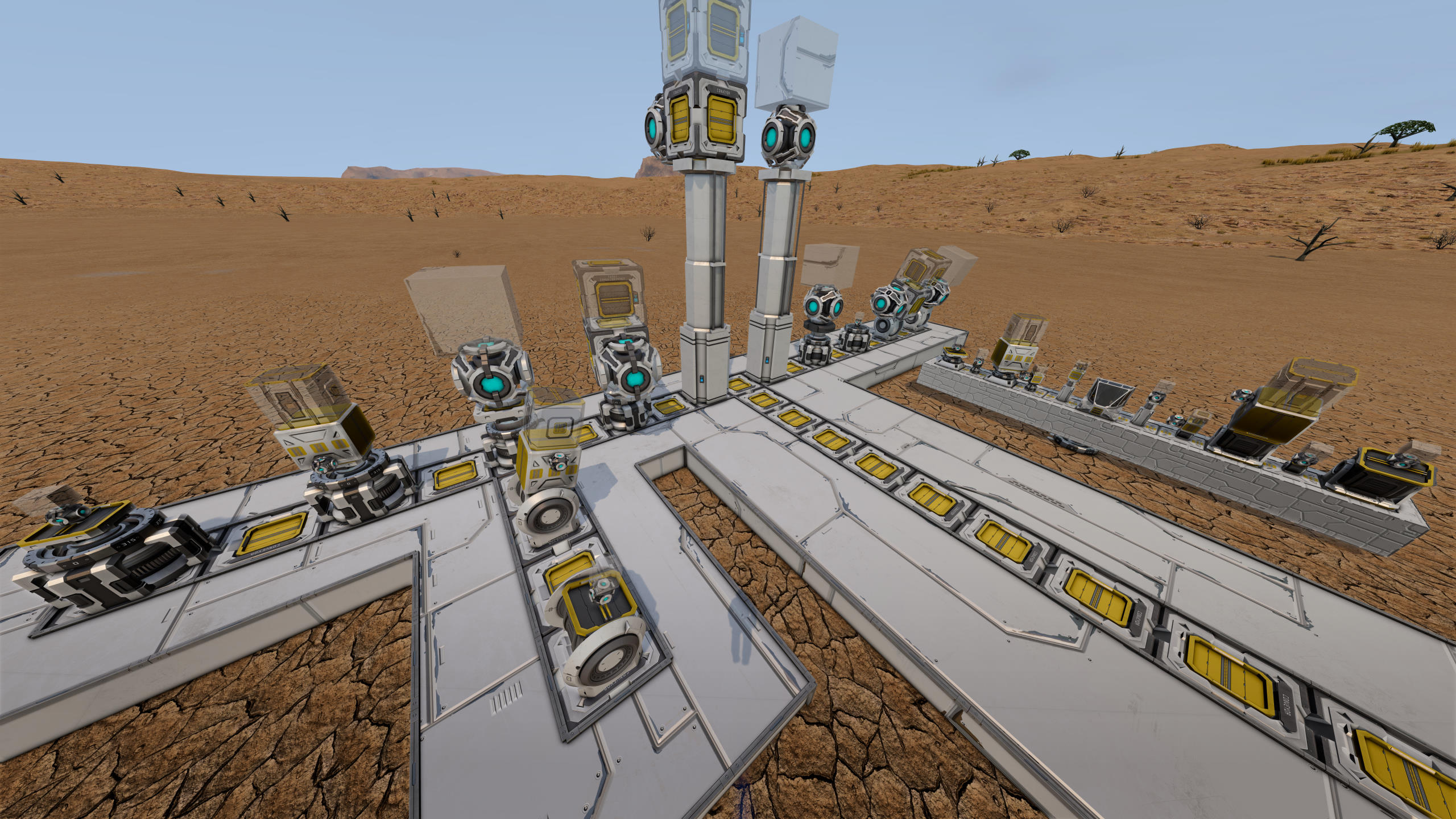
About Survival Subgrid Projection
From Steam WorkshopSurvival Subgrid Projection is a mod that automatically places conveyors and projectors on top of mechanical blocks such as rotors, hinges, and pistons; loads the subgrid as a blueprint into the…
Survival Subgrid Projection is a mod that automatically places conveyors and projectors on top of mechanical blocks such as rotors, hinges, and pistons; loads the subgrid as a blueprint into the projector; and also stores this information inside blueprints. This enables welding up blueprints with subgrids on rotors, hinges, and pistons in survival! You must (re)build the subgrids of your existing blueprints using this mod though, as we require a projector to be placed on a particular spot on the subgrid.
Status
Works in singleplayer, multiplayer, and dedicated servers!
How To Use
- Place a mechanical block on your main grid: a rotor, hinge, or piston.
- In the terminal for this mechanical block: press "Project subgrid".
- Weld up the placed projector and conveyor (if any).
- Build the rest of your subgrid.
- In the terminal for the mechanical block: press "Store subgrid".
The subgrid is now stored inside the mechanical block. Enable "Automatically project subgrid" and make a blueprint of your main grid. When you weld up your blueprint in survival, the projector is automatically placed and loaded with a blueprint of your subgrid, which can then also be welded!
Placement of conveyors can be disabled by disabling "Place conveyor on subgrid" in the terminal. Note that if you change this after you've built your subgrid, the projection will be off. So be sure to change this setting *before* building your subgrid.
Nested/stacked subgrids are supported, but you must first press "Store subgrid" on the outtermost grid, then on its parent grid, and so forth.
FireManDan made a video tutorial that you can watch here!
Mod Compatibility
This mod does not cause incompatibilities with other mods. However, mods that add new mechanical top parts need to be explicitly supported. We currently support this for the following mods:
- Small Advanced Rotor
- Attachments - large to small grid without limits!
- Electronics Panel - small blocks on large grid
Current Limitations
- Subgrids need to be specifically made and stored. Existing blueprints with subgrids will not automagically work.
- Nested subgrids are supported, but requires storing them in a particular order. This may be automated in the future.
- No errors are given when a conveyor or projector cannot be placed for whatever reason. Currently this just silently fails.
- Projectors and conveyors are placed at preset locations and orientations.
Troubleshooting
- When loading the blueprint of your main grid in a projector in survival mode, SE will give you the "Multiple grids are not supported. Only the largest grid will be used." warning. That pertains the limitation of SE itself, not this mod. This warning can be ignored. However, if your subgrid is larger than your main grid, the subgrid will be projected instead. In that case, you must first remove the subgrid from your main grid by detaching the rotor/hinge/piston, and then take another blueprint of your main grid.
Known bugs
No known bugs at the moment.
Highlights
From source dataFootprint
Rated a light load on a server.
Last update
Its author last shipped an update 4 yr ago.
Survival Subgrid Projection on Nxeon
From our catalogue- One-click install
- Not available. One-click install isn't available for this game's mods yet. Download it and upload it to your server in Files.
- Server load
- light
- Smallest plan we suggest
- Space Engineers — 8 GB (8 GB RAM). This follows our own load rating above, not a benchmark.
- Latest build
- 2022-05-08, released 2022-05-08
Game versions by loader
| Loader | Game versions | Newest |
|---|---|---|
| Workshop |
From 1 recorded build of Survival Subgrid Projection.
Run Survival Subgrid Projection on a Space Engineers server
Deploy a server above, then upload the file in Files.
What kind of mod it is
From the catalogGameplay & overhauls
New mechanics, content and overhauls that change how the game plays.
Compatibility
- Game
- Space Engineers
Verified at the source
- ✓Steam WorkshopOfficial listing, checked 2026-11-01Open ↗
- ✓AuthorGohla, as published on Steam Workshop
- ✓LicenseNot published by the sourceFree












