






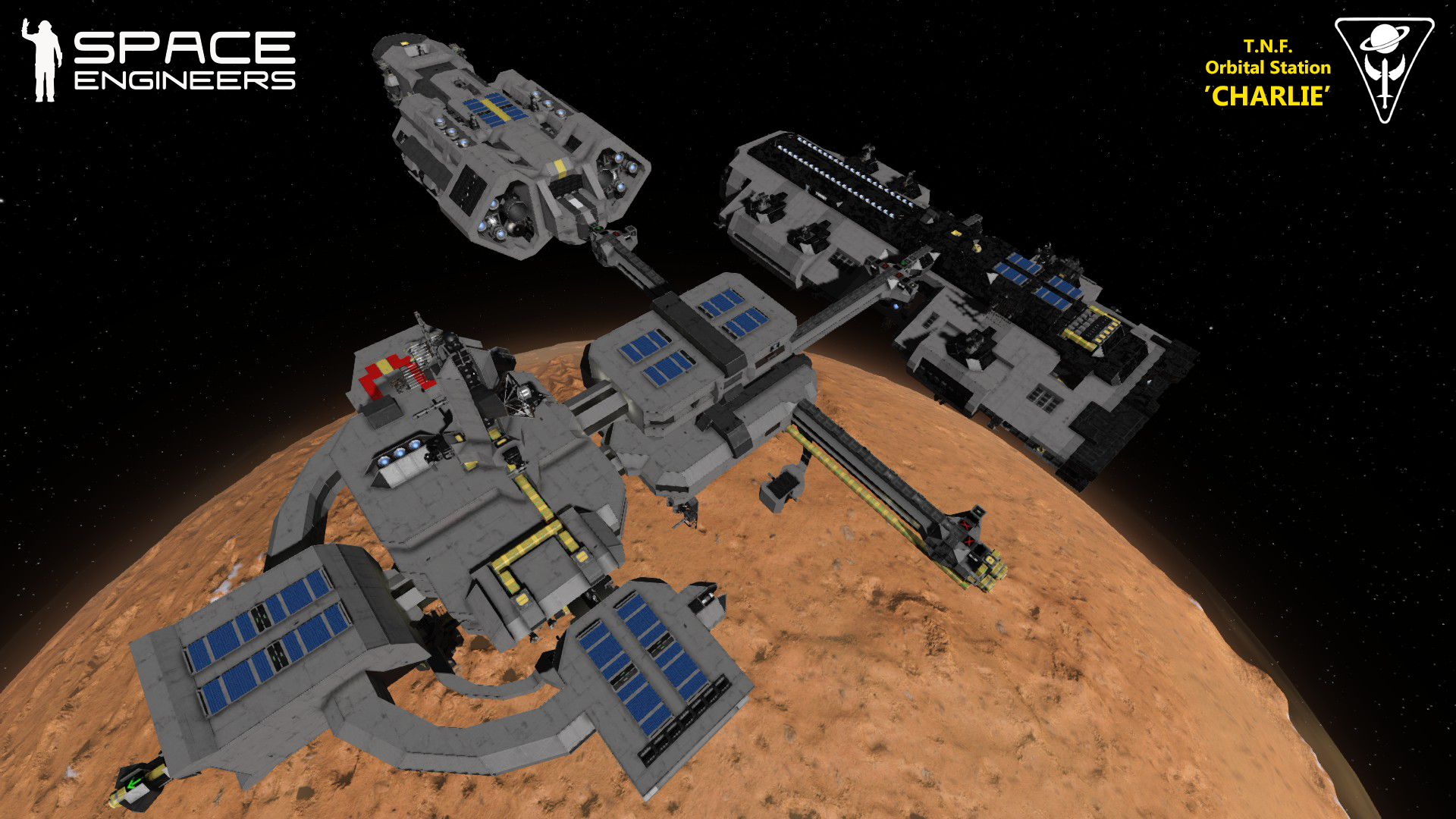

About T.N.F. Orbital Station 'Charlie'
From Steam WorkshopRooting out warring corporations and pirate organizations from whole planets is time consuming, and some clean-up operations may take months or years to complete. This creates a need for…
Rooting out warring corporations and pirate organizations from whole planets is time consuming, and some clean-up operations may take months or years to complete. This creates a need for semi-permanent bases and outposts that can orbit planets, and work as logistical support, mission command and control, meeting places between warship captains, and communications relays. A Charlie station can do all of these things.
Built as a continuation of the Object Defense Platforms Delta and Echo, both of which where originally designed as deep space stations, the Orbital Station Charlie is mainly designed to orbit planets.
It has a drone bay supporting two small drones with top-placed connectors. If the station is placed near asteroids it can therefore resupply itself using its Ceres Mk.IV Mining Drone, for as long as there are available ore deposits. It can also more easily repair itself using its Welan Mk.II Utility Drone, or deploy it to support friendly warships.
Establishing Stable Orbit: 1: When near a planet, use the station's thrusters to move into the planet's gravity pull. 2: After entering the planet's gravity, press Button 1 "Start Gravity Counteraction" on the right control panel (next to the gravity readings). 3: Lower the station to wanted altitude. The station's thrusters can counteract the following gravitational pull: -Max gravity with ion thrusters: 0.37 G (alien planet) -Max gravity with hydrogen thrusters: 0.60 G (alien planet) 4: Press Button 3 "Lock Current Altitude". 5: Begin accelerating in the direction which you want your orbital trajectory. 6: When you have reached the speed you want, press button 5 in toolbar 2 ("Station Breaking Thrusters On/Off") in the Station Control Seat, and stop the acceleration. The station will now orbit the planet.
General characteristics: -Crew: 10 station operators -Length: 200 m -Width: 140 m -Height: 115 m -Mass (standard equipped): 4 kilotons -Block count: 6 869 blocks
Armaments: -7x 25mm Gatling Turrets
Features: -Has two hangar types and a landing pad, supporting smallcraft of various sizes. -It carries a Ceres Mk.IV Mining Drone and a Welan Mk.II Utility Drone for resource gathering and repairs in space. -Robust ion hovering thrusters for operations in low orbit. - Three Jump Drives with a maximum range of 2146 km. -Several control room displays showing the station’s status using Automatic LCDs 2 ] and Floor Plan Script by Alysius. -An internal projector to aid in repairing the station. -Solar panels, oxygen farms and various production equipment for prolonged independent operations. -Docking arms compatible with all T.N.F. ships, and those which dock by using a cluster of connectors. -Contains fuel, ammunition and components – tested in survival.
Known issues: -The active scripts will impact the sim speed upon pasting the blueprint into the world. If this happens, just restart the map/server, and the sim speed will be back to normal. -When a ship docks, a bug will sometimes remove the oxygen from the entire new grid, regardless of airlocks etc. -Some of the scripts are still awfully slow after the last updates.
Acknowledgements: -MMaster's Automatic LCDs 2 and Oxygen Lockdown scripts. - The logos and screens were converted to monospace by Whiplash141. -Diagnostics screens using the Floor Plan Script by Alysius. -The station keeps its position relative to the planet's gravity due to the Hover Aligner script by p3st|cIdE.
Highlights
From source dataFootprint
Rated a light load on a server.
Last update
Its author last shipped an update 8 yr ago.
T.N.F. Orbital Station 'Charlie' on Nxeon
From our catalogue- One-click install
- Not available. One-click install isn't available for this game's mods yet. Download it and upload it to your server in Files.
- Server load
- light
- Smallest plan we suggest
- Space Engineers — 8 GB (8 GB RAM). This follows our own load rating above, not a benchmark.
- Latest build
- 2019-04-14, released 2019-04-14
Game versions by loader
| Loader | Game versions | Newest |
|---|---|---|
| Workshop |
From 1 recorded build of T.N.F. Orbital Station 'Charlie'.
Run T.N.F. Orbital Station 'Charlie' on a Space Engineers server
Deploy a server above, then upload the file in Files.
What kind of mod it is
From the catalogWorld generation
Changes or adds to how new terrain, biomes and structures are created.
Compatibility
- Game
- Space Engineers
Verified at the source
- ✓Steam WorkshopOfficial listing, checked 2026-11-01Open ↗
- ✓AuthorMalmhrid, as published on Steam Workshop
- ✓LicenseNot published by the sourceFree












