






About TD Shipboard Phasers Graphene
From Steam WorkshopTD Shipboard Phasers - Graphene '25 Edition Threshold Dynamics, Applied Geometry Are your enemies cyborgs? Pointy Eared, Green Blooded machievellians? Wrinkly foreheaded warriors? And is your fleet…
TD Shipboard Phasers - Graphene '25 Edition
Threshold Dynamics, Applied Geometry Are your enemies cyborgs? Pointy Eared, Green Blooded machievellians? Wrinkly foreheaded warriors? And is your fleet already armoured in Graphene? This is the weapons pack for you! Star Trek-style beam weapons, built from scratch for Space Engineers. Every phaser is grid-mounted — there is no handheld version, and there will not be one. No WeaponCore required: This was designed to run on a vanilla weapons world.
REQUIRES Graphene 2025 - Core. This edition contains the complete TD Shipboard Phasers pack, plus a Graphene '25 version of every block in it.
Two tiers
Standard Every phaser, lance and capacitor exactly as in TD Shipboard Phasers. Graphene '25 The same blocks built from Graphene 2025 materials, converted the same way Graphene 2025 converts its own weapons: steel plate becomes layered graphene composite, construction components become graphene aerogel, metal grids become graphene-reinforced mesh, and steel tubes become their graphene counterparts. The electronics — superconductors, reactor components, power cells, detectors and computers — are unchanged. They are far lighter and tougher, and take two and a half times as long to weld. Beams, damage, range and targeting are identical to the standard tier. Marked with the Graphene badge on their icons. Each tier has its own scrollable slot in the Threshold Dynamics tab.
The lineup
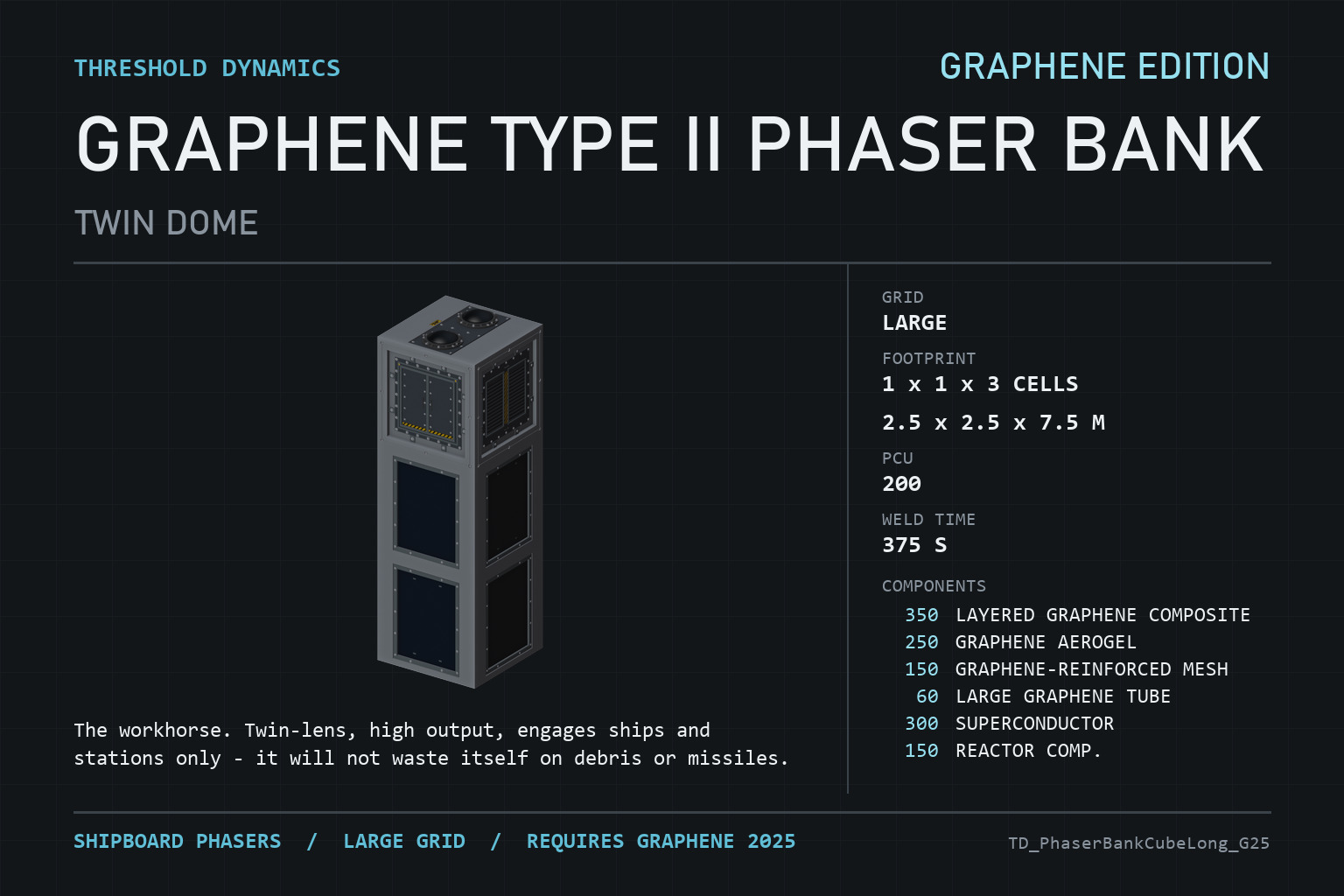
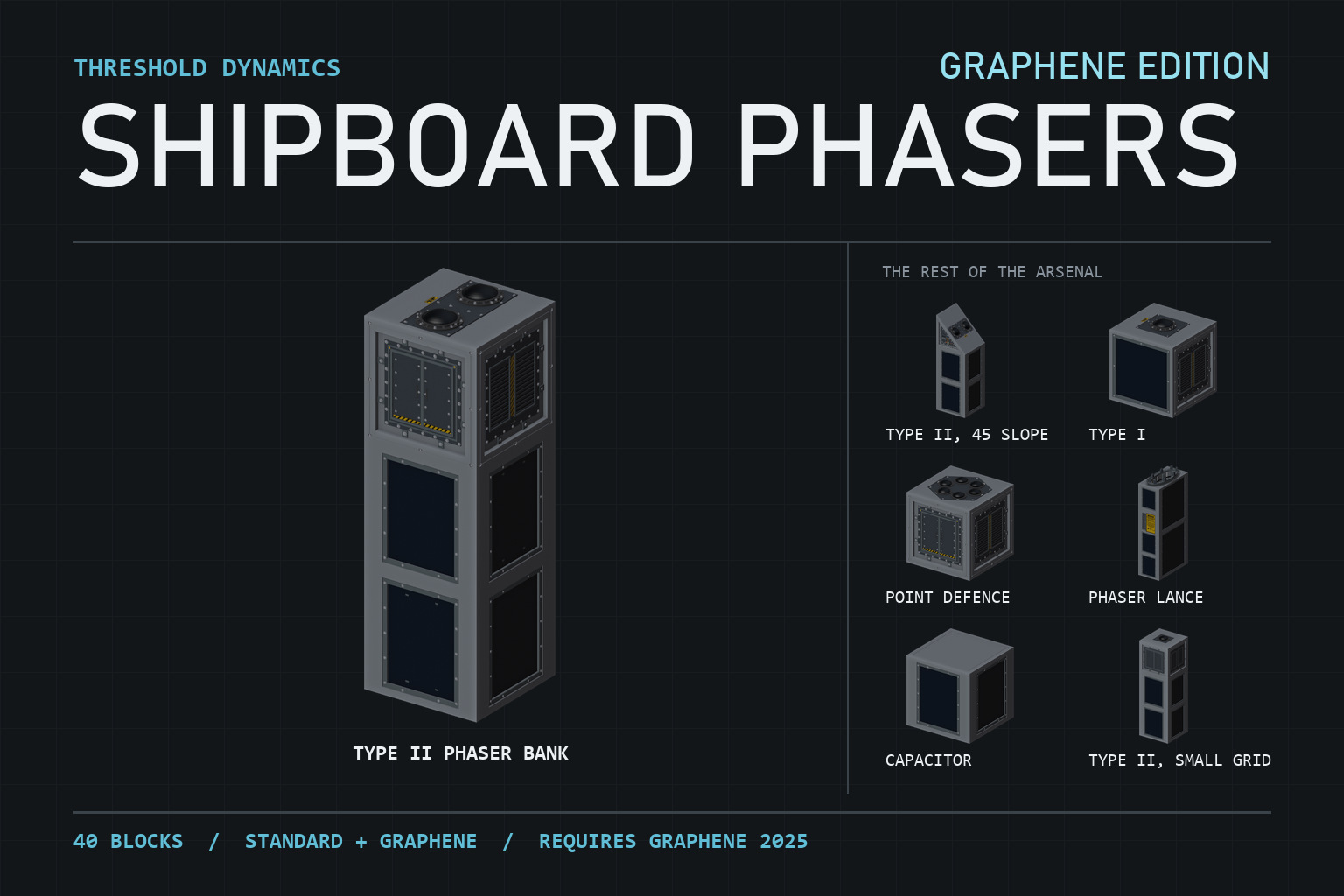
Type II Phaser Bank (Twin Dome) The workhorse. Twin-lens, high output, engages ships and stations only — it will not waste itself on debris or missiles. Five hull forms: 1x1x3 long, half-block, 45-degree slope, and 2x1 slope (body-below and body-behind variants), large grid. The small grid variants are scaled down in their capability. Type I Phaser Single-lens and about a third of a Type II's output, but it will shoot at anything — ships, small grids, characters, missiles. The point-defence and utility option, in cube, 45-slope, 2x1-slope and half-block forms. Point Defence Phaser (PDC) A six-muzzle cluster with its own dedicated missile-scan targeting, short ranged and built for one job: shredding incoming ordnance before it arrives. Cube, 45-slope and 2x1-slope forms. Phaser Lance One heavy fixed gun, no turret slew. Trigger it manually from a toolbar weapon slot for a single massive burst, then wait out the recharge. Ship-to-ship capital-scale damage — and it happens to tunnel clean through an asteroid if one gets in the way. Capacitor A passive support block. Charged, it adds +10% damage to every phaser within 5 metres of it. Standard and Graphene capacitors work with phasers of either tier. Every phaser comes with a beam colour dropdown — nine colours, including the classic warm orange and cold blue. Pick one per block; there is no fleet-wide setting. Every unit (except the Lance) can benefit from the Stock Heat Vent that Keen included in one of the DLC packs. It reduces the cooldown time in between bursts of shooting. Like the Capacitor, having one within 5m of a phaser lets that phaser benefit. Each phaser unit can only benefit from one capacitor and one heat vent, but multiple phasers can benefit from the same vent or capacitor if they are in range of it.
How targeting actually works
Vanilla turret AI is not built for a weapon like this, so banks and Type I phasers pick their own target: the nearest hostile that is in range, inside the gun's own firing cone, and allowed by the turret's own target-lock switches. The PDC skips all of that and scans directly for missiles. Vanilla turret AI is only ever a fallback. The terminal panel on every phaser carries a live Status line. If a gun is not firing, it will tell you why — no target, out of cone, blocked by a safe zone, whatever it is. Read that line before assuming something is broken.
One edition only
Install this or the standard TD Shipboard Phasers, never both. The standard blocks are identical in both editions, so switching between them does not remove anything you have built.
Playing with other mods
No Defense Shields dependency. Testing by an ambitious user found that they dont play well with WeaponCore. They play along fine with Vanilla+ systems. Nerd's Shield Framework works well against them.
Tell me what is wrong with it
This is early. Damage and heat numbers are still being tuned in real play, and some of it will move. If a gun won't fire when it obviously should, a Status line doesn't make sense, or a hull shape looks wrong from some angle — say so in the comments. "I expected X and got Y" is the single most useful kind of report.
☕ Support the Ongoing Experiments If you enjoyed this improbable engineering exercise, feel free to toss a few credits into the reactor core — funds coffee, replacement keyboards lost to arguments with the AI over "theoretically possible" versus "actually works," and the continued pursuit of overengineering perfectly good ideas. https://ko-fi.com/unsayablestorm Download it, build ridiculous things, have fun either way. Every contribution increases the probability of future projects by a scientifically significant margin.* *Science has not reviewed this claim.
Credits
Built with AI assistance — Claude, by Anthropic — as a working partner throughout. Every design decision, every balance number, and all of the in-game testing are mine. Graphene materials by Epsilon, from Graphene 2025 - Core.
[hr][/hr] Threshold Dynamics accepts no responsibility for target selection made in its name.
Highlights
From source dataFootprint
Rated a light load on a server.
Last update
Its author last shipped an update 17d ago.
TD Shipboard Phasers Graphene on Nxeon
From our catalogue- One-click install
- Not available. One-click install isn't available for this game's mods yet. Download it and upload it to your server in Files.
- Server load
- light
- Smallest plan we suggest
- Space Engineers — 8 GB (8 GB RAM). This follows our own load rating above, not a benchmark.
- Latest build
- 2026-10-19, released 2026-10-19
Game versions by loader
| Loader | Game versions | Newest |
|---|---|---|
| Workshop |
From 4 recorded builds of TD Shipboard Phasers Graphene.
Recent builds
| Build | Released | Game versions | Loaders |
|---|---|---|---|
| 2026-10-19 | 2026-10-19 | n/a | Workshop |
| 2026-10-10 | 2026-10-10 | n/a | Workshop |
| 2026-10-04 | 2026-10-04 | n/a | Workshop |
| 2026-10-02 | 2026-10-02 | n/a | Workshop |
Dependencies
- Required: steam_workshop project 3606312134 (steam_workshop, not in our catalogue)
Declared by the newest build that lists any. Required ones are installed with it on one-click installs.
Run TD Shipboard Phasers Graphene on a Space Engineers server
Deploy a server above, then upload the file in Files.
What kind of mod it is
From the catalogCreatures & NPCs
Adds or changes creatures, NPCs and how they behave.
Compatibility
- Game
- Space Engineers
Verified at the source
- ✓Steam WorkshopOfficial listing, checked 2026-10-29Open ↗
- ✓AuthorUnSayableStorm, as published on Steam Workshop
- ✓LicenseNot published by the sourceFree












