






About TouchScreenAPI
From Steam Workshophttps://i.imgur.com/fVVaDCS.gif TouchScreenAPI This mod adds Touch Screen feature and UI Elements to Space Engineers. It is a framework for other mods and programmable block scripts. It allows…

TouchScreenAPI
This mod adds Touch Screen feature and UI Elements to Space Engineers. It is a framework for other mods and programmable block scripts.
It allows modders to add interaction with in game LCD screens like a mouse cursor or touch screen. By itself this mod adds nothing to the game. See a list of Touch Apps by the end of this description.
If you are a player and liked this mod. Feel free to give your feedback and ideas. But please remember, this mod has no features with the game blocks besides drawing to screens. Any interaction with blocks are handled by mods using this.
How to use it
If you want to develop a mod or script using this, feel free to send me a message on Github, Steam or Discord (@adrianolima). For details about using it, see the project readme files on Github.
The API is ready for use, but feedback is always welcome. Also, communicate with me if you're using it, if I need to make an important change I can let you know you in advance.
Mouse clicks and Joystick
It now accepts Left click as primary action button, some apps may have separated funcionalities for Right click and Middle click as well. On joysticks use RB for primary and LB to reproduce right click action. For middle click action press both RB and LB.
Ui Kit - Elements
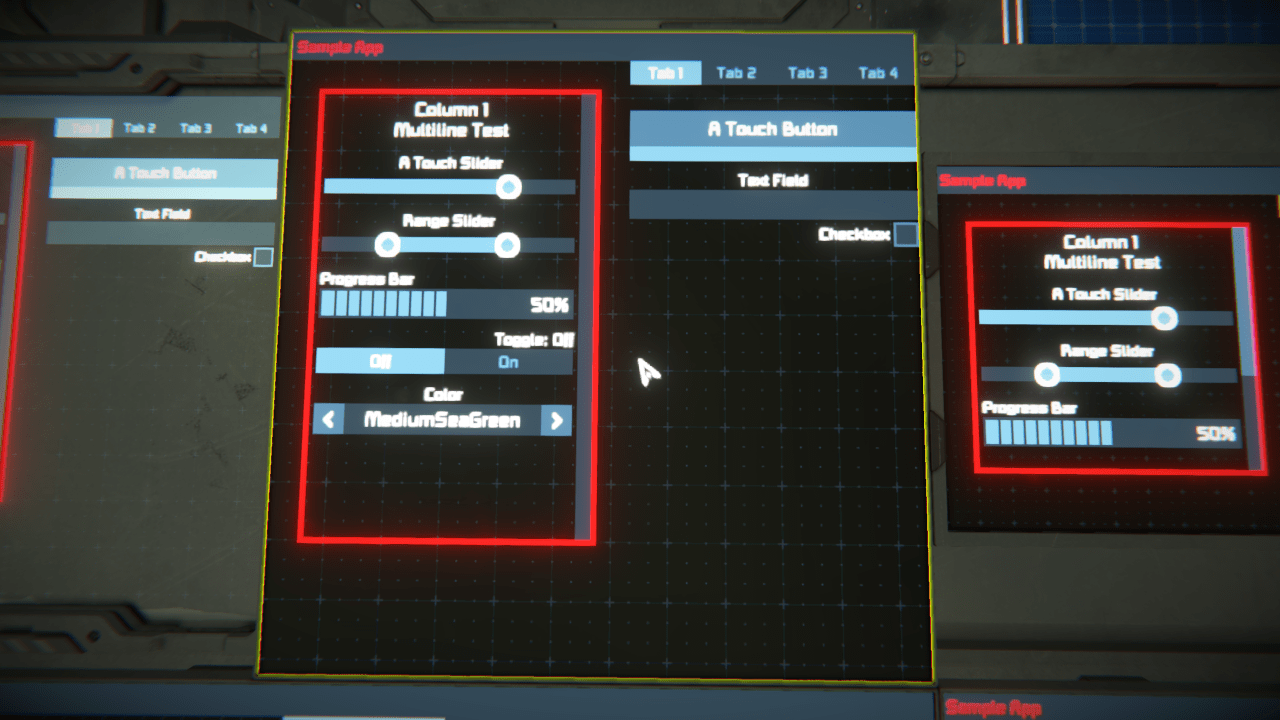
The Ui Kit is a decent library of common UI elements, there are more elements planned. It is completely optional, the Touch features can be imported and used separated from the UI elements if the mod only needs the cursor feature.
- TouchApp - It is the main element, control draw loops, updates and dispose.
- Button - A simple button with a text label. There is an empty version of it that can have icons as children.
- Chart - Line charts on a grid, can have multiple lines.
- Checkbox - Simple checkbox.
- Label - Text Label, one of the simplest elements.
- ProgressBar - Progress bar, have a vertical option, also optional label.
- Selector - Multi options selector.
- Slider - A slider witha draggable thumb.
- SliderRange - Another slide, but for a range value, has two thumbs.
- Switch - A multi options switcher, can be used like tabs for a panel.
- TextField - Text input field, editable with keyboard. One of the most complex elements.
- View - The major container, has properties like margin, padding, border, alignmet, etc.
- ScrollView - Like a view, but with scroll, automatically hide children out of bounds.
- WindowBar - Useful for app names and buttons for options at the top of a window.
- EmptyElement - Useful for adding custom MySprites to the App's hierarchy.
Ui Kit - Styling
Every component have some properties to change their visuals, they're inspired and works like html+css elements. May looks pretty straight forward if you're familiar with website development. The most importants are these, for a complete list and documentation see the project github page:
- Enabled - If false, the element will not be drawn.
- Absolute - If true, the element will not align and anchor with the parent.
- Flex - The ratio of the parent that this element should fill.
- Pixels - Fixed size in pixels, not related to parent.
- Margin - Margin value for spacing elements on the four sides.
- Padding - Padding value for inner spacing of an element on the four sides.
- Border - Border value for an element. It is colored by BorderColor property.
- Anchor - Position of the children on the same axis of the Direction. Like start, center, end, etc.
- Alignment - The aligment of children on the crossed axis of the Direction
- Direction - The direction the elements will line, like Column and Row. Can be reversed.
- Gap - Adds a spacing between children. Better than adding margin to each child.
- BgColor - Background color.
LCD Screens
It automatically works for all current screens in vanilla game and DLCs, including cockpits and both large grid and small grid. But it also works for custom modded LCD blocks with a quick setup using Screen Calibration TSS. There is also an API for adding and removing screen coordinates with code, see github page for details.
Touch Apps
- Electric Network Info
- Button Pad
- I'm currenty working on more apps...
[hr][/hr] - "If I have seen further it is by standing on the shoulders of Giants."
[spoiler]Thanks for all the support at Keen's Discord #modding-programming channel, this community is amazing! ❤️ Digi, Malware, enenra, Draygo, Klime, Gwindalmir and many others.[/spoiler]
Highlights
From source dataFootprint
A 816 KB download, rated a light load on a server.
Last update
Its author last shipped an update 3 yr ago.
TouchScreenAPI on Nxeon
From our catalogue- One-click install
- Not available. One-click install isn't available for this game's mods yet. Download it and upload it to your server in Files.
- Server load
- light
- Smallest plan we suggest
- Space Engineers — 8 GB (8 GB RAM). This follows our own load rating above, not a benchmark.
- Latest build
- 2024-01-21, released 2024-01-21, 816 KB
Game versions by loader
| Loader | Game versions | Newest |
|---|---|---|
| Workshop |
From 1 recorded build of TouchScreenAPI.
Run TouchScreenAPI on a Space Engineers server
Deploy a server above, then upload the file in Files.
What kind of mod it is
From the catalogLibraries & compatibility
Foundations and fixes other mods build on. Usually installed because something else needs it.
Compatibility
- Game
- Space Engineers
- File size
- 816 KB
Verified at the source
- ✓Steam WorkshopOfficial listing, checked 2026-10-10Open ↗
- ✓AuthorAdriano, as published on Steam Workshop
- ✓LicenseNot published by the sourceFree












