






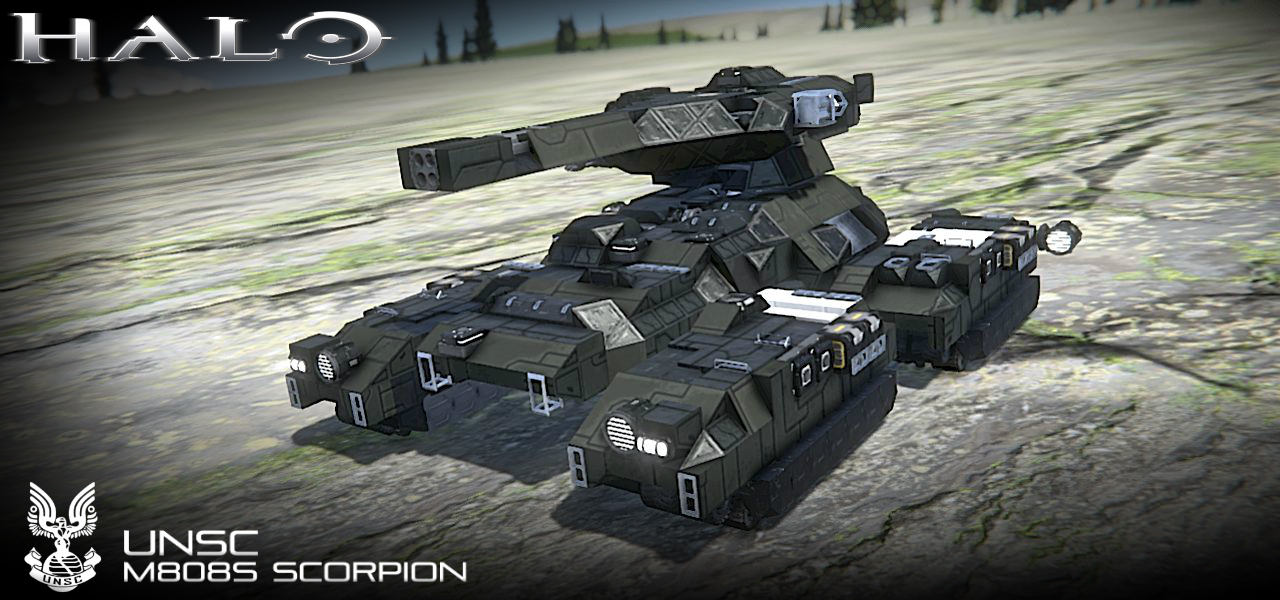
About UNSC M808S Scorpion
From Steam WorkshopM808S Main Battle Tank The M808S Main Battle Tank, commonly known as the Scorpion, is a variant of the M808 Scorpion The UNSC Spirit of Fire carried a large complement of M808S Scorpions modified by…
M808S Main Battle Tank
[Source: Halo Wars 2]
The M808S Main Battle Tank, commonly known as the Scorpion, is a variant of the M808 Scorpion
The UNSC Spirit of Fire carried a large complement of M808S Scorpions modified by Serina before 2537. Her improvements include a more efficient armor arrangement, better situational awareness for the operator, and upgrades to the main cannon. Isabel found little room for improvement on this blueprint, but saw possibilities for specialized variants that leverage the chassis for other roles. Scorpions were used by UNSC forces attached to the UNSC Spirit of Fire against Banished forces for control of Installation 00 in April 2559
Production information
> Manufacturer: : Chalybs Defense Solutions > Product line: Scorpion > Model: M808S
Dimensions
> Length: 12.0 meters (Actual: 10.2 meters ) > Width: 10.0 meters (Actual: 7.8 meters ) > Height: 6.5 meters (Actual: 4.4 meters )
Instructions [Driver]:
01.) Proceed to climb the left side of the Scorpion tank to reach the hatch.
02.) Press the button located next to the hatch to access the driver's seat. Once in, press [1] on toolbar 02 to close the hatch.
03.) Press [6] on the toolbar to unlock the turret's rotors.
Instructions [Driving]:
01.) The rotors holding the four bogies of the M850 are pre-set to off to allow for independent movement of each bogie. When climbing terrain, activate the rotors by pressing [8] on the toolbar. Select the appropriate configuration by pressing [9] on the toolbar (use your best judgement). At times, you may have to shake the tank left/right in order to climb slopes.
Controls:
Controls [Toolbar 01]: [1]: M512 Smooth Bore High Velocity Cannon - (Fire) [2]: M247T Medium Machine Gun [Turret] - (Fire) [3]: Camera [M512 Smooth Bore High Velocity Cannon] - (View) [4]: Front Lights - (On/Off) [5]: Rotors [Turret] - (Lock/Unlock) [6]: Rotor [Hatch] - (Reverse) [7]: Thrusters [Assist] - (On/Off) [8]: Rotors [All Bogies]- (On/Off) [9]: Rotors [All Bogies]- (Reverse)
Notes:
[1] - You must enable supergrids in the Advanced Settings to use this vehicle.
[2] - Tread carefully when driving through uneven surfaces (recommended going ~3.0-5.0 m/s) to prevent damaging the bogies/treads.
[3] - When climbing inclines, turn on the assistance thrusters by pressing [7] on toolbar 01.
Additional Credits:
>Automatic LCDs 2 by "MMaster": http://steamcommunity.com/sharedfiles/filedetails/?id=822950976&searchtext=automatic+lcds
>Skid Steering Suspensions (Script) by "Sunoko": https://steamcommunity.com/sharedfiles/filedetails/?id=945775847
>Whip's Artificial Horizon and Velocity Script: https://steamcommunity.com/sharedfiles/filedetails/?id=713653017
> Whip's Mouse Aimed Rotor Turret Script: http://steamcommunity.com/sharedfiles/filedetails/?id=944915802
>Whip's Subgrid Wheel Control Script: https://steamcommunity.com/sharedfiles/filedetails/?id=1445055239
>Whip's Image To LCD Converter: http://forum.keenswh.com/threads/tool-whips-image-to-lcd-converter.7393443/
Special thanks to Asgard10 and VanuBaguio for assisting me in this project!
Highlights
From source dataFootprint
Rated a light load on a server.
Last update
Its author last shipped an update 7 yr ago.
UNSC M808S Scorpion on Nxeon
From our catalogue- One-click install
- Not available. One-click install isn't available for this game's mods yet. Download it and upload it to your server in Files.
- Server load
- light
- Smallest plan we suggest
- Space Engineers — 8 GB (8 GB RAM). This follows our own load rating above, not a benchmark.
- Latest build
- 2019-08-05, released 2019-08-05
Game versions by loader
| Loader | Game versions | Newest |
|---|---|---|
| Workshop |
From 1 recorded build of UNSC M808S Scorpion.
Run UNSC M808S Scorpion on a Space Engineers server
Deploy a server above, then upload the file in Files.
What kind of mod it is
From the catalogVehicles & ships
Cars, boats, aircraft, ships and other things to drive or fly.
Compatibility
- Game
- Space Engineers
Verified at the source
- ✓Steam WorkshopOfficial listing, checked 2026-11-01Open ↗
- ✓AuthorPrimoSuperT, as published on Steam Workshop
- ✓LicenseNot published by the sourceFree












