







About [UPD 07/2017] Cargo Inventory Sorter
From Steam WorkshopUpdated 07/2017! 01/03/2015 Important Update notes: The script became much more complex, so if someone gets "script is too complex" error, please report. Now it's possible to use types. Adding "all",…
Updated 07/2017!
01/03/2015 Important Update notes:
The script became much more complex, so if someone gets "script is too complex" error, please report. Now it's possible to use types. Adding "all", "ore", "ingots", "tools" or "components" will make the inventory collect all items of that type. It's also possible to exclude some items or types by using "-" (minus) sign. Examples: $ore -stone (Collects all types of ores except for stone) $all -tools -components (Collects everything except character tools and building components) $ore ingots (The same as above) $ingots ore -stone:ore -uranium:ingot (Collects all ingots and ores except for raw stone and refined uranium)
Also, the script works with blocks with more than one inventories. You need to use "|" symbol to separate inventories. Refineries, arc furnaces and assemblers have the "input | output" pattern. Examples: $ores | $iron:ingot (Collects all ores, but keeps only iron ingots) |$ (Doesn't do anything with the input and keeps the output empty. This pattern is useful for cooperative assemblers) $iron nickel cobalt -ingot (Takes all the specified ores, and doesn't do anything with the output. This is useful for arc furnaces. Although they don't take ingots, the script will try to push iron ores also, if you don't specify otherwise)
The special characters can be changed in the beginning of the script.
Requirements:
Programmable block x1 Timer block x1 Extra container for unsorted items x1
Usage:
The script sorts items in separate cargo containers.
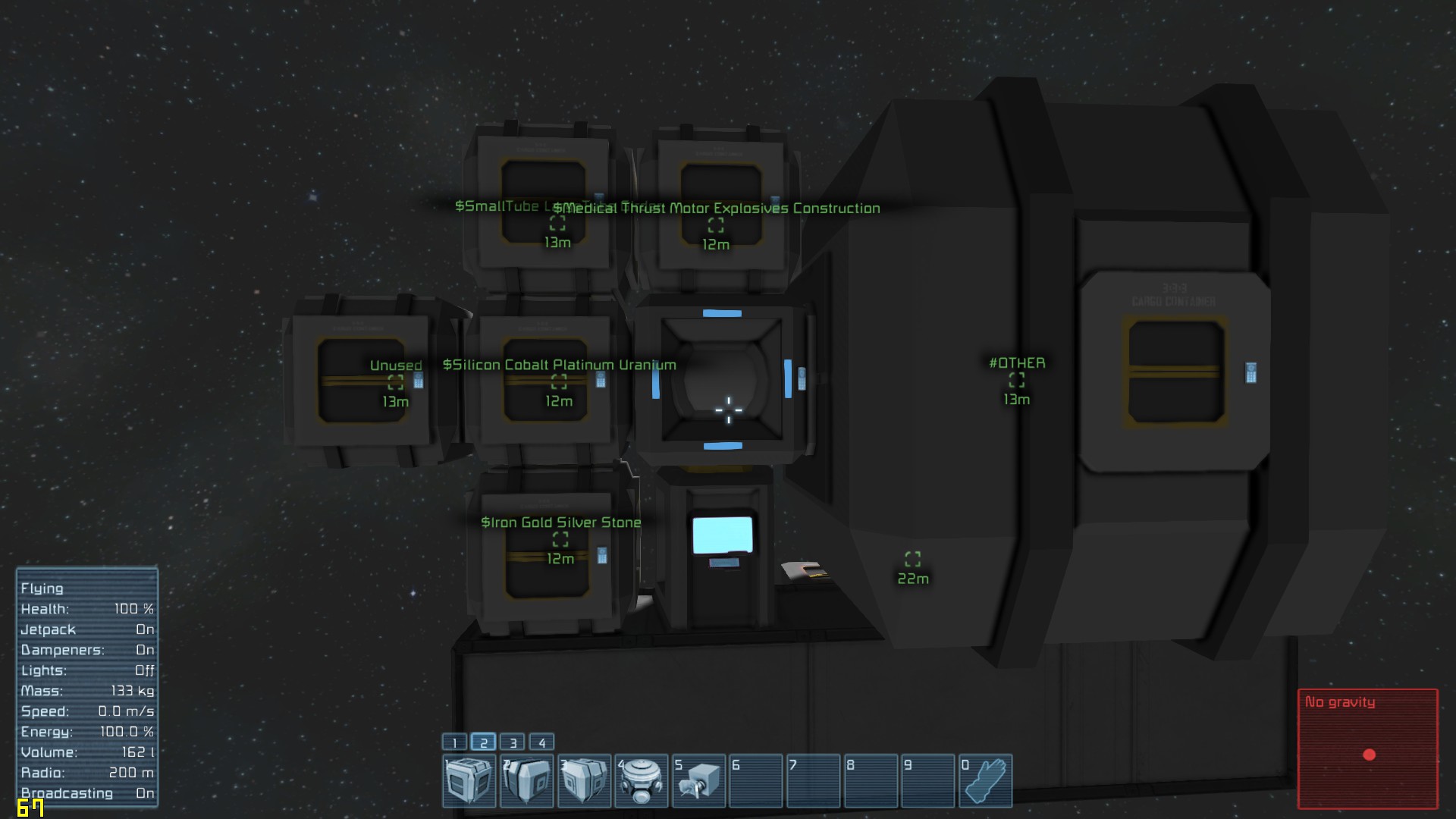
Load the script into your programmable block, connected to the grid. Then set a timer block to run the program every two seconds and to start the countdown again. Name one container "#OTHER". This container will collect items that cannot be sorted and will act as an intermediate container.
If you want to make a cargo container sortable, it name must start with "$" and contain types and names of the items you want to store there. For example, "$Gold Iron ore Thrust LargeTube" will collect All ores, Gold and Iron ingots, Thrust and Large Tube from other containers, while will drop other items to the "#OTHER" container(name of the extra container can be changed in the script). Containers whose names don't start with "$" won't be sorted. You also need to know the exact item name.
You still can have any description in the name. The inventory will be sorted as long as the name starts with "$". "$Small Cargo Container ingots" will work.
Feel free to ask any questions.
Known issues (To be fixed ASAP):
-The script doesn't check availabe space in inventories -The script doesn't check if the inventory supports the item -The script works with the entire grid and there is no way to separate it in sorting subsystem.
Past updates:
Updated 01/02/2015: +Added support for lower case names +Added support for drills, grinders, welders, connectors, collectors, ejectors and reactors.
Updated 01/02/2015: +Added support for turrets, gatling guns and reloadable rocket launchers +Fixed issue with "Sandbox.ModAPI.MyInventoryItem"
Updated 01/02/2015: +Added support for all block with inventories +Added support for types(ingots, ores, tools, components, all) +Added support for specifying the type of an item(iron:o(re), stone:i(ngot)) +Added support for ignoring blocks(- sign) +Added support for blocks with two inventories such as assemblers, refineries and arc furnaces (Use "|" to separate description of inventories) *Thanks Rime Burst for help with testing
Highlights
From source dataFootprint
Rated a light load on a server.
Last update
Its author last shipped an update 9 yr ago.
[UPD 07/2017] Cargo Inventory Sorter on Nxeon
From our catalogue- One-click install
- Not available. One-click install isn't available for this game's mods yet. Download it and upload it to your server in Files.
- Server load
- light
- Smallest plan we suggest
- Space Engineers — 8 GB (8 GB RAM). This follows our own load rating above, not a benchmark.
- Latest build
- 2017-07-03, released 2017-07-03
Game versions by loader
| Loader | Game versions | Newest |
|---|---|---|
| Workshop |
From 1 recorded build of [UPD 07/2017] Cargo Inventory Sorter.
Run [UPD 07/2017] Cargo Inventory Sorter on a Space Engineers server
Deploy a server above, then upload the file in Files.
What kind of mod it is
From the catalogQuality of life & UI
Small conveniences, tweaks and interface improvements players notice straight away.
Compatibility
- Game
- Space Engineers
Verified at the source
- ✓Steam WorkshopOfficial listing, checked 2026-11-01Open ↗
- ✓AuthorBorg, as published on Steam Workshop
- ✓LicenseNot published by the sourceFree












