






About Vector Power OS
From Steam WorkshopVECTOR POWER OS Live power HUD · Auto generator control · Jump drives · Connected ships A clean, fully graphical power management system for Space Engineers. Designed for stations, carriers, and…
VECTOR POWER OS Live power HUD · Auto generator control · Jump drives · Connected ships
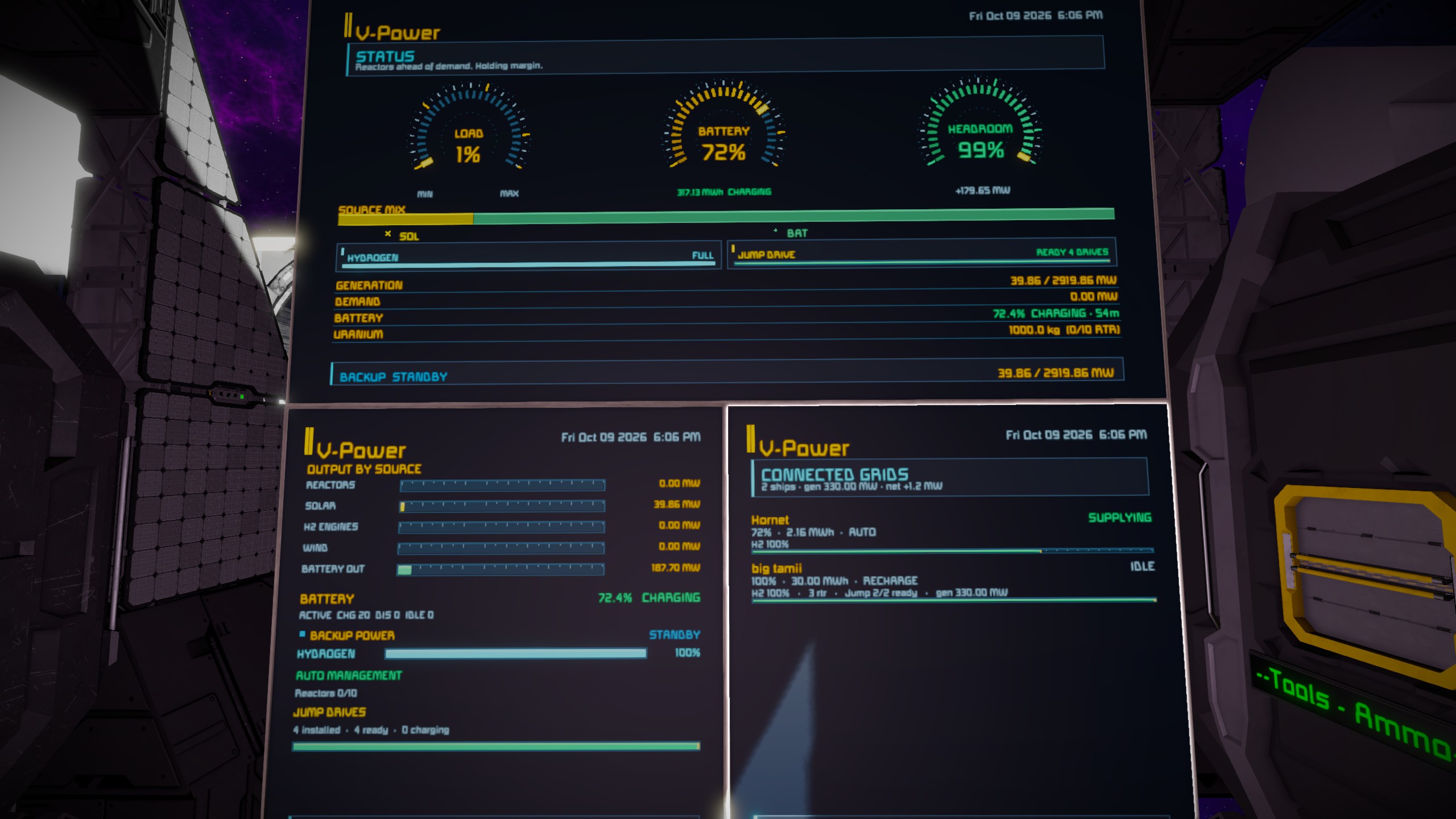
A clean, fully graphical power management system for Space Engineers. Designed for stations, carriers, and large grids that need clear information at a glance.
FEATURES
Main HUD • Live load, battery, and headroom gauges • Source mix bar (reactors / solar / H2 / wind / battery) • Hydrogen and jump drive status • Generation, demand, battery state, uranium, and grid summary • Smart persona status messages that react to your power situation
Dedicated pages • Detail – output by source • Reactors – fuel, runtime, auto status • Solar / Wind / H2 Engines • Battery – charge, flow, ETA, “if generators fail” estimate • Connected Grids – docked ships with real power impact
Connected Grids page shows per ship: • Name + status (PULLING / SUPPLYING / IDLE) • Battery % · stored MWh · mode (AUTO / RECHARGE / DISCHARGE) • Hydrogen % · reactors · H2 engines · jump drive status • Color-coded charge bar
Auto Power Management • Automatically stages reactors and hydrogen engines • Prefers highest-output units first • Respects minimum run time and deficit confirmation • Tag any reactor or H2 engine [VPO:ignore] to exclude it
Other • Two themes (Mixed / Amber) • Boot sequence • Tags update automatically (no reload needed when you rename an LCD) • Works on LCDs, cockpits, and multi-screen blocks
QUICK SETUP
1. Place a Programmable Block and paste the script. 2. Compile and run it. 3. Name any LCD / cockpit / text panel with a tag:
[VPO] Main power HUD [VPO:detail] Output by source [VPO:reactors] Reactors [VPO:solar] Solar [VPO:h2] Hydrogen engines [VPO:wind] Wind [VPO:battery] Batteries [VPO:grids] Connected / docked ships
Multi-screen blocks accept several tags — screens are mapped in order. Extra screens reuse the last tag.
COMMANDS
Run these as an argument on the Programmable Block:
reload> Reload config + rescan grid save> Write settings to CustomData boot> Replay boot sequence auto on|off> Toggle auto power management theme> Switch Mixed ↔ Amber tag <name> Change the LCD tag (default [VPO]) pages> List all detected surfaces and their pages dump> Full diagnostic snapshot help> Show help on the PB screen
NOTES
• DEMAND = non-battery load • NET = battery flow (+ charging / − discharging) • GENERATION / HEADROOM count generators only — battery discharge does not inflate headroom • Header clock uses server-local time • Auto management only controls reactors and H2 engines that are not tagged [VPO:ignore]
CREDITS
Created by Rick Grinds Public Domain (CC0 1.0) — free to use, modify, and re-upload.
Highlights
From source dataFootprint
Rated a light load on a server.
Last update
Its author last shipped an update 26d ago.
Vector Power OS on Nxeon
From our catalogue- One-click install
- Not available. One-click install isn't available for this game's mods yet. Download it and upload it to your server in Files.
- Server load
- light
- Smallest plan we suggest
- Space Engineers — 8 GB (8 GB RAM). This follows our own load rating above, not a benchmark.
- Latest build
- 2026-10-09, released 2026-10-09
Game versions by loader
| Loader | Game versions | Newest |
|---|---|---|
| Workshop |
From 1 recorded build of Vector Power OS.
Run Vector Power OS on a Space Engineers server
Deploy a server above, then upload the file in Files.
What kind of mod it is
From the catalogQuality of life & UI
Small conveniences, tweaks and interface improvements players notice straight away.
Compatibility
- Game
- Space Engineers
Verified at the source
- ✓Steam WorkshopOfficial listing, checked 2026-10-17Open ↗
- ✓AuthorRick Grinds, as published on Steam Workshop
- ✓LicenseNot published by the sourceFree













