







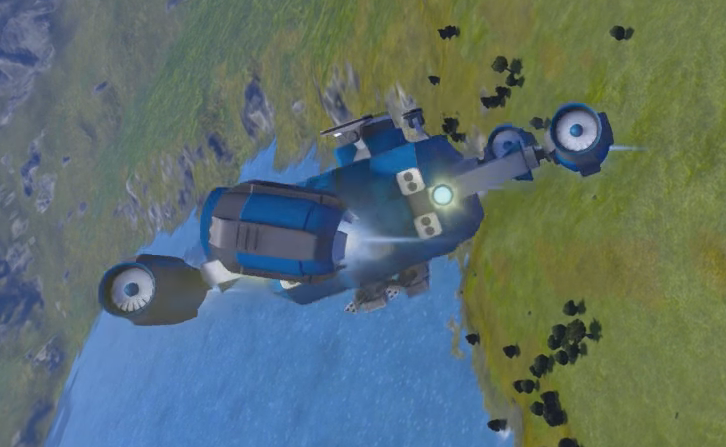
About Vector Thrust 2 [old]
From Steam Workshop[url=https://steamcommunity.com/sharedfiles/filedetails/?id=2831096030]Maintained Version Vector Thrust Put your thrusters on rotors!…
Maintained Version
Vector Thrust
Put your thrusters on rotors! Documentation
If you have Control Module installed in the world, it will just work. This is optional.
MAIN SETUP
1. Load the script into a programmable block (If you don't know how to do that) 2. Run the programmable block It should be already running. if its on standby mode, you will have to pass the %standby argument 3. Setup your Cockpit buttons or use Control Module (you need %Standby either way) 4. Get in and press the jetpack button to turn the engines on.
INFO PANEL SETUP
While this is optional, I highly recommend it. 1. Place a text panel 2. Put %VectorLCD in the name or 1. put "%Vector:0" (without quotes) on its own line in the custom data of your cockpit
VANILLA BUTTONS SETUP
1. Get in your cockpit, press G 2. Drag the programmable block to the bar and select "RUN" 3. Copy & paste the code for your controls. You will need:
%jetpack
%dampeners
%cruise
%standby
%raiseAccel
%lowerAccel
%resetAccel
Standby completely stops the script, till you press the button again (and also safely turns off thrusters & rotors) please use it in multiplayer the last 3 control your 'Target Accel' value and are optional Dampeners, Jetpack, and Cruise all toggle their respective values.
CONTROL MODULE
 [b]X[/b]:  engines on/off
 [b]Z[/b]:  inertia dampenerse on/off
 [b]R[/b]:  cruise mode on/off
 [b]+[/b]:  increase target acceleration
 [b]-[/b]:  decrease target acceleration
 [b]0[/b]:  reset target acceleration
there is currently no binding for standby, so you will have to set that up with the vanilla method
CRUISE MODE
This makes the craft behave like an airplane, it will drift forward, but apply inertia dampeners for any other direction. suggested by Raiteri
FAQ
Better Instructions? Here!
Why don't my thrusters point the right way? / Why do my thrusters spin like crazy? This is most likely the Keen Phantom Torque bug. As it stands there isn't much I can do about it. There is a workaround in the Detailed Manual (see 'Centre of Mass Issues'). If you have tried those and it still doesn't point the right way, tell me.
Does it work in Space? Short answer: Yes. Long answer: The concept doesn't really work that well in space. It takes time for the thrusters to move to the desired position, this is made worse in space since the thrusters might need to point in any direction. In gravity, the thrusters don't need to turn as much because they mostly just need to point down.
Rotor on a Rotor? Short answer: No. Long answer: This is unstable and would require a large re-design. If you really want a rotor on a rotor, you can force it by putting a thruster on each subgrid that has a rotor head.
Can I stop my ship from controlling other vector thrust ships on the base? Yes! See the 'Tags' section in the Detailed Manual.
Why won't my thrusters turn on? Short answer: You need to turn them on using the script, not the terminal. Long answer: pass the %jetpack argument, or if you are using Control Module, press your suit jetpack key.
The Git Feel free to fork this, If you make a workshop page I will happily link it here.
Highlights
From source dataFootprint
A 59 KB download, rated a light load on a server.
Last update
Its author last shipped an update 7 yr ago.
Vector Thrust 2 [old] on Nxeon
From our catalogue- One-click install
- Not available. One-click install isn't available for this game's mods yet. Download it and upload it to your server in Files.
- Server load
- light
- Smallest plan we suggest
- Space Engineers — 8 GB (8 GB RAM). This follows our own load rating above, not a benchmark.
- Latest build
- 2019-12-27, released 2019-12-27, 59 KB
Game versions by loader
| Loader | Game versions | Newest |
|---|---|---|
| Workshop |
From 1 recorded build of Vector Thrust 2 [old].
Run Vector Thrust 2 [old] on a Space Engineers server
Deploy a server above, then upload the file in Files.
What kind of mod it is
From the catalogWorkshop
Its source category doesn’t say more about what it does, so NxLabs lists it under Other.
Compatibility
- Game
- Space Engineers
- File size
- 59 KB
Verified at the source
- ✓Steam WorkshopOfficial listing, checked 2026-10-10Open ↗
- ✓AuthorVermillion, as published on Steam Workshop
- ✓LicenseNot published by the sourceFree












