About Vehicle Dashboard Script
From Steam WorkshopDo not use script on custom programmable blocks that does not have drawing surfaces! It SHOULD have at least one!! Description This script is about dashboard. I did it for my own need and tryed to…
Do not use script on custom programmable blocks that does not have drawing surfaces! It SHOULD have at least one!!
Description
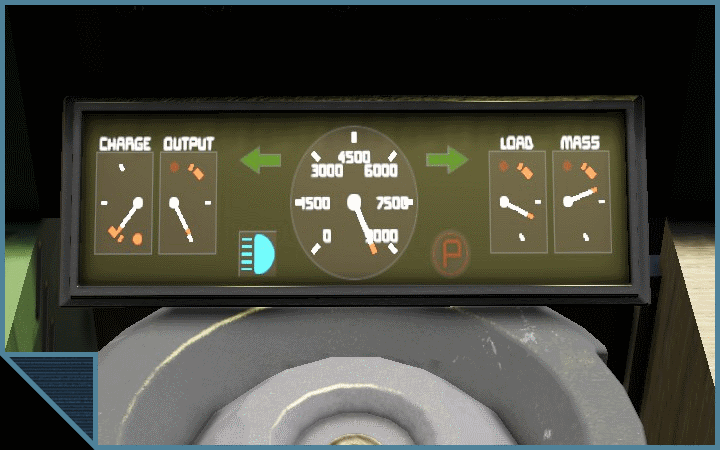
This script is about dashboard. I did it for my own need and tryed to make it simple. It will draw all neccecary information on chosen block screen. It also controls turn signals on your truck. Here is a list of current features:
- Battery charge and output;
- Turn and hazard warning signals leds;
- Cargo volume and mass limit of vehicle;
- Speedometer with adjustable speed limit;
- Spotlights and handbrake leds.
Deployment preparation
Vehicle must meet next requirements:
- Controller block: Cockpit or remote control;
- Something with text surface. It can be anything that have text surface;
- Battery(Optional);
- Lightning block with your faworite name for it. To write it in custom data.
- Turn signal light name must contain "turn left/right". This also apply to trailers.
Settings
First time you run this script on a vehicle, it will write pattern data in it's programmable block custom data.
Controller block name : Cockpit
Surface provider name: Dashboard
Surface number: 0
Gather mode: 1
Battery name: Battery
Headlight name: Spotlight
Speed limit: 120.0
Cargo mass limit: 40000.0
Battery Charge: 40:70:80
Battery Output: 100:70:80
Spidometer: 256:70:120
Turn left led: 166:37:40
Turn right led: 346:37:40
Headlight led: 166:110:35
Handbrake led: 346:110:40
Load meter: 410:70:80
Mass meter: 470:70:80
Controller block name: Name of chosen controller, by default it's "Cockpit". It can be cockpit or remote control block; Surface provider name: Name of block that have text surfaces where dashboard elements will be drawn; Surface number: Well, if this block have more than one surface you can choose it here. It's number starts from zero; Gather mode: Get total volume of -
- 0 - cargo containers and connectors only;
- 1 + ship tools and controllers;
- 2 + assemblers, refiners and gas generators;
- 3 + weaponry.
Battery name: It's battery name! How fantastic. Im sure you will use reactors, or whatever you use there. If you don't need it just leave it as default and set "Battery Charge" and "Battery Output" as 0:0:0. If it wont work with message "check custom data" just put one small battery to be sure; Headlight name: Your favorite headlight name that will be trigger on "L" key; Speed limit: As the name suggests. Cargo mass limit: A magical number from your head that will be shown at mass meter. Just, as reminder how much cargo your bulky vehicle can haul without scratching with it's bottom. All that is beneath: Is a coordinate on screen and size. You can put elements on screen anywhere and any size you like. Just remember that 0:0:0 will disable that element. All names must exactly match the name of the blocks. Case sensitive.
Commands:
- trailer - Will gather all lights on trailer and calculate maximum volume for cargo;
- hazard warning - Crashed in to something? Toggle that hazard lights switch.
Turn signals
They are activated by roll control, keys by default "Q" and "E". They will turn off each other, and hazard lights. Theyalso would be turned off when you will release steering wheel (and wheels will get to neutral position) or you turn it in opposite side. Put PB VDS on toolbar with "hazard warning" run argument, to turn on hazard lights. Also, if you have VCOS on your truck it will ping VDS about attaching trailers, if not than you should put VDS on toolbar with "trailer" run argument.
Conclusion
Yeah i know that there is already published scripts for those thing in workshop. But it's mine, and have different looking. And also probably glitchy. It's still in WIP, so things could change over time.
Highlights
From source dataFootprint
Rated a light load on a server.
Last update
Its author last shipped an update 5 yr ago.
Vehicle Dashboard Script on Nxeon
From our catalogue- One-click install
- Not available. One-click install isn't available for this game's mods yet. Download it and upload it to your server in Files.
- Server load
- light
- Smallest plan we suggest
- Space Engineers — 8 GB (8 GB RAM). This follows our own load rating above, not a benchmark.
- Latest build
- 2021-10-05, released 2021-10-05
Game versions by loader
| Loader | Game versions | Newest |
|---|---|---|
| Workshop |
From 1 recorded build of Vehicle Dashboard Script.
Run Vehicle Dashboard Script on a Space Engineers server
Deploy a server above, then upload the file in Files.
What kind of mod it is
From the catalogQuality of life & UI
Small conveniences, tweaks and interface improvements players notice straight away.
Compatibility
- Game
- Space Engineers
Verified at the source
- ✓Steam WorkshopOfficial listing, checked 2026-11-01Open ↗
- ✓AuthorPrellentor, as published on Steam Workshop
- ✓LicenseNot published by the sourceFree