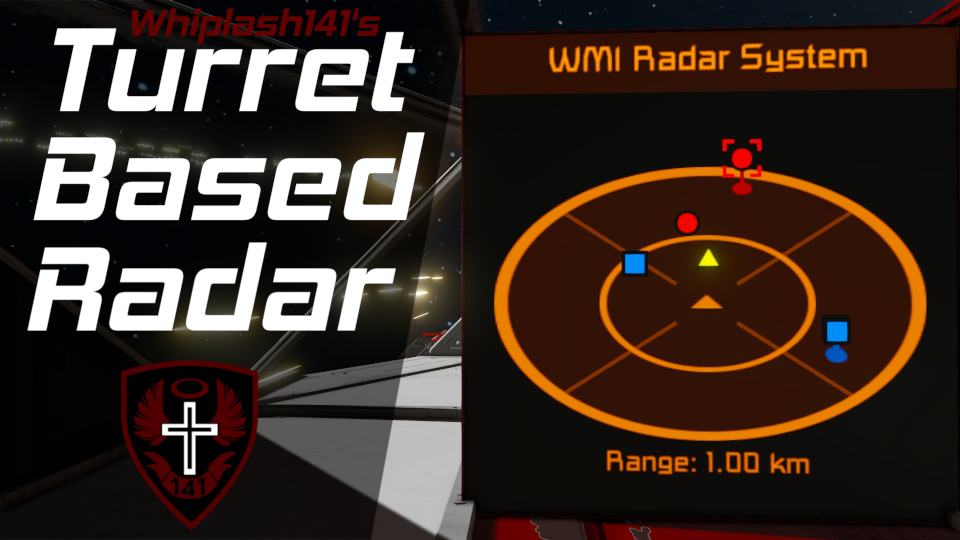
About Whip's Turret Based Radar
From Steam WorkshopWhip's Turret Based Radar System Description Howdy! This script uses turret targeting to populate a 3D radar and is designed to increase the user's situational awareness. This script also works with…
Whip's Turret Based Radar System
[img=https://i.imgur.com/iHy45ds.png]
Description
Howdy!
This script uses turret targeting to populate a 3D radar and is designed to increase the user's situational awareness. This script also works with custom turret control blocks!
This radar bears many visual and functional similarities to those of Elite Dangerous. Targets are plotted upon an angled plane centered around your ship, and vertical lines denote the target's elevation above your ship.
Also, targets are shared across antenna networks; if one ship detects a target, any other ships within its antenna range can see that target on their radar.
Targets locked with WHAM or LAMP will also be displayed.
[img=https://i.imgur.com/mzFoGxf.png]
[img=https://i.imgur.com/iHy45ds.png]
Setup Instructions
Required Steps
[olist] [*] Place this script on your ship. [*] Add turrets and custom turret control blocks to your ship. [*] Add Radar to the name of text panels or blocks with text surfaces that you want the radar displayed.
- Blocks with text surfaces include: Cockpits, flight seats, programmable blocks, consoles, etc.
- Configure which text surface the radar is displayed on within the block's custom data (You don't need to do this for text panels).
[/olist] [img=https://i.imgur.com/8UJuYyjl.png?1]
Optional steps
- Place one or more ship controllers on your ship (Cockpits, Flight Seats, or Remote Controls). [list][*]These will be used to orient the way the radar is drawn.[/list]
- Place the word Reference in the name of the specific ship controller that you want use to orient the radar.
- [list][*] If you do not specify, the code will automatically detect and use the seat you are controlling the ship from![/list]
- Place some sensors on your ship if you want to also use sensors to detect targets.
- Place one or more antennas to enable the antenna network target sharing functionality.
NOTE: If you don't have turrets on your ship, the code will still work; however, you will only be able to see targets that are broadcast to you by other friendlies.
[img=https://i.imgur.com/iHy45ds.png]
Custom Data Config
You can change how the radar looks and behaves within the Custom Data of the programmable block this script is running from. Simply open the custom data, modify it, and click "Ok". The code will update to reflect these changes within 10 seconds at most. [img=https://i.imgur.com/adHNy18.png]
[img=https://i.imgur.com/iHy45ds.png]
Multiscreen Display
You can also combine multiple LCD panels together to create larger surfaces to draw sprites on.
In order to create a multiscreen display: [olist] [*] Make a wall of LCD panels (They must all be the same type of LCD). [*] Add the name tag Radar to only the top left LCD panel in the wall. [*] Add the following to the custom data of that top left LCD panel:
[Radar - Multiscreen Config]
Screen rows=1
Screen cols=1
- Change "Screen rows" and "Screen cols" to match the shape of your screen wall.
[*] Run the argument refresh to process changes. [/olist] This will now be treated as one massive LCD screen! [img=https://imgur.com/7cwkyOI.png]
[img=https://i.imgur.com/iHy45ds.png]
Arguments
To use an argument, enter it in the argument box and click the "Run" button. [table] [tr] [th]Argument[/th] [th]Function[/th] [th]Example[/th] [/tr] [tr] [td]range [number][/td] [td]Sets radar display range to the specified number (in meters)[/td] [td]range 1200[/td] [/tr] [tr] [td]range increment [number][/td] [td]Increments the radar display range by the specified number (in meters)[/td] [td]range increment -100[/td] [/tr] [tr] [td]range default OR range auto[/td] [td]Resets radar display range to be automatically determined from the max turret range[/td] [td](Same as argument)[/td] [/tr] [/table]
Increasing the radar display range does not magically increase the range that turrets can detect targets!
[img=https://i.imgur.com/iHy45ds.png]
What the FAQ?!
Will this script work with sensors?
Yes, simply add sensors to your ship.
How is the radar range determined?
It uses the max range of the turrets on your ship (default) or the range override.
How do I detect enemies and neutrals?
Turrets.
How do I detect friendies?
They need this radar script and they need to have you within antenna range.
There are also other scripts that broadcast valid IFF messages including:
- LAMP
- Turret Slaving
- Turret Based Radar Transponder (user made)
Do enemy ships need this script to show up on my radar?
No. They merely need to be in turret range.
Why don't I see any ships on my radar?
- You have no allied ships nearby with this radar
- Your turrets are not shooting at any targets
Can I force the radar to show a different range than my turret range?
Yes. Change the range override in the custom data of the program block.
Will this script use camera raycast (aka LIDAR)?
No, hence the name. Raycast is absolutely awful at blindly scanning volumes without slagging sim-speed.
Highlights
From source dataFootprint
A 432 KB download, rated a light load on a server.
Last update
Its author last shipped an update 5 mo ago.
Whip's Turret Based Radar on Nxeon
From our catalogue- One-click install
- Not available. One-click install isn't available for this game's mods yet. Download it and upload it to your server in Files.
- Server load
- light
- Smallest plan we suggest
- Space Engineers — 8 GB (8 GB RAM). This follows our own load rating above, not a benchmark.
- Latest build
- 2026-05-22, released 2026-05-22, 432 KB
Game versions by loader
| Loader | Game versions | Newest |
|---|---|---|
| Workshop |
From 1 recorded build of Whip's Turret Based Radar.
Run Whip's Turret Based Radar on a Space Engineers server
Deploy a server above, then upload the file in Files.
What kind of mod it is
From the catalogQuality of life & UI
Small conveniences, tweaks and interface improvements players notice straight away.
Compatibility
- Game
- Space Engineers
- File size
- 432 KB
Verified at the source
- ✓Steam WorkshopOfficial listing, checked 2026-10-10Open ↗
- ✓AuthorWhiplash141, as published on Steam Workshop
- ✓LicenseNot published by the sourceFree