






About TeleportEverything
From ThunderstoreTeleport Everything 3 with UI is the official OdinPlus modularized pack for Teleport Creatures, Teleport Carts, Teleport Boats and Quick Teleport. Compatible with Valheim 1.0 (Deep North).
TeleportEverything
Choose what travels with you, then manage its settings in one in-game panel. It integrates TeleportCreatures, TeleportCarts, TeleportBoats, or QuickTeleport for managing the features you want. Compatible with Valheim 1.0 (Deep North).
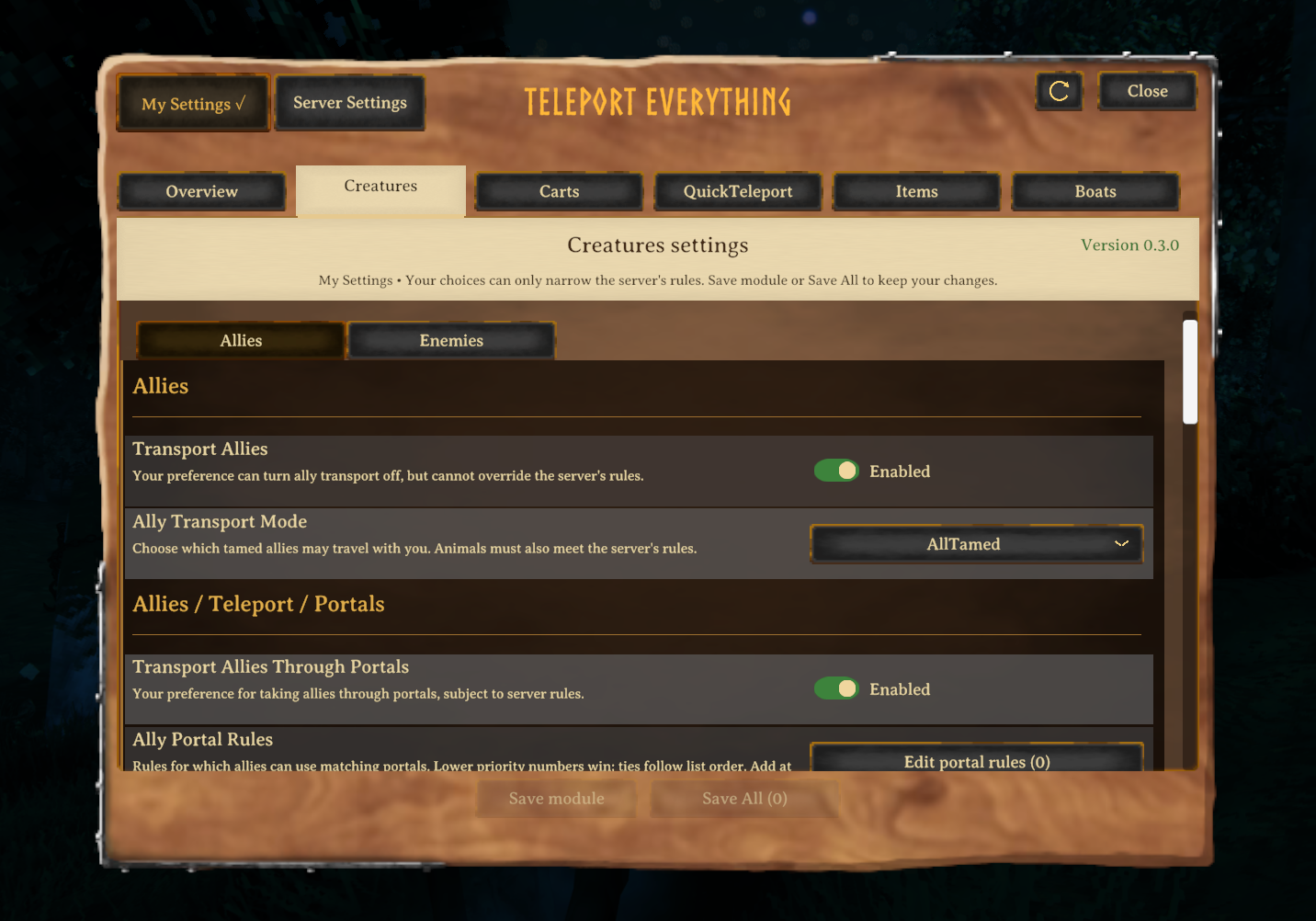
Default <kbd>Left Shift</kbd> + <kbd>Up Arrow</kbd> opens the in-game settings panel.
TeleportEverything brings together optional transport modules and a shared settings panel. Each module works independently and owns its own behavior.
- Manage supported module settings from one in-game panel.
- Choose only the transport features you want.
- Keep personal preferences within the server's rules.
Getting started
- Install BepInExPack for Valheim and TeleportEverything in the same Valheim profile on the server and participating clients. For the easiest setup, use Gale, which can use the Hexium and Thunderstore catalogs.
- Installing TeleportEverything through Thunderstore or Gale installs the ecosystem modules automatically: TeleportCreatures, TeleportCarts, TeleportBoats, and QuickTeleport. The wrapper can also run by itself; remove modules you do not want or install them separately.
- Keep matching module versions on the server and participating clients. For manual installation, place
TeleportEverything.dllinValheim/BepInEx/plugins/. - Open the panel through ConfigurationManager or press Left Shift + Up Arrow (default).
When moving from version 2.x, old monolithic settings are not migrated automatically. Configure the corresponding module policies and preferences after installing version 3.
Optional modules
| Module | What it adds | | --- | --- | | TeleportCreatures | Bring eligible tamed allies along; servers can separately enable enemy behavior. | | TeleportCarts | Bring an attached or nearby cart through allowed transitions. | | TeleportBoats | Use a shortcut to bring a nearby boat to clear water. | | QuickTeleport | Adjust portal and dungeon transition fade, delay, and arrival safety. |
Panel controls
General → Enable Mod in ConfigurationManager defaults to on. Turn it off to close and disable the TeleportEverything panel and its local portal and dungeon adjustments. Your saved settings remain available when you turn it on again. TeleportCreatures, TeleportCarts, TeleportBoats and QuickTeleport keep their own enable settings and continue to work independently.
Change Open Configuration Hotkey in odinplus.TeleportEverything.cfg; set it to None to unbind it. Panel Scale is local to your client.
Configuration
Local portal and dungeon controls
Open the Portals tab to adjust portal settings and dungeon entrance reach on your client. Portal controls and a separate Dungeon entrances section apply immediately and are saved to odinplus.TeleportEverything.cfg; they are not server settings and do not require Save module or Save All. They are also available in ConfigurationManager.
| Setting | Default | Range | Effect | | --- | ---: | ---: | --- | | Portal Activation Distance | 5 m | 0–10 m | Sets how far from the portal you can be to activate its target-found signal. Default: 5 m. Range: 0 to 10 m. | | Portal Sound Volume | 100% | 0–100% | Scales the portal's original game volume; 100% is the default and 0% is muted. | | Portal — Increase interaction hover distance by | 0 m | 0–2 m | Adds the selected amount to the portal's normal interaction reach. | | Dungeon — Increase interaction hover distance by | 0 m | 0–2 m | Adds the selected amount to a dungeon entrance's normal interaction reach. |
The activation distance is measured from the portal's proximity marker in 3D. The Portal and Dungeon settings add the selected amount to normal interaction reach. These controls apply only to this client; other players use their own settings.
My Settings and Server Settings
- My Settings contains your local preferences. They can narrow server rules or opt you out, but cannot enable a feature the server has disabled.
- Server Settings shows server policy. Only the host or a native server admin can save server changes; the configuration lock does not grant permission.
Saving changes
- Save module saves the complete current module draft, including both Creatures pages.
- Save All saves changed modules in the selected scope.
- Reset defaults stages defaults for the current scope; save afterward to apply them.
- Refresh reads saved settings and asks before replacing changed drafts.
- Check save status checks an uncertain save result before you try again.
Compatibility
| Compatible | Mod | Quick description | | --- | --- | --- | | Yes | TeleportCreatures / TeleportCarts / TeleportBoats | Optional modules own their respective transport behavior. | | Yes | QuickTeleport | Optional transition settings page; native destination selection remains in control. | | Yes | TargetPortal | The selected destination is respected by the owning transport modules. | | Yes | Basements / OdinsUndercroft | Creatures and Carts handle the supported transitions they own. | | Yes | LetMeTameYou (AllTamable) | Creature transport eligibility is still decided by TeleportCreatures. | | Yes | QuietPortals | TeleportEverything's portal sound volume takes precedence. |
Troubleshooting
Highlights
From source dataLoaders
Runs on BepInEx.
Footprint
Rated a light load on a server.
Dependencies
Needs 1 other project installed alongside it.
TeleportEverything on Nxeon
From our catalogue- One-click install
- Supported on Nxeon Valheim servers, for BepInEx servers. We download it from Thunderstore, place it, and restart the server.
- Server side
- Optional on the server
- Server type needed
- BepInEx
- Server load
- light
- Smallest plan we suggest
- Valheim — 4 GB (4 GB RAM). This follows our own load rating above, not a benchmark.
- Latest build
- 3.0.11, released 2026-10-23
Game versions by loader
| Loader | Game versions | Newest |
|---|---|---|
| BepInEx |
From 30 recorded builds of TeleportEverything.
Recent builds
| Build | Released | Game versions | Loaders |
|---|---|---|---|
| 3.0.11 | 2026-10-23 | n/a | BepInEx |
| 3.0.10 | 2026-10-17 | n/a | BepInEx |
| 3.0.9 | 2026-10-13 | n/a | BepInEx |
| 3.0.8 | 2026-10-11 | n/a | BepInEx |
| 3.0.7 | 2026-10-11 | n/a | BepInEx |
| 3.0.4 | 2026-10-04 | n/a | BepInEx |
Dependencies
- Required: BepInExPack Valheim
- Required: QuickTeleport
- Required: TeleportBoats
- Required: TeleportCarts
- Required: TeleportCreatures
Declared by the newest build that lists any. Required ones are installed with it on one-click installs.
Run TeleportEverything on a Valheim server
Pick a server or deploy a new one above; it is installed in one click.
What kind of mod it is
From the catalogVehicles & ships
Cars, boats, aircraft, ships and other things to drive or fly.
Works on a server
From source side supportThunderstore lists server-side support for TeleportEverything as optional: it can run on a server, but isn’t required there.
Compatibility
- Game
- Valheim
- Loaders
- BepInEx
- Runs on
- Serveroptional on the server
- Requires
- One-click install needs a BepInEx server. 1 other project installed alongside it.
Verified at the source
- ✓ThunderstoreOfficial listing, checked 2026-10-24Open ↗
- ✓AuthorOdinPlus, as published on Thunderstore
- ✓LicenseNot published by the sourceFree















