About ARMOR and EQUIPMENT STATS CUSTOMIZER
From Steam WorkshopTired of low defense, gear breaking mid-boss fight, heavy armor weighing you down, or weak shield capacity? Vanilla Palworld restricts you to strict equipment values. With Armor & Equipment Stats…
Tired of low defense, gear breaking mid-boss fight, heavy armor weighing you down, or weak shield capacity? Vanilla Palworld restricts you to strict equipment values. With Armor & Equipment Stats Customizer, take complete control over EVERY body armor, helmet, energy shield, ring, amulet, glider, and capture module in the game! Edit base defense, max HP bonuses, energy shield capacity, durability, weight, and assign custom passive perks (Air Dash, Quadruple Jump, Elemental Resistances, Vampire Lifesteal) individually or scale everything with instant global multipliers.
╭─────────────────────────────── ⚙ HOW TO CUSTOMIZE EQUIPMENT, STATS & PASSIVES ╰─────────────────────────────── ⚙
▍ 1. Open the Config File Open main.lua with any text editor (Notepad++, VS Code, or standard Notepad).
▍ 2. Adjust Global Multipliers & Cheats (Top of File) Apply global rules across all equipment at once without editing individual items: Global = { EnableMod = true, -- Master switch (true / false) DefenseMultiplier = 1.0, -- e.g., 2.0 = 2x Defense on all armor & helmets HPMultiplier = 1.0, -- e.g., 2.0 = 2x Max HP bonus from gear ShieldMultiplier = 1.0, -- e.g., 3.0 = 3x Energy Shield capacity AttackMultiplier = 1.0, -- Multiplies attack power on accessories DurabilityMultiplier = 1.0, -- Multiplies armor/helmet durability WeightMultiplier = 1.0, -- 0.0 = Completely weightless equipment
InfiniteDurability = false, -- Set to true for 100% unbreakable gear DebugLogging = true, -- Toggle console debug logs }
▍ 3. Customize Individual Items (Database Section) Scroll down to the Equipment table to fine-tune exact stats for any Armor, Helmet, Shield, Accessory, Glider, or Sphere Module: Def / HP / Shield / Atk — Base numerical values. Durability — Durability before breaking. Weight — Inventory weight (in kg). Passive1 ... Passive4 — Built-in perks or abilities (set to nil to remove).
-- Example 1: Shield with Custom Shield Capacity ["Shield_07"] = { Def = 0, HP = 0, Shield = 5000, Atk = 0, Durability = 50000, Weight = 0.0 }, -- Ancient / Master Shield
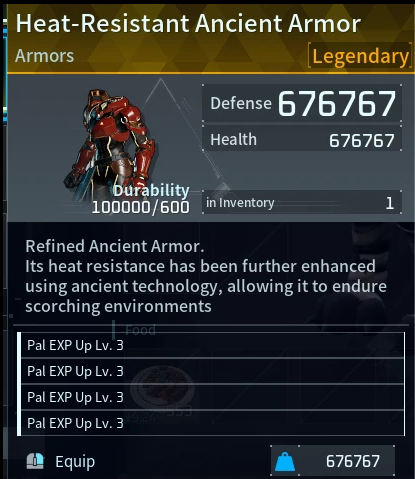
-- Example 2: Ancient Armor with Custom Stats & 4 Passives ["AncientArmor_5"] = { Def = 1500, HP = 5000, Shield = 0, Atk = 0, Durability = 100000, Weight = 10.0, Passive1 = "TemperatureResist_Heat3Cold3", Passive2 = "defense_ACC_up4", Passive3 = "OctaviaArmorVampire", Passive4 = "Attack_ACC_up4_Armor" }, -- Ancient Armor +4 (Legendary)
-- Example 3: Quadruple Air Dash Boots ["Accessory_AirDash4"] = { Def = 0, HP = 0, Shield = 0, Atk = 0, Durability = 0, Weight = 1.0, Passive1 = "AirDash_4" }, -- Quadruple Air Dash Boots
-- Example 4: Homing Module with Max Capture Boost ["SphereModule_Homing"] = { Def = 0, HP = 0, Shield = 0, Atk = 0, Durability = 0, Weight = 0.0, Passive1 = "SphereModule_Homing", Passive2 = "CaptureLevel_Up_3" }, -- Homing Module
╔════════════════════════════════════════════════════ ⚠️ CRITICAL SYNTAX WARNING ⚠️ LUA SYNTAX IS EXTREMELY STRICT! IF YOU MISS EVEN A SINGLE COMMA ( , ) OR QUOTE ( " ), THE SCRIPT WILL CRASH AND THE MOD WILL STOP WORKING COMPLETELY! ╚════════════════════════════════════════════════════
▍ 4. Mini-Tutorial: How to Add & Edit Passives You can add up to 4 passive slots to any item (Passive1, Passive2, Passive3, Passive4).
Follow the 3 Golden Rules: ALWAYS put skill names inside double quotes: "AirDash_4" ALWAYS put a comma ( , ) at the end of every line you add or edit. NEVER change the casing — write Passive1 (Capital 'P'), NOT passive1.
❌ WRONG (THIS WILL BREAK THE ENTIRE MOD!): ["AncientHelmet"] = { Def = 500, HP = 1200 -- ❌ BROKEN: Missing comma at the end! Shield = 0, Passive1 = AirDash_4, -- ❌ BROKEN: Missing quotes around skill name! Passive2 = "JumpCount_3" -- ❌ BROKEN: Missing comma at the end! },
✅ CORRECT (WORKS 100% PERFECTLY): ["AncientHelmet"] = { Def = 500, HP = 1200, Shield = 0, Atk = 0, Durability = 25000, Weight = 15.0, Passive1 = "AirDash_4", Passive2 = "JumpCount_Increase3", Passive3 = "OctaviaArmorVampire", Passive4 = "defense_ACC_up4" }, -- Ancient Helm (Customized)
▍ 5. Passive Skills Cheat Sheet Copy and paste these exact identifiers into your items: Temperature: "TemperatureResist_Heat3Cold3", "TemperatureResist_Heat3", "TemperatureResist_Cold3" Player Stat Buffs (+30%): "Attack_ACC_up4", "defense_ACC_up4", "HP_ACC_up4", "WorkSpeed_ACC_up4" Movement & Mobility: "AirDash_4" (Quad Air Dash), "JumpCount_Increase3" (Quad Jump), "JumpPower_Increase", "AvoidDurationUp_EquipSkill_2" (Dodge i-Frames) Combat & Special: "OctaviaArmorVampire" (Life Steal), "NonKilling" (Mercy Ring), "Invalid_ToxicGas_EquipSkill" (Gas Mask) Catching & Pals: "CaptureLevel_Up_3", "PalExp_Increase_3_Otomo_Only_Equip", "FriendshipPoint_Increase_EquipSkill"
▍ 6. Save & Troubleshooting Save your changes in main.lua and launch Palworld. Mod not working? You made a syntax typo. Press F5 in the UE4SS console or check UE4SS.log — it will tell you the exact line number where a comma or quote is missing!
More my mods https://www.nexusmods.com/profile/wol4ara896
Highlights
From source dataFootprint
Rated a light load on a server.
Last update
Its author last shipped an update 51d ago.
ARMOR and EQUIPMENT STATS CUSTOMIZER on Nxeon
From our catalogue- One-click install
- Not available. One-click install isn't available for this game's mods yet. Download it and upload it to your server in Files.
- Server load
- light
- Smallest plan we suggest
- Palworld — 8 GB (8 GB RAM). This follows our own load rating above, not a benchmark.
- Latest build
- 2026-08-25, released 2026-08-25
Game versions by loader
| Loader | Game versions | Newest |
|---|---|---|
| Workshop |
From 1 recorded build of ARMOR and EQUIPMENT STATS CUSTOMIZER.
Dependencies
- Required: UE4SS Experimental (Palworld)
Declared by the newest build that lists any. Required ones are installed with it on one-click installs.
Run ARMOR and EQUIPMENT STATS CUSTOMIZER on a Palworld server
Deploy a server above, then upload the file in Files.
What kind of mod it is
From the catalogWeapons, items & crafting
New weapons, gear, items and the recipes to make them.
Compatibility
- Game
- Palworld
Verified at the source
- ✓Steam WorkshopOfficial listing, checked 2026-10-10Open ↗
- ✓AuthorStolas, as published on Steam Workshop
- ✓LicenseNot published by the sourceFree