







About Better Inventory Grid
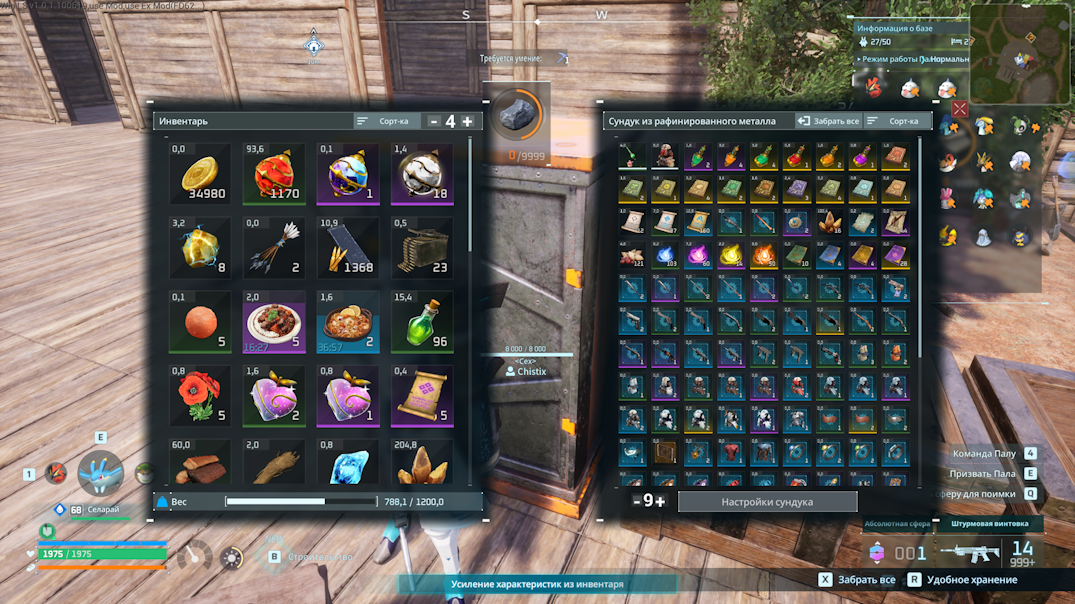
From Steam WorkshopThis mod allows you to configure the number of columns in the player inventory and storage containers. Choose a value from 4 to 12 columns and adjust the grid to suit your screen and playstyle. Main…
This mod allows you to configure the number of columns in the player inventory and storage containers.
Choose a value from 4 to 12 columns and adjust the grid to suit your screen and playstyle.
Main Features
- Configure the grid from 4 to 12 columns.
- Separate settings for the player inventory and storage containers.
- Selected values are saved automatically.
- When the inventory or storage panel is opened, the grid automatically rebuilds itself using the saved value.
- Compatible with most other mods.
Separate Settings
The number of columns for the player inventory and storage containers is configured separately.
This allows you to use different grid sizes at the same time.
For example:
Player Inventory: 8 columns Storage Containers and Chests: 12 columns
The settings are saved separately and automatically applied the next time the corresponding panel is opened.
How Does It Work?
When the inventory or storage panel is opened, the mod reads the saved number of columns and automatically rebuilds the grid.
The mod does not replace the entire interface or rewrite the inventory system. It only changes the layout and size of the grid slots.
Possible Incompatibilities:
The mod may conflict with other mods that:
- Modify the inventory or storage grid.
- Replace inventory panels.
- Change the layout of interface elements.
- Overwrite the same user interface elements.
It is recommended to use only one mod that changes the number of columns or the structure of the inventory grid.
Changing the Number of Columns Does Not Increase:
- Maximum carry weight.
- Item stack sizes.
- The actual number of storage slots.
Installation and Troubleshooting
[list=1] [*]Subscribe to this mod. [*]Subscribe to the required dependency: UE4SS Experimental (Palworld) [*]Launch the game. [*]Open Settings - Mod Management. [*]Enable this mod and UE4SS Experimental (Palworld). [/list]
Are the Configuration Buttons Missing?
Sometimes the game may prevent interface modifications from loading correctly, so the buttons for changing the number of columns may not appear automatically.
Open any chest or storage container and press Shift + F1. The configuration buttons should then appear in the interface.
Links


Highlights
From source dataFootprint
Rated a light load on a server.
Last update
Its author last shipped an update 3 mo ago.
Better Inventory Grid on Nxeon
From our catalogue- One-click install
- Not available. One-click install isn't available for this game's mods yet. Download it and upload it to your server in Files.
- Server load
- light
- Smallest plan we suggest
- Palworld — 8 GB (8 GB RAM). This follows our own load rating above, not a benchmark.
- Latest build
- 2026-08-01, released 2026-08-01
Game versions by loader
| Loader | Game versions | Newest |
|---|---|---|
| Workshop |
From 1 recorded build of Better Inventory Grid.
Dependencies
- Required: UE4SS Experimental (Palworld)
Declared by the newest build that lists any. Required ones are installed with it on one-click installs.
Run Better Inventory Grid on a Palworld server
Deploy a server above, then upload the file in Files.
What kind of mod it is
From the catalogQuality of life & UI
Small conveniences, tweaks and interface improvements players notice straight away.
Compatibility
- Game
- Palworld
Verified at the source
- ✓Steam WorkshopOfficial listing, checked 2026-11-01Open ↗
- ✓AuthorChistix, as published on Steam Workshop
- ✓LicenseNot published by the sourceFree












