






About DarnMenu
From Steam WorkshopDarnMenu In-game options for your mods, darn it. A native-looking Mod Options button in the ESC menu, so mod settings get edited like game settings — not by hand-editing Lua files. Client-side mod.…
DarnMenu
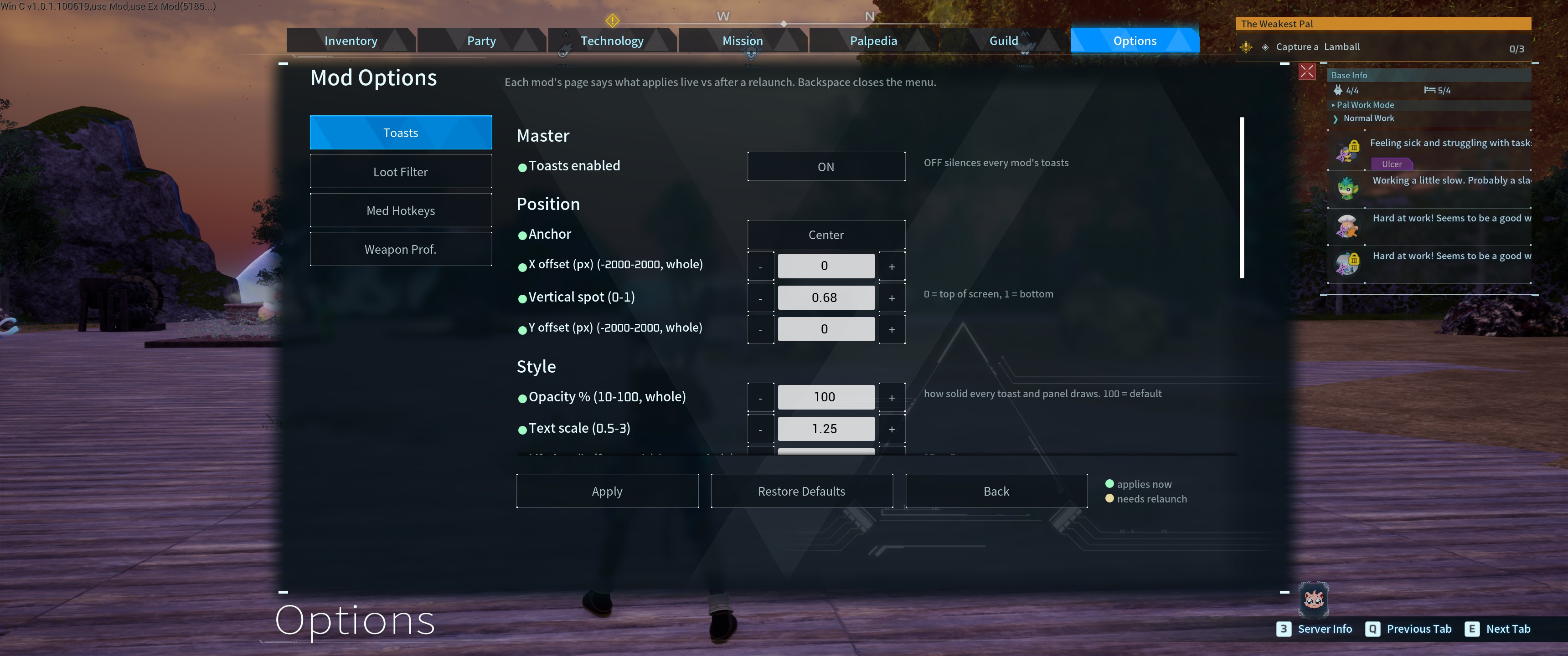
In-game options for your mods, darn it. A native-looking Mod Options button in the ESC menu, so mod settings get edited like game settings — not by hand-editing Lua files.
Client-side mod. You install it; the server does not need it. Works in single-player and when playing on a dedicated server.
How it works
- Press ESC > Mod Options (right under Link Discord) — registered mods list on the left, the selected mod's settings on the right.
- Every control type — toggles, option cycling, − / + steppers with sane bounds, text fields, managed item lists, and hotkey binding where you just press the key you want.
- Live where possible — mods can apply changes the moment you hit Apply, and the page tells you which: green dot = applies now, amber dot = needs a relaunch (legend by the buttons).
- Bad input can't break anything — out-of-range numbers and over-long text are rejected with a clear message, never silently accepted.
- Apply and done — settings save to files that survive mod updates; Restore Defaults is one click.
A platform — and a hand for the mods that haven't joined
DarnMenu ships with no pages of its own: every mod registers its own, including ours — DarnToasts, Outdoor Loot Filter, Living Arsenal, and Medicine Hotkeys appear the moment they're installed, through the same door any third-party mod uses.
And for mods that haven't added a page, there's an Other Mods list: DarnMenu finds the UE4SS Lua mods you have installed that lack a DarnMenu page but do have a config file, shows a read-only preview, and gives you a button to open that file in your file manager — so even un-integrated mods are one click from editing instead of a folder hunt. Strictly read-only: DarnMenu never touches another mod's config.
Mod authors — open to everyone
Register with pure data: write shared/DarnMenu_schema_YourMod.lua (tab, sections, options, defaults, a *_user.lua target) and add your name to shared/DarnMenu_schema_index.lua. If you use DarnToasts, ToastLib.registerMenuSchema() does both in one call. Your tab appears at the next menu open — no restart. Validation (min/max, lengths, custom functions), − / + steppers, labeled choices, live-settings support (Darn.watchConfig + the live/relaunch dots + your own Apply message), action panels (a section of clickable buttons that fire an in-game action, not just settings — how Living Arsenal's weapon Prestige panel works), and a capability marker to feature-gate against the installed version. New to it? Start with the 5-minute walkthrough in Scripts/DarnMenu_TUTORIAL.md; full reference (every control kind + limits) in Scripts/DarnMenu_API.md; copy-paste template in Scripts/DarnMenu_schema_example.lua.
Updating
- Steam handles the update for you — nothing to uninstall, and your settings in Mods\shared\ are never touched.
- DarnUI is no longer required. From 1.6.3 the widget kit ships inside DarnMenu, so there is no second mod to keep in step. If you have DarnUI installed it does no harm — other mods may still use it.
- Upgrading from before 1.6.3? Nothing to do. A leftover DarnMenu\Scripts\ui.lua from an older install is simply replaced by the bundled kit — on 1.6.0–1.6.2 that leftover could stop the mod loading, and this release ends that for good.
Known issues
- The first click on Mod Options can occasionally do nothing -- click again and it opens. This is understood and deliberately not "fixed": the game rebuilds its ESC menu constantly (three times in as many seconds is normal), and an old copy stays on screen for a moment, so a very quick click can land on the old menu instead of the new one. Every way to prevent it means removing or hiding widgets inside the game's own panels, which is what causes the crashes this mod has spent a long time eliminating. A harmless second click is the better trade.
- Once you have typed in a text field, Backspace no longer backs out of that ESC menu (ESC still closes it as normal). Reopening the menu restores it.
Compatibility
- Works in single-player and on dedicated servers (menu is client-side; auto-disables on headless).
- Requires UE4SS. Pure Lua — no DLLs, no paks, no shell calls.
For other mod authors: what I have learned
There are good authoritative references -- pwmodding.wiki for Palworld specifics, UE4SS's own docs for the Lua API, and the game's own files, which beat both: UE4SS's CXXHeaderDump is generated from the running game and is definitive for every class, function and enum, and the game's data tables can be extracted straight out of the paks. Start there. What none of them cover is the failure modes, so this mod ships Scripts/FOR_DEVS_BEST_PRACTICES.md, where I dump what I have worked out the hard way.
It covers the ForEach callback that hard-kills the process with no crash dump (and why the pcall you wrapped it in does not help), why pcall cannot save you from a native crash at all, the five values of UMG visibility and why "not visible" is not "hidden", why the UI must be anchored to the centre rather than a screen corner (Palworld scales by HEIGHT -- one unit is a 1080p pixel), how to probe an unknown API without killing the game, widget churn and why it crashes UMG mods, atomic writes so a crash cannot eat your users' saved data, and the two different places crash dumps land.
Field notes rather than gospel: every item was measured, usually after it cost me a crash or a play-test, and where I am unsure I say so. Corrections welcome -- I would rather it be right than be mine.
If something breaks
Highlights
From source dataFootprint
Rated a light load on a server.
Last update
Its author last shipped an update 3 mo ago.
DarnMenu on Nxeon
From our catalogue- One-click install
- Not available. One-click install isn't available for this game's mods yet. Download it and upload it to your server in Files.
- Server load
- light
- Smallest plan we suggest
- Palworld — 8 GB (8 GB RAM). This follows our own load rating above, not a benchmark.
- Latest build
- 2026-08-21, released 2026-08-21
Game versions by loader
| Loader | Game versions | Newest |
|---|---|---|
| Workshop |
From 1 recorded build of DarnMenu.
Dependencies
- Required: UE4SS Experimental (Palworld)
Declared by the newest build that lists any. Required ones are installed with it on one-click installs.
Run DarnMenu on a Palworld server
Deploy a server above, then upload the file in Files.
What kind of mod it is
From the catalogQuality of life & UI
Small conveniences, tweaks and interface improvements players notice straight away.
Compatibility
- Game
- Palworld
Verified at the source
- ✓Steam WorkshopOfficial listing, checked 2026-11-01Open ↗
- ✓AuthorA New Darn, as published on Steam Workshop
- ✓LicenseNot published by the sourceFree












