






About Expedition Timer On-Screen HUD
From Steam WorkshopDisplays your active Pal Expedition timer directly on your HUD. A clean, lightweight, and non-intrusive on-screen HUD timer for your active Palworld Expeditions. Never miss a completed expedition…
Displays your active Pal Expedition timer directly on your HUD.
A clean, lightweight, and non-intrusive on-screen HUD timer for your active Palworld Expeditions. Never miss a completed expedition again!
──────────────────────────────────────────────────────────────────
✨ Key Features
Smart HUD Counter & Timer: Displays real-time expedition status directly on your screen. Customizable Icon Styles: Choose between different built-in icon presets via the configuration script. Fully Configurable: Easily adjust overall scale, icon scale, screen position (X/Y offsets), and icon alignment. Clear Status Formatting:
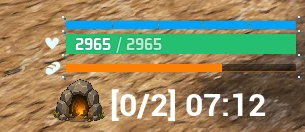
[0/1] 29:59 – 0 ready for pickup, 1 running (shows the timer for the mission finishing first).
[1/1] 09:59 – 1 ready for reward pickup, 1 still running.
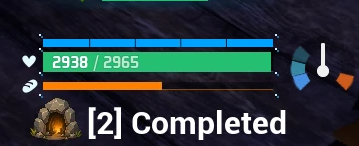
[2] Completed – All running expeditions are finished and waiting for reward pickup.
Global Distance Tracking: Timers stay accurate even when traveling far away from your base camps. Tested only in single-player.
⚙️ Configuration & Customization
You can easily customize icons, position, scales, fonts, and colors by editing main.lua with any text editor (Notepad, Notepad++, VS Code):
-- ============================================================ -- ICON SELECTION -- ============================================================ -- 0 = Icon 0 (Default) -- 1 = Icon 1 -- 2 = Icon 2 local SELECTED_ICON = 0
-- ============================================================ -- FONT & STYLE SETTINGS -- ============================================================ -- Set to true to override default .pak font styling local OVERRIDE_FONT = false local FONT_PRESET = "PalDefault" -- "PalDefault", "Roboto", "DroidMono"
-- Font Size (native crisp vector scaling) local OVERRIDE_FONT_SIZE = false local FONT_SIZE = 24
-- Text Color (RGBA values 0.0 to 1.0) local OVERRIDE_COLOR = false local TEXT_COLOR = { R = 1.0, G = 1.0, B = 1.0, A = 1.0 }
-- Text Outline local OVERRIDE_OUTLINE = false local OUTLINE_SIZE = 1.5 local OUTLINE_COLOR = { R = 0.0, G = 0.0, B = 0.0, A = 0.9 }
-- ============================================================ -- POSITION & SCALE -- ============================================================ -- HUD screen position offset local OFFSET_X = 0 local OFFSET_Y = 0
-- Overall HUD & Icon scales local HUD_SCALE = 1.0 local ICON_SCALE = 1.0
-- Separate Icon position offset local ICON_OFFSET_X = 0 local ICON_OFFSET_Y = 0
More my mods https://www.nexusmods.com/profile/wol4ara896
Highlights
From source dataFootprint
Rated a light load on a server.
Last update
Its author last shipped an update 2 mo ago.
Expedition Timer On-Screen HUD on Nxeon
From our catalogue- One-click install
- Not available. One-click install isn't available for this game's mods yet. Download it and upload it to your server in Files.
- Server load
- light
- Smallest plan we suggest
- Palworld — 8 GB (8 GB RAM). This follows our own load rating above, not a benchmark.
- Latest build
- 2026-08-27, released 2026-08-27
Game versions by loader
| Loader | Game versions | Newest |
|---|---|---|
| Workshop |
From 1 recorded build of Expedition Timer On-Screen HUD.
Dependencies
- Required: UE4SS Experimental (Palworld)
Declared by the newest build that lists any. Required ones are installed with it on one-click installs.
Run Expedition Timer On-Screen HUD on a Palworld server
Deploy a server above, then upload the file in Files.
What kind of mod it is
From the catalogQuality of life & UI
Small conveniences, tweaks and interface improvements players notice straight away.
Compatibility
- Game
- Palworld
Verified at the source
- ✓Steam WorkshopOfficial listing, checked 2026-11-01Open ↗
- ✓AuthorStolas, as published on Steam Workshop
- ✓LicenseNot published by the sourceFree












