






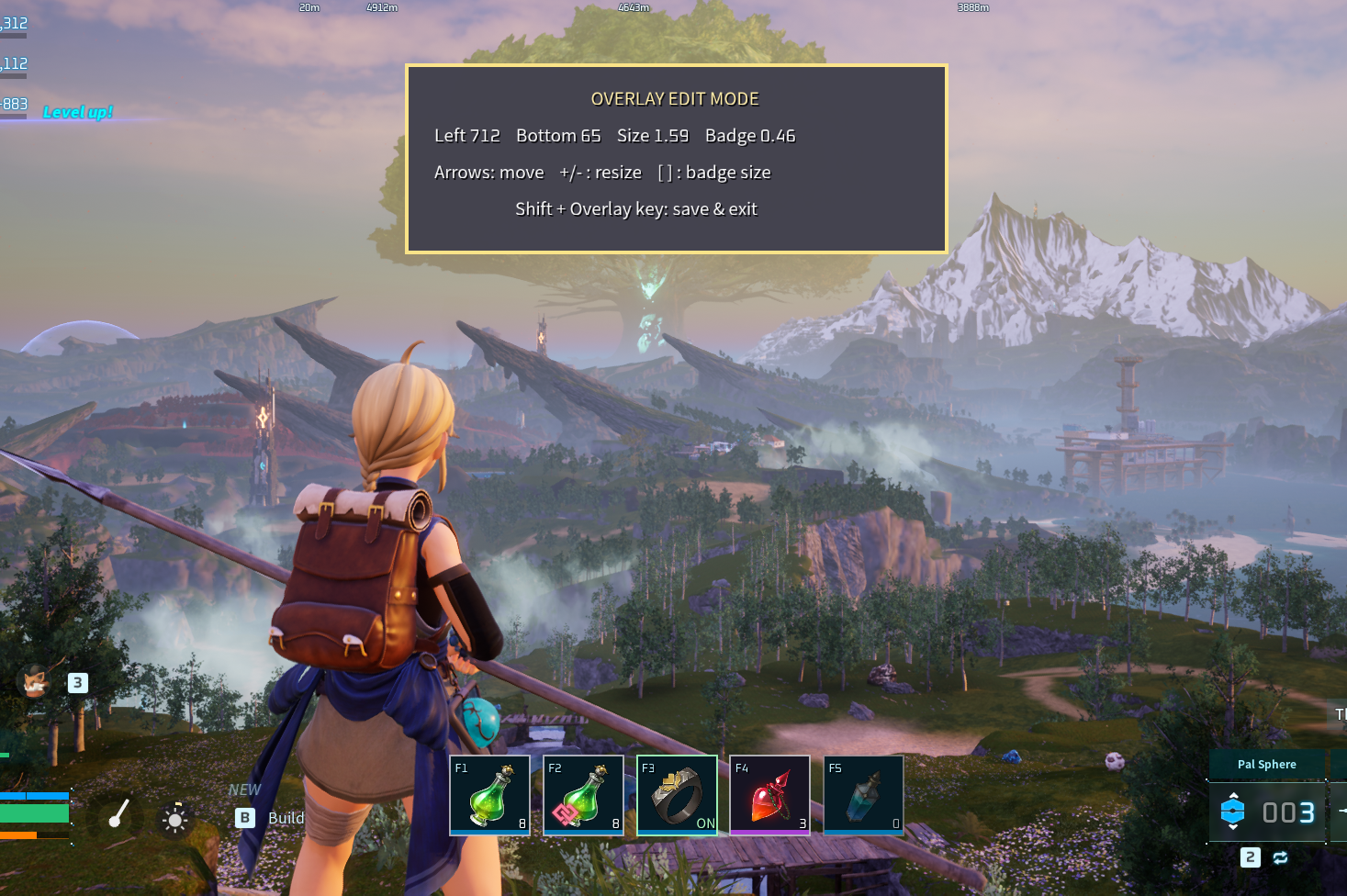
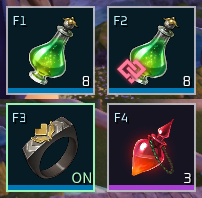
About Hotkey Consumables
From Steam WorkshopFeatures Heal yourself - Exactly what it says on the tin! Does nothing if you're already topped up or have a heal status. Uses your stonger potions first. Heal your weakest pal - Automatically…
Features
- Heal yourself - Exactly what it says on the tin! Does nothing if you're already topped up or have a heal status. Uses your stonger potions first.[/*]
- Heal your weakest pal - Automatically detects the lowest percent HP pal on your team and applies a potion to them. Just like the self heal skips over pals already healed/healing.[/*]
- Revive your dead pals[/*]
- Chug tree water[/*]
- Equip/unequip Mercy accessories[/*]
Each at the touch of a button! No pesky inventory menu needed.
Additional features:
- Uses the in-game message system for item usage messages[/*]
- Support for mod menus DarnMenu and Mod Options Framework[/*]
- Fully client-side[/*]
Requirements
Usage
F1 - Heal self F2 - Heal lowest pal F3 - Toggle Mercy accessory F4 - Revive pal F5 - Use World Tree Holy Water
F6 - Toggle hotbar overlay on/off Shift + F6 - Toggle Edit Mode on/off. Use this to reposition and resize the hotbar to your liking. Shift + F6 again to save and close. Ctrl + F6 - Reload settings.ini. With the exception of the keybinds, you can reload every other option in settings.ini without having to restart the game.
Configuration
If you have DarnMenu or Mod Options Framework installed, all these settings can be updated in-game through their respective menus.
Otherwise, all settings can be reloaded without having to restart the game by pressing Ctrl+F6 (or whatever key you bound the overlay to).
Keybinds
Set a key to "none" (or leave it blank) to disable that group. A key may carry ONE modifier: Shift+F1 / Ctrl+F1 / Alt+F1 (case-insensitive). The Overlay key takes NO modifier -- Shift/Ctrl+it are the editor/reload.
[Keybinds]
Hotkey1 = F1    ; Consumable group 1 -- Potions
Hotkey2 = F4    ; Consumable group 2 -- Pal Revive (revives a downed party Pal)
Hotkey3 = F5    ; Consumable group 3 -- World Tree Holy Water
Equip1  = F3    ; Accessory equip/swap group 1 -- Mercy
HealPal = F2    ; Heal the most-hurt party Pal (skips the target-select popup)
Overlay = F6    ; Show/hide (Shift+key = edit layout, Ctrl+key = reload config)
Equip Swap Priority
The default behavior of the Mercy Accessory toggle is to swap it with the first other accessory found in your inventory. But if you like to carry more that one extra with you and don't like which one the in-game sort puts first, you can set your own preference list here.
When you press the key to take the Mercy accessory OFF, the first accessory listed in this option that the mod finds in your inventory equipped in its place.
Use comma-separated item ids, with highest priority first. See the accompanying accessories.txt to lookup the ids. Leave blank to just equip the first accessory in your bag.
Ctrl+F6 (or whatever you changed the Overlay key to) to reload without restarting the game.
[EquipSwapPriority]
Equip1 =        ; e.g. Accessory_HP_1, Accessory_AT_1, Accessory_defense_1
Overlay Settings
First off, you can actually adjust the position and size of the overlay in-game. Press Shift+F6 (or whatever you changed the Overlay key to) to open the edit mode, where you can use the arrow keys and +/- to move and resize things. Shift+F6 again closes the edit mode and saves your changes.
[font=Courier New]leftMargin = auto[/font] (the default) keeps the hotbar horizontally centered on screen at any resolution, and it only counts the hotkeys you actually have enabled -- disable one and the bar re-centers itself. Moving it left/right in edit mode takes over from that and saves the pixel position instead; only resizing it there leaves it centered.
The other overlay and color settings are listed here for you to fine-tune to your content.
Ctrl+F6 (or whatever you changed the Overlay key to) to reload these settings without restarting the game.
[Overlay]
Show          = true     ; Overlay visible on load? (Overlay key still toggles it)
hideEmpty     = false    ; Hide a cell when you carry none of its group's items (accessory cells: none worn or carried)
leftMargin    = auto     ; "auto" = centered on screen, or px from the left edge (Shift+F6 edit writes these)
bottomMargin  = 90       ; Px from the bottom screen edge (Shift+F6 edit writes these)
scale         = auto     ; Overall hotbar scale: a number, or "auto" = cell is ~6.5% of screen height (Shift+F6 edit writes these)

cellSize      = 56       ; Icon cell size (px, before scale)
cellGap       = 8        ; Gap between cells
cellPad       = 3        ; Inset from cell border to icon
cellBorder    = 1.5      ; Container border thickness
badgeScale    = 0.5      ; Badge icon size, fraction of the cell (Shift+F6 [ and ] tunes this)
flashDuration = 0.35     ; Seconds a cell stays lit after its key is pressed (0 = off)
editScale     = 2        ; Edit-mode panel size

[Rarity]    ; Colors for the rarity bars and backgrounds. RRGGBB hex.
common_bg     = 131D1F
uncommon_bg   = 121E1A
uncommon_bar  = 396C30
rare_bg       = 061B24
rare_bar      = 0078B3
epic_bg       = 171422
epic_bar      = A740D3
legendary_bg  = 312F1C
legendary_bar = EDBC00
Known Issues
Highlights
From source dataFootprint
Rated a light load on a server.
Last update
Its author last shipped an update 3 mo ago.
Hotkey Consumables on Nxeon
From our catalogue- One-click install
- Not available. One-click install isn't available for this game's mods yet. Download it and upload it to your server in Files.
- Server load
- light
- Smallest plan we suggest
- Palworld — 8 GB (8 GB RAM). This follows our own load rating above, not a benchmark.
- Latest build
- 2026-08-03, released 2026-08-03
Game versions by loader
| Loader | Game versions | Newest |
|---|---|---|
| Workshop |
From 1 recorded build of Hotkey Consumables.
Dependencies
- Required: UE4SS Experimental (Palworld)
Declared by the newest build that lists any. Required ones are installed with it on one-click installs.
Run Hotkey Consumables on a Palworld server
Deploy a server above, then upload the file in Files.
What kind of mod it is
From the catalogQuality of life & UI
Small conveniences, tweaks and interface improvements players notice straight away.
Compatibility
- Game
- Palworld
Verified at the source
- ✓Steam WorkshopOfficial listing, checked 2026-11-01Open ↗
- ✓AuthorTheNoteBubble, as published on Steam Workshop
- ✓LicenseNot published by the sourceFree












