






About Native Mod Options - Settings Menu for Mods
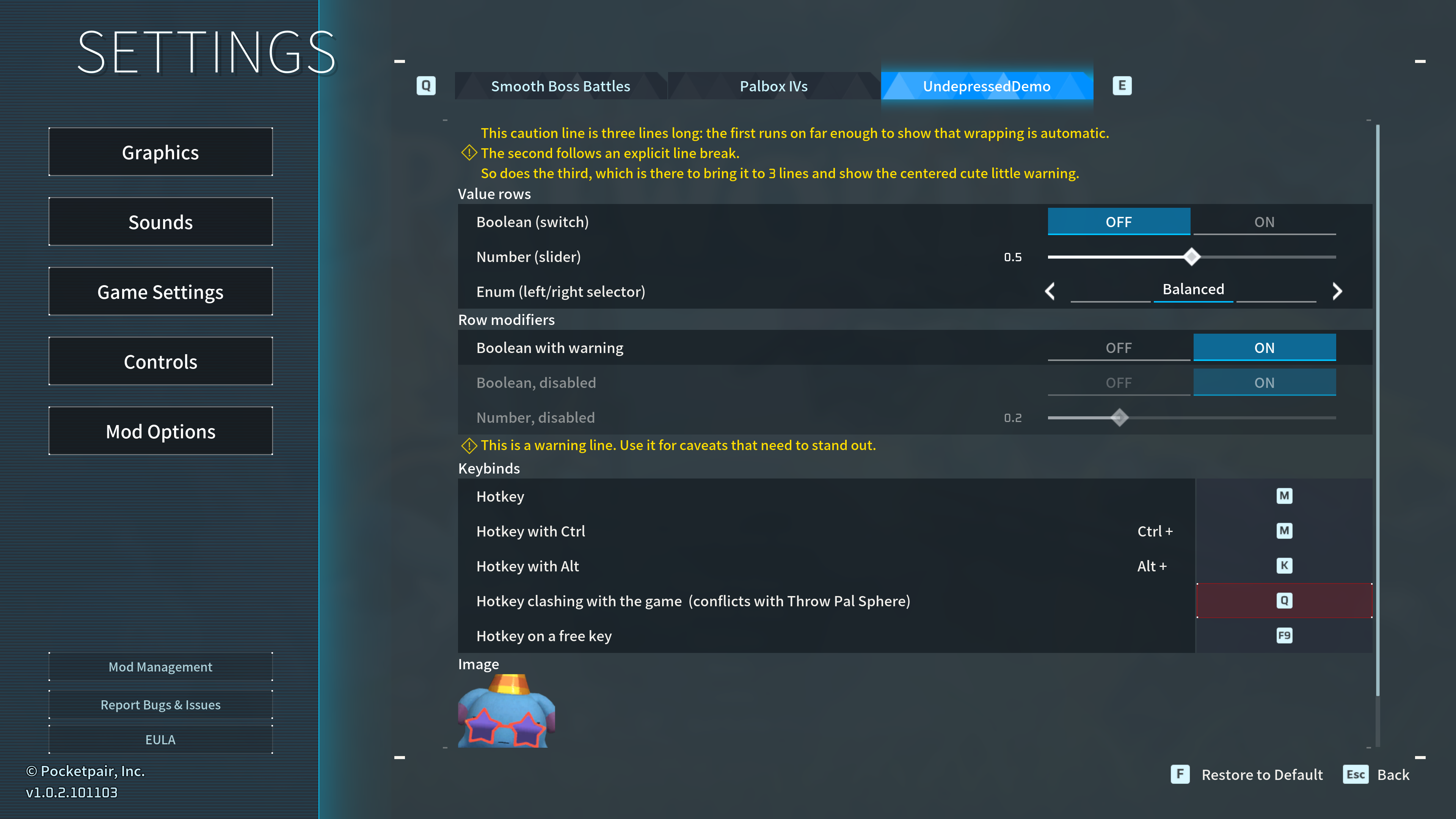
From Steam WorkshopAll your mod settings, in Palworld's own options menu. Options → Mod Options, right under Controls. One tab per mod. The game's actual switches and sliders, not copies of them. No config files to…
All your mod settings, in Palworld's own options menu.
Options → Mod Options, right under Controls. One tab per mod. The game's actual switches and sliders, not copies of them. No config files to edit, no relaunching to flip a toggle. Works on the title screen too, before you've loaded a save.
This adds the menu, not the settings. On its own it shows an empty Mod Options entry. What fills it is whatever mods you have that support it, so install it when one asks for it.
You'll need
UE4SS. Hit Subscribe to all above and Palworld deploys both, with the build this was tested against.
What you get
- Every mod's settings in the one place you'd already think to look.
- Keybind rows that tell you when the key you picked is already taken, by the game or another mod.
- Changes wait for Apply, same as every other settings tab.
- Your choices are live from the first frame of the next launch, not the first time you open the menu.
For mod authors
Copy one file into your Scripts folder, describe your settings as a table, call register() and subscribe(). The player hits Apply, your callback fires. That's it.
- Real widgets. Your rows inherit Palworld's styling, focus states and gamepad navigation, and keep inheriting them when the game restyles.
- Apply and Reset are the screen's own. Hooked, not rebuilt.
- Seven row types, including keybinds that report conflicts, plus sections, warnings and images. Any row can be greyed out or flagged.
- Event driven. No timer, in this mod or in yours. Idle costs nothing.
- Values correct from your first frame, so you never run on defaults waiting for a menu.
Optional dependency: without it your defaults apply, the calls do nothing, nothing errors.
Docs, a worked example and the source: https://github.com/tlechien/Palworld-Undepresso-NativeModOptions
Where this came from
The ones I tried either reinvented the wheel or duct-taped it onto the game. I wanted something mature the community could build on.
The honest bit
- Keybinds are A to Z and F1 to F12, with Ctrl or Alt. No Shift, and not the whole keyboard: every key offered becomes a permanent global bind UE4SS can't remove. Same reason a rebind leaves the old one loaded but inert.
- A combination isn't one key. Ctrl+R fires both R and Ctrl+R, because the game doesn't treat a chord as one thing and mod keybinds don't swallow the press. Fine in a lot of cases, conflicting in some others.
- No text boxes. The options UI has no native widget for typing into.
- Panel width is fixed to what vanilla measures, and untested at every resolution. If labels clip on yours, drop your resolution in the comments.
- A mod that registers late shows up next time you open Options, not instantly.
Cost while you're not using it
Nothing. No timers, no polling, no background loops. A settings menu nobody has open should cost nothing, and this one does.
Something not working?
Comments below, or open an issue if you'd rather: https://github.com/tlechien/Palworld-Undepresso-NativeModOptions/issues
Either way, include the [NativeModOptions] lines from your UE4SS.log. It usually names the problem outright, and the wiki's Troubleshooting page covers the common ones.
An Undepresso mod.
Highlights
From source dataFootprint
Rated a light load on a server.
Last update
Its author last shipped an update 2 mo ago.
Native Mod Options - Settings Menu for Mods on Nxeon
From our catalogue- One-click install
- Not available. One-click install isn't available for this game's mods yet. Download it and upload it to your server in Files.
- Server load
- light
- Smallest plan we suggest
- Palworld — 8 GB (8 GB RAM). This follows our own load rating above, not a benchmark.
- Latest build
- 2026-08-24, released 2026-08-24
Game versions by loader
| Loader | Game versions | Newest |
|---|---|---|
| Workshop |
From 1 recorded build of Native Mod Options - Settings Menu for Mods.
Dependencies
- Required: UE4SS Experimental (Palworld)
Declared by the newest build that lists any. Required ones are installed with it on one-click installs.
Run Native Mod Options - Settings Menu for Mods on a Palworld server
Deploy a server above, then upload the file in Files.
What kind of mod it is
From the catalogQuality of life & UI
Small conveniences, tweaks and interface improvements players notice straight away.
Compatibility
- Game
- Palworld
Verified at the source
- ✓Steam WorkshopOfficial listing, checked 2026-11-01Open ↗
- ✓AuthorFataelis, as published on Steam Workshop
- ✓LicenseNot published by the sourceFree












