







About Quick Connect Manager
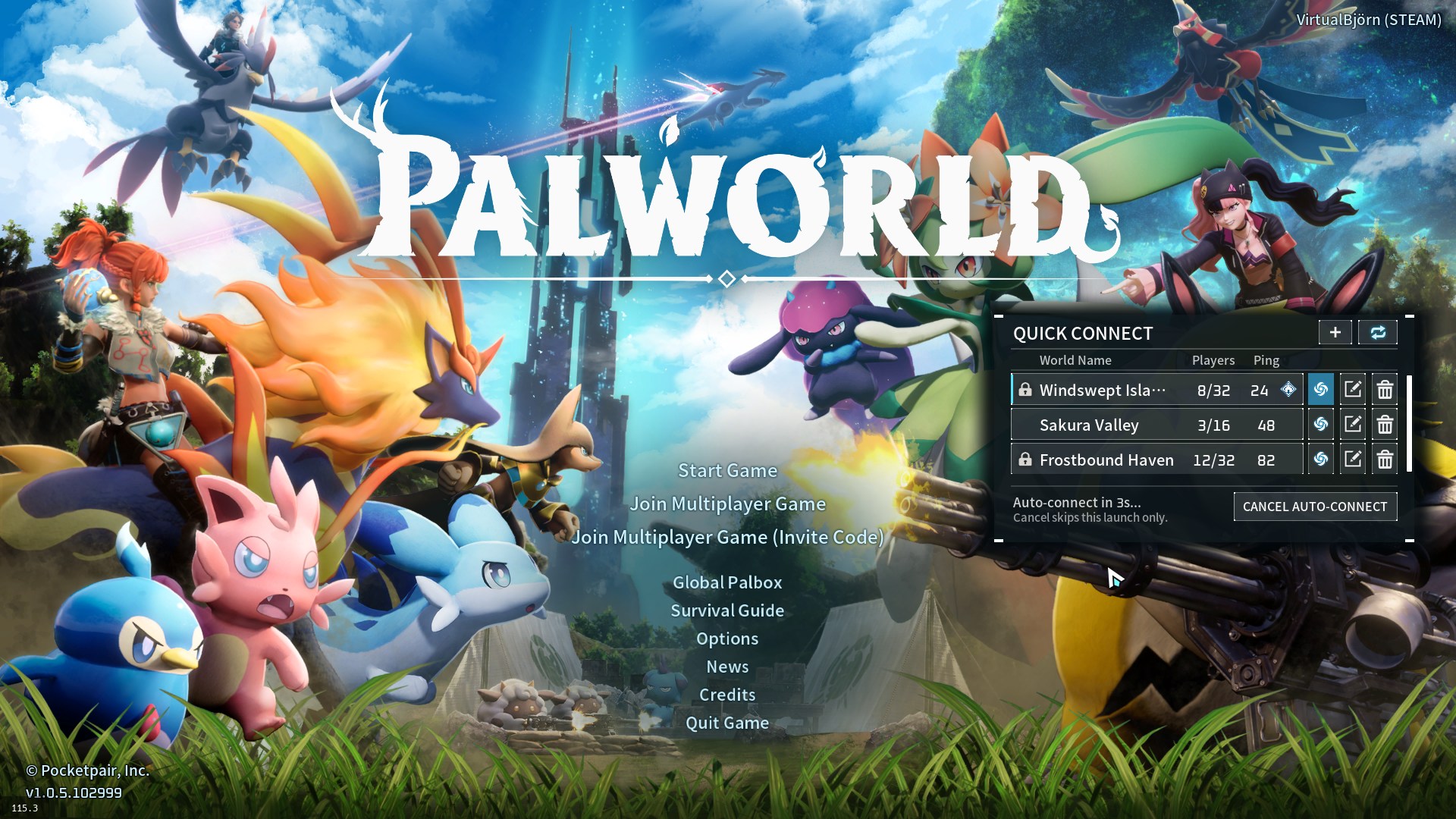
From Steam WorkshopQuick Connect Manager Adds a native, non-modal, gamepad-compatible dedicated-server selector and editor to Palworld's launch screen. Select a server row to connect immediately while the normal title…
Quick Connect Manager
Adds a native, non-modal, gamepad-compatible dedicated-server selector and editor to Palworld's launch screen. Select a server row to connect immediately while the normal title menu remains available.
Use the teleport button to connect automatically once per launch. A base icon beside the ping marks the selected server. Newly installed disabled Steam Workshop mods pause auto-connect for one launch; the first check also reviews existing disabled mods. Manual Connect stays available. Auto-connect now shows a three-second countdown with a Cancel Auto-connect button. Cancel skips this launch only and keeps the saved preference enabled. Manual connection or another panel action cancels the countdown.
Features
- Server names, player counts, ping, and password indicators.
- Integrated Add, Modify, and Delete controls with address, name, and password fields.
- Automatic saving after successful manual or Join Multiplayer connections.
- Controller navigation and Palworld-native controller text entry.
- Vertical scrolling for every configured server in the compact three-row panel.
- One-time first-install import of active recent servers from Palworld History.
- Version-aware filtering for complete and incomplete History status.
- Refresh for current status and saved credentials without renaming saved worlds; Shift+Refresh for forced rediscovery.
- Native saved-password connection flow.
- Ctrl+Shift+F1 through Ctrl+Shift+F8 shortcuts and qc console commands.
Requirement
Requires the UE4SS Experimental package. Enable both dependencies under Options > Mod Management.
Passwords
Saved server passwords are stored as plain text in the installed Scripts\config.lua. Protect that local file and do not include it in support logs or shared archives.
Passwords can be updated through Modify Server or refreshed after a successful Join Multiplayer connection.
Safety
Quick Connect is client-side and does not modify dedicated servers, authentication, saves, worlds, or gameplay. Title re-renders and callbacks are isolated and validated, and no gameplay UI is created. [hr][/hr]
Support the project
If this mod has been useful and you would like to support continued development, you can leave a tip on Ko-fi or Patreon.
Highlights
From source dataFootprint
Rated a light load on a server.
Last update
Its author last shipped an update 40d ago.
Quick Connect Manager on Nxeon
From our catalogue- One-click install
- Not available. One-click install isn't available for this game's mods yet. Download it and upload it to your server in Files.
- Server load
- light
- Smallest plan we suggest
- Palworld — 8 GB (8 GB RAM). This follows our own load rating above, not a benchmark.
- Latest build
- 2026-09-25, released 2026-09-25
Game versions by loader
| Loader | Game versions | Newest |
|---|---|---|
| Workshop |
From 1 recorded build of Quick Connect Manager.
Dependencies
- Required: UE4SS Experimental (Palworld)
Declared by the newest build that lists any. Required ones are installed with it on one-click installs.
Run Quick Connect Manager on a Palworld server
Deploy a server above, then upload the file in Files.
What kind of mod it is
From the catalogQuality of life & UI
Small conveniences, tweaks and interface improvements players notice straight away.
Compatibility
- Game
- Palworld
Verified at the source
- ✓Steam WorkshopOfficial listing, checked 2026-11-04Open ↗
- ✓AuthorVirtualBjörn, as published on Steam Workshop
- ✓LicenseNot published by the sourceFree












