






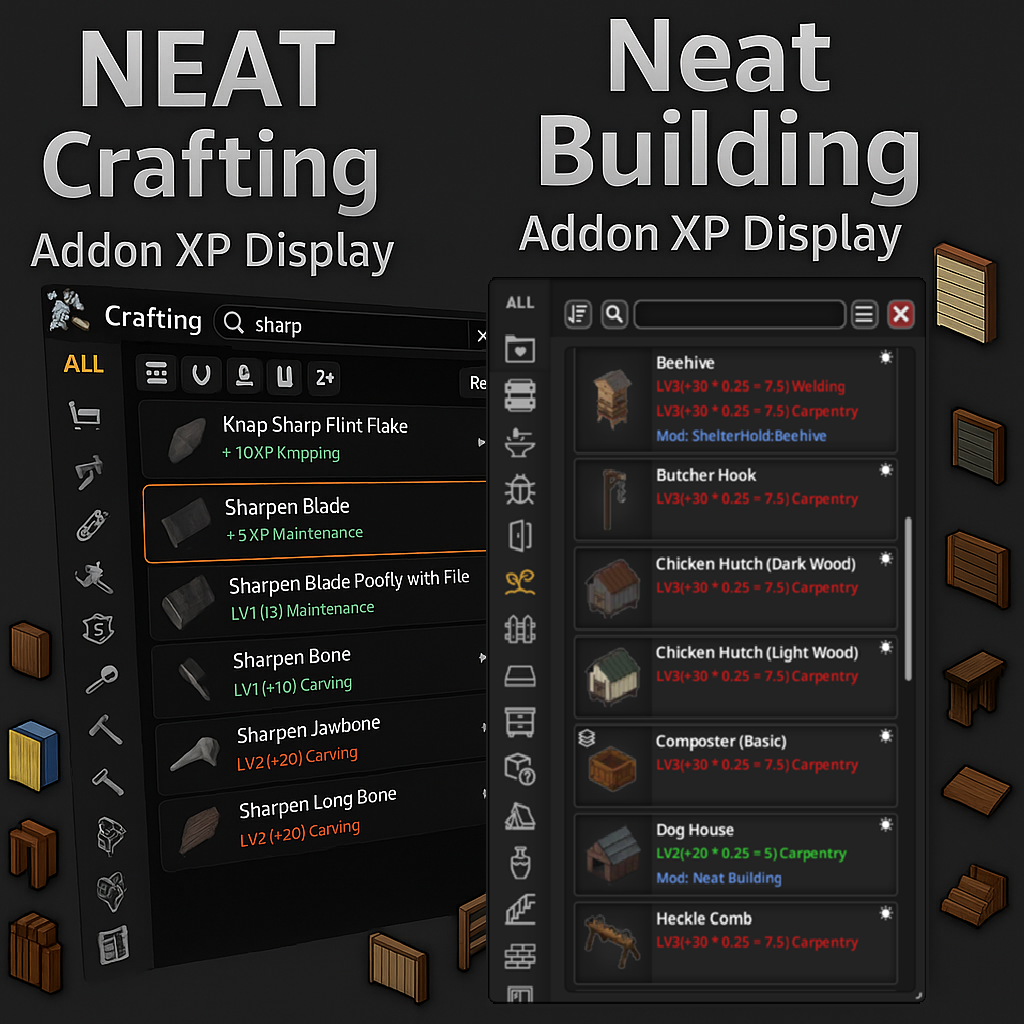
About Neat Crafting & Neat Building – XP & Mod Display
From Steam WorkshopBuild Support: B42.12 to B42.21 — Build 42 only Neat Crafting & Neat Building – XP & Mod Display is a lightweight UI companion for…
Build Support: B42.12 to B42.21 — Build 42 only
Neat Crafting & Neat Building – XP & Mod Display is a lightweight UI companion for Neat Crafting and Neat Building, the original base mods created by Rocco.
It adds optional XP and source mod information directly to crafting and building lists. It does not change the XP awarded by the game.
[hr]
Two Independent Addons
- Neat Crafting — XP & Mod Display — for Neat Crafting.
- Mod ID: Neat_Crafting_AddonXP
- Neat Building — XP & Mod Display — for Neat Building or Neat Building - UI Only.
- Mod ID: Neat_Building_AddonXP
Enable only the addon or addons matching the base mods you use.
Requirements & Load Order
Both addons require NeatUI Framework.
Recommended order:
- NeatUI Framework
- Neat Crafting, if used
- Neat Building or Neat Building - UI Only, if used
- Neat Crafting — XP & Mod Display, after Neat Crafting
- Neat Building — XP & Mod Display, after Neat Building / UI Only
Separate buildable/entity modules do not need their own XP addon. XP display attaches to the Neat Building UI.
Features
- XP per recipe/build: shows how much XP is awarded and which skill receives it
- XP modes: Base XP, Final XP, Multiplier, or Full Breakdown
- Multiplier details: may include starting skill bonuses, books, traits, sandbox XP and global XP multipliers
- Source mod line: optionally shows which mod provides each entry
- XP-only filter: shows entries that award XP
- Mod-only filter: shows entries added by mods
- Auto-resize + text scaling: helps prevent clipping with longer information
XP Display Modes
- Base XP — XP before applicable multipliers
- Final XP — estimated XP after applicable multipliers
- Multiplier — combined XP multiplier
- Full Breakdown — XP with available multiplier details
Configure the display through Mod Options: ESC > Options > Mods.
These addons only display XP information; they do not modify XP gains.
Multiplayer Setup
In MP, the server must include the required Mod IDs and corresponding Workshop IDs. The order in Mods=... should follow the load order above.
Mod ID — Workshop ID
- NeatUI_Framework — 3508537032
- Neat_Crafting — 3502080466
- Neat_Building / Neat_Building_UIOnly — 3536052310
- Neat_Crafting_AddonXP / Neat_Building_AddonXP — 3540503606
Both XP addons share Workshop item 3540503606, so add that Workshop ID only once even if both addon Mod IDs are enabled.
This Workshop item is UI/display-focused and does not add world objects by itself. The base Neat Crafting and Neat Building mods may register recipes, entities or other Build 42 data.
Back up existing saves before removing base mods and check their own uninstall/save instructions first.
Troubleshooting
If XP information is missing, the addon does not appear, or the UI behaves incorrectly after an update:
- Close Project Zomboid completely.
- Make sure NeatUI Framework, the correct base mod and its XP addon are enabled.
- Verify game files:
- Steam Library > Project Zomboid > Properties > Installed Files > Verify integrity of game files
- Check the load order.
- Test in a new save or backup test save using only the minimum required mods.
Neat Crafting test:
NeatUI Framework
Neat Crafting
Neat Crafting — XP & Mod Display
Neat Building test:
NeatUI Framework
Neat Building OR Neat Building - UI Only
Neat Building — XP & Mod Display
For MP Host / Dedicated Server, also check: Zomboid\Server<YourServer>.ini
Neat Crafting example:
Mods=NeatUI_Framework;Neat_Crafting;Neat_Crafting_AddonXP;...
WorkshopItems=3508537032;3502080466;3540503606;...
Neat Building example:
Mods=NeatUI_Framework;Neat_Building;Neat_Building_AddonXP;...
WorkshopItems=3508537032;3536052310;3540503606;...
If using Neat_Building_UIOnly, replace Neat_Building with Neat_Building_UIOnly.
If the minimum setup works, add your other mods back in small groups until you identify the interaction.
If it still fails with the minimum setup, close PZ and try a clean Workshop redownload.
Bug Reports
If the problem remains, please post in the Bug Reports thread and include:
- PZ version and SP / MP Host / Dedicated Server
- Base mod and addon variant used
- Mod list and load order
- For MP: relevant Mods=... and WorkshopItems=... lines
- Exact steps to reproduce
- Relevant console/server log and stack trace
- Screenshot or short video if useful
Translations
CH, CN, DA, DE, EN, ES, FR, HU, IT, JP, KO, NL, PL, PT, PTBR, RU, TH, TR, UA
Credits
- Neat Crafting & Neat Building — original base mods by Rocco
- Starlit Library — reflection logic by albion
- Crafting XP Display — inspiration by N0wh3re
Highlights
From source dataFootprint
Rated a light load on a server.
Last update
Its author last shipped an update 19d ago.
Neat Crafting & Neat Building – XP & Mod Display on Nxeon
From our catalogue- One-click install
- Supported on Nxeon Project Zomboid servers. We download it from Steam Workshop, place it, and restart the server.
- Server load
- light
- Smallest plan we suggest
- Project Zomboid — 6 GB (6 GB RAM). This follows our own load rating above, not a benchmark.
- Latest build
- 2026-10-15, released 2026-10-15
Game versions by loader
| Loader | Game versions | Newest |
|---|---|---|
| Workshop |
From 2 recorded builds of Neat Crafting & Neat Building – XP & Mod Display.
Recent builds
| Build | Released | Game versions | Loaders |
|---|---|---|---|
| 2026-10-15 | 2026-10-15 | n/a | Workshop |
| 2026-09-25 | 2026-09-25 | n/a | Workshop |
Dependencies
- Required: Neat Crafting [B42]
- Required: Neat Building [B42]
- Required: NeatUI Framework [B42]
Declared by the newest build that lists any. Required ones are installed with it on one-click installs.
Run Neat Crafting & Neat Building – XP & Mod Display on a Project Zomboid server
Pick a server or deploy a new one above; it is installed in one click.
What kind of mod it is
From the catalogQuality of life & UI
Small conveniences, tweaks and interface improvements players notice straight away.
Compatibility
- Game
- Project Zomboid
Verified at the source
- ✓Steam WorkshopOfficial listing, checked 2026-11-01Open ↗
- ✓AuthorAfyrmo, as published on Steam Workshop
- ✓LicenseNot published by the sourceFree















