






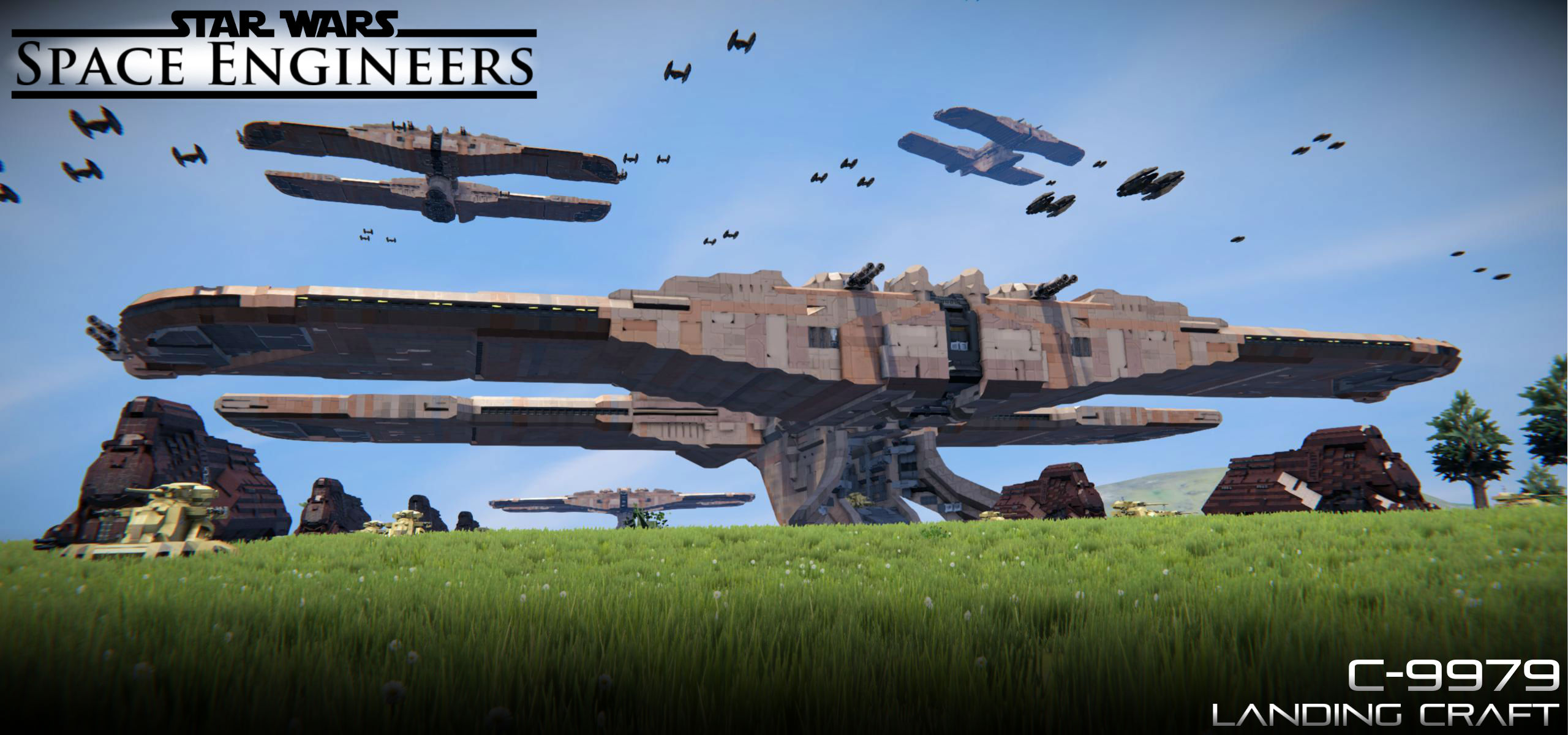

About TF C-9979 Landing Craft
From Steam WorkshopC-9979 Landing Craft The C-9979 landing craft, also known as the Trade Federation landing ship or the Separatist landing craft, was a large-sized landing craft built by Haor Chall Engineering for the…
C-9979 Landing Craft [Source: Star Wars: Episode I]
The C-9979 landing craft, also known as the Trade Federation landing ship or the Separatist landing craft, was a large-sized landing craft built by Haor Chall Engineering for the Trade Federation's military forces, and later for the Confederacy of Independent Systems. When the Trade Federation began planning to create its military forces, Haor Chall Engineering produced a design for a landing craft that would carry troops and ground vehicles from warships down to planets.
> Manufacturer: Haor Chall Engineering > Model: C-9979 landing craft > Class: Landing craft
Technical information
> Armament: Wingtip laser cannons (4) Turret-mounted cannons (4) >Complement: Platoon Attack Crafts (28: 7 per wing) Armored Assault Tanks (114: 24 per fore wing, 33 per aft wing) Multi-Troop Transports (11: 3 per fore wing, 3 in staging area, 2 in landing pedestal) NR-N99 Persuader-class droid enforcers CIS mobile command center (1) Sheathipede-class transport shuttle (1)a > Crew: OOM-series battle droids (88) 140 sapients
>Passengers: Repair droids (30) OOM command battle droids (40) OOM pilot battle droids (39) OOM security battle droids (164)
Instructions [Pilot]:
01.) Find a clear and flat area for a landing zone and begin landing proceedures
02.) When touching the ground, press [8] on Toolbar 01 to lock the landing gear (NOTE: DO NOT PRESS THE NORMAL LANDING GEAR SWITCH BUTTON SINCE IT WILL DISCONNECT THE VEHICLES).
03.) Once landed, press [4] on Toolbar 01 to open the Main Deployment Doors.
Instructions [Vehicle Deployment]:
(*Use the Free Camera to assist you during the deployment process. If applicable, have another player guide the vehicle operator*)
01.) To unlock the vehicle, press the appropriate button on the button panel adjacent to the column to turn on/off the connector. You can also unlock the vehicle by going inside the vehicle of interest and turning off the connector from there.
02.) Once you have unlocked the vehicle, turn ON intertia dampeners and activate the repulsorlifts (Set altitude to 1.0-1.5m for the MTT; 0.6m for the AAT).
03.) Proceed to make your way outside of the column and to the central staging area. Once at the middle, turn the vehicle towards the front of the landing craft.
04.) Once the vehicle is facing forward and aligned with the path, reverse the vehicle until you reach the Deployment Ramp. The deployment ramp does have sensors which can automatically deploy the ramp after hovering over the ramp; they can also be disabled should you choose to deploy the ramp manually.
05.) When the vehicle is inside the Deployment Ramp, decrease the altitude of the repulsorlifts then deactivate the repulsorlifts (be sure to touch one of the landing gear pads). (TIPS: when operating the AAT, open the rear hatchway when settling on the ramp; when operating the MTT, activate the assist thrusters).
06.) Wait for the ramp to lower to the landing pedestal of the craft. Once the locks disengage, activate the repulsorlifts of the vehicle; set altitude to 1.0-1.5m for the MTT and 1.1m for the AAT. Slowly make your way to the main deployment doors and outside of the craft. (*PRAY THAT YOU DON’T CRASH*)
07.) When deployment is complete, manually raise the deployment ramp by going to one of the button panels near the ramp. Repeat the process when the next vehicle(s) arrive to the deployment ramp.
Controls [Toolbar 01]: [1]: Laser Cannons - (Fire) [2]: Advanced Rotors [Wing-Tip Blaster Cannons] – (Reverse) [3]: -Empty- [4]: Main Deployment Doors – (Open/Close) [5]: -Empty- [6]: -Empty- [7]: -Empty- [8]: Landing Gear – (Lock/Unlock) [9]: Radiant Ion Drive Engines – (On/Off)
Controls [Toolbar 02]: [1]: Antenna - (On/Off) [2]: -Empty- [3]: -Empty- [4]: -Empty- [5]: -Empty- [6]: -Empty- [7]: -Empty- [8]: -Empty- [9]: -Empty-
*NOTES:
[1] – The Trade Federation Landing Craft includes 5 vehicles in total: 4 Trade Federation Armored Assault Tanks and 1 Trade Federation Multi-Troop Transport (Light). Blueprints for the TF AAT and the TF MTT (Complete) will be uploaded on a later date.
[2] – There are a total of 24 connectors inside the forewings of the Landing Craft: 12 on level with the staging area and 12 elevated. You are able to fit at max 24 AATs or 6 MTTs + 12 AATs.
[3] - Exercise caution when operating the MTT inside the landing craft as the corridors are narrow.
Additional Credits:
>85mm D-5T Tank Gun - AWG by "AWG": https://steamcommunity.com/workshop/filedetails/?id=1581787910
>Automatic LCDs 2 by "MMaster": http://steamcommunity.com/sharedfiles/filedetails/?id=822950976&searchtext=automatic+lcds
>HoverEngine by "Takeshi" and "Mogwai": https://steamcommunity.com/sharedfiles/filedetails/?id=1225107070&searchtext=hover+engine
>(DX11) Star Wars Weapons by "Razortron": https://steamcommunity.com/sharedfiles/filedetails/?id=598138548
>(ARMCO) Repulsor Engines by “Spacebar” and Kreeg”: https://steamcommunity.com/sharedfiles/filedetails/?id=1656790406&searchtext=armco
>Whip's Artificial Horizon and Velocity Script: https://steamcommunity.com/sharedfiles/filedetails/?id=713653017
>Whip's Image To LCD Converter: http://forum.keenswh.com/threads/tool-whips-image-to-lcd-converter.7393443/
Highlights
From source dataFootprint
Rated a light load on a server.
Last update
Its author last shipped an update 8 yr ago.
TF C-9979 Landing Craft on Nxeon
From our catalogue- One-click install
- Not available. One-click install isn't available for this game's mods yet. Download it and upload it to your server in Files.
- Server load
- light
- Smallest plan we suggest
- Space Engineers — 8 GB (8 GB RAM). This follows our own load rating above, not a benchmark.
- Latest build
- 2019-03-03, released 2019-03-03
Game versions by loader
| Loader | Game versions | Newest |
|---|---|---|
| Workshop |
From 1 recorded build of TF C-9979 Landing Craft.
Dependencies
- Required: [Discontinued] Star Wars Weapons
- Required: Small Ship Window Pack
- Required: HoverEngine
- Required: (Fixed) 85mm D-5T Tank Gun - AWG
- Required: (ARMCO) Repulsor Engines
Declared by the newest build that lists any. Required ones are installed with it on one-click installs.
Run TF C-9979 Landing Craft on a Space Engineers server
Deploy a server above, then upload the file in Files.
What kind of mod it is
From the catalogVehicles & ships
Cars, boats, aircraft, ships and other things to drive or fly.
Compatibility
- Game
- Space Engineers
Verified at the source
- ✓Steam WorkshopOfficial listing, checked 2026-11-01Open ↗
- ✓AuthorPrimoSuperT, as published on Steam Workshop
- ✓LicenseNot published by the sourceFree












