






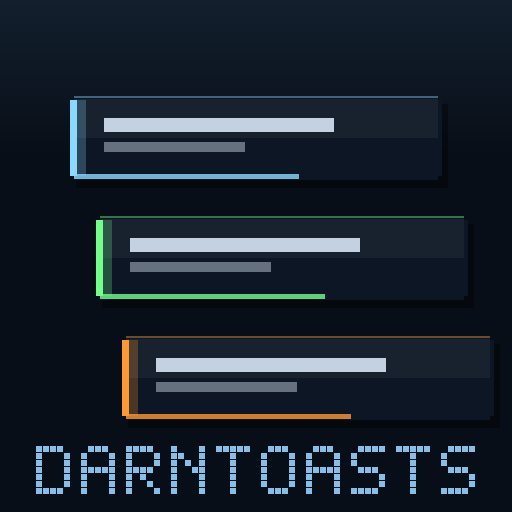
About DarnToasts + Panels
From Steam WorkshopDarnToasts Pretty little notification toasts, darn it. A shared library — it does nothing alone, but mods built on it get animated, stacking, fully user-styleable pop-ups instead of hard-coded text.…
DarnToasts
Pretty little notification toasts, darn it. A shared library — it does nothing alone, but mods built on it get animated, stacking, fully user-styleable pop-ups instead of hard-coded text.
Client-side mod. You install it; the server does not need it. Works in single-player and when playing on a dedicated server.
How it works
- Toasts unravel — each message wipes open from a colored accent stripe, text typing on behind the reveal, hangs ~5 seconds, then ravels shut.
- Messages stack — new toasts unroll below the pile; the pile glides up as older ones finish. Each mod gets its own color and lane.
- One config rules them all — position, size, colors, duration, unravel direction, exit style, stack depth — set once, applies to every mod using the library. Or mute one mod. Or all of them.
In-game menu
Subscribe to DarnMenu (optional) and every setting is editable under ESC > Mod Options. Prefer files? Copy Scripts/ToastLib_config_example.lua to Mods/NativeMods/UE4SS/Mods/shared/ToastLib_config.lua. Either way, your settings survive updates.
Mod authors
THE CHANNEL MODEL (2.0): ToastLib.new("YourMod") with no opts = the default channel — style, position, auto-lanes, and the player-facing mute list are all handled here; your mod ships zero toast config. ToastLib.custom("YourMod", {...}) = your own surface (panels, pinned toasts) — drawing machinery only, you manage its config on your own options page and push changes live with configure(). One mod can hold both. Docs in the package: Scripts/DarnToasts_TUTORIAL.md (both recipes in minutes) and Scripts/DarnToasts_API.md (full reference). ToastLib.registerMenuSchema() still gives your mod a DarnMenu options page in one call.
Compatibility
- Works in single-player and on dedicated servers (client-side).
- Requires UE4SS, installed automatically when you subscribe.
If something breaks
Crashes are rare but real, and so is "it just stopped working". A good report usually gets it fixed fast -- past bugs in this mod family were found and fixed precisely because players sent the right files. Start here: [olist] [*]First, update every Darn mod you have -- DarnMenu, DarnToasts and DarnUI as well as the mod itself. These share libraries, and updating one while another stays old is the single most common cause of a mod behaving strangely or not running at all. If that fixes it, you are done. [*]Before you relaunch, copy UE4SS.log from the UE4SS folder the mod is installed under (Steam installs: Palworld\Mods\NativeMods\UE4SS\UE4SS.log). It is overwritten on the next launch, so grab it first -- it usually names the problem outright. [*]If the game CRASHED, grab its own crash record too: the newest folder in %LOCALAPPDATA%\Pal\Saved\Crashes. [*]Include the mod's version: open ESC -> Mod Options -> this mod's page -- the version is shown at the top (needs DarnMenu 1.7.4+; it is also printed near the top of UE4SS.log at every launch). Note whether you play singleplayer or on a dedicated server, what you were doing just before, and your other mods. [*]Zip it up, upload to gofile.io (free, no account needed), and post the link in a comment -- or, if you also use Nexus, file it on the mod's Bugs tab there, which is hardest for me to lose. [/olist]
AI disclosure
Being upfront: these mods are built in collaboration with an AI assistant (Anthropic's Claude). I'm a software engineer — the design and direction are mine, and I take a critical eye to the function of the code, review it, and test it in real play. AI drafts the code and much of the text; it saves me a great deal of time and is honestly what makes creating these mods feasible at all. If AI-assisted work isn't your thing, no hard feelings — you deserve to know before subscribing.
Highlights
From source dataFootprint
Rated a light load on a server.
Last update
Its author last shipped an update 3 mo ago.
DarnToasts + Panels on Nxeon
From our catalogue- One-click install
- Not available. One-click install isn't available for this game's mods yet. Download it and upload it to your server in Files.
- Server load
- light
- Smallest plan we suggest
- Palworld — 8 GB (8 GB RAM). This follows our own load rating above, not a benchmark.
- Latest build
- 2026-08-13, released 2026-08-13
Game versions by loader
| Loader | Game versions | Newest |
|---|---|---|
| Workshop |
From 1 recorded build of DarnToasts + Panels.
Dependencies
- Required: UE4SS Experimental (Palworld)
- Required: DarnMenu
Declared by the newest build that lists any. Required ones are installed with it on one-click installs.
Run DarnToasts + Panels on a Palworld server
Deploy a server above, then upload the file in Files.
What kind of mod it is
From the catalogLibraries & compatibility
Foundations and fixes other mods build on. Usually installed because something else needs it.
Compatibility
- Game
- Palworld
Verified at the source
- ✓Steam WorkshopOfficial listing, checked 2026-11-01Open ↗
- ✓AuthorA New Darn, as published on Steam Workshop
- ✓LicenseNot published by the sourceFree












