







About PalIconInfo - PalBox Utilities
From Steam WorkshopPal Icon Information — Displays detailed Pal information on Pal icons. PalBox Page Skip — Skip multiple PalBox pages, jump to the first/last occupied page, and remember your last page. Pal Preset…
Pal Icon Information — Displays detailed Pal information on Pal icons. PalBox Page Skip — Skip multiple PalBox pages, jump to the first/last occupied page, and remember your last page. Pal Preset Swap — Rearrange registered Pal Presets by swapping or inserting, with quick apply.
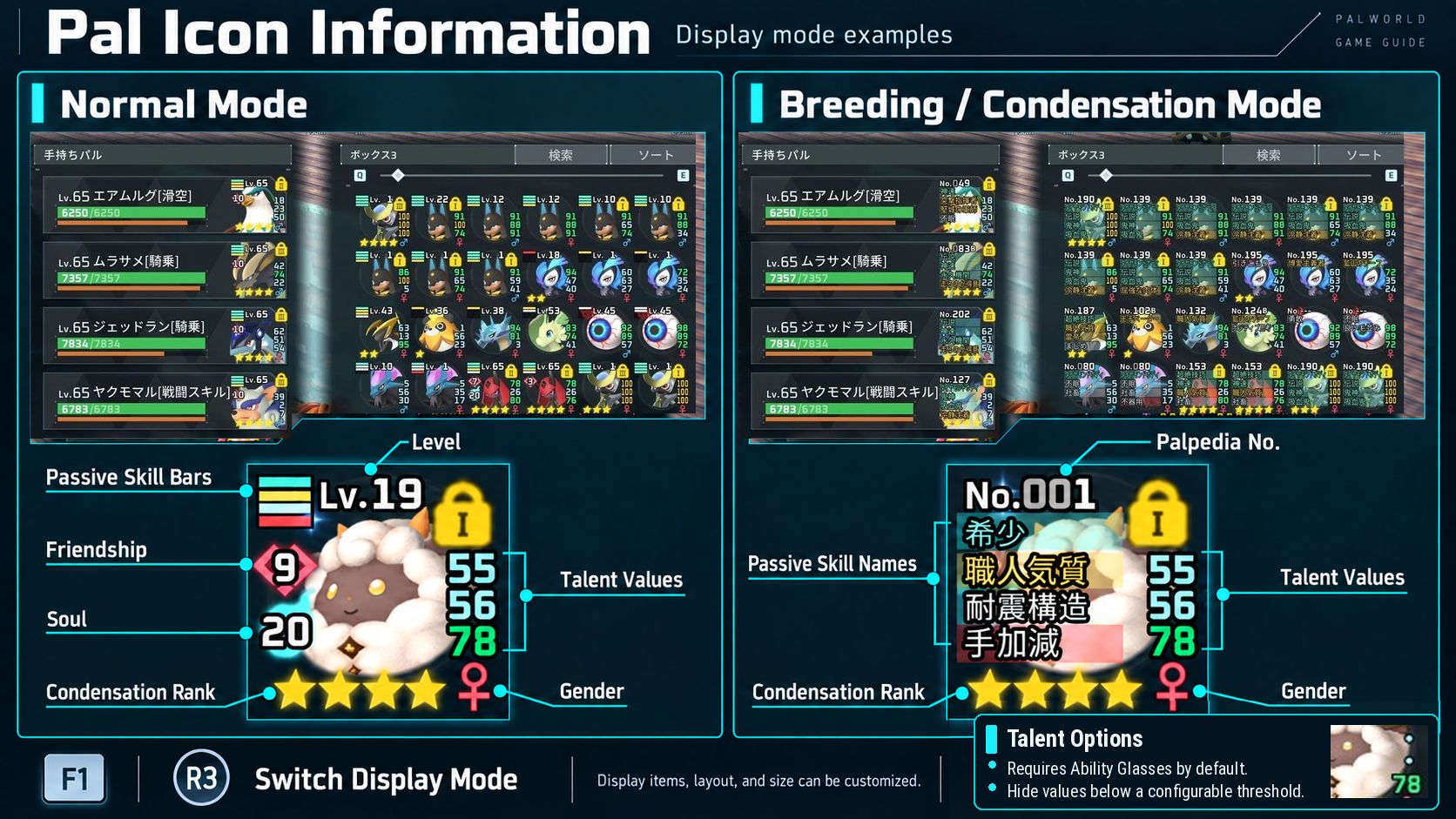
Display Modes — F1 / Right Stick Press Normal: Level / Gender / Condensation Rank / Soul Rank / Friendship Rank / Passive Skills (Bar) / Talent ↓ F1 / Right Stick Press Breeding / Condensation: Palpedia Number / Gender / Condensation Rank / Soul Rank / Friendship Rank / Passive Skills (Name) / Talent ↓ F1 / Right Stick Press Hidden: All information hidden ↓ F1 / Right Stick Press Normal
*Talent information requires Ability Glasses by default. Also supports Party slots, Presets and multi-hatch results. Presets show current Pal data.
Awakening Effects Enhanced gold glow, plus a glowing frame and animated accents in the Party list. Optional: disable for vanilla effects. Requires a full game restart.
Bonus Feature — PalBox Page Skip & Page Memory D / Right Stick Right — Forward 5 pages A / Right Stick Left — Back 5 pages W / Right Stick Up — First page S / Right Stick Down — Last page containing a Pal Page Skip offset/inputs are customizable. Supported lists remember the last page until game exit (not saved to disk). Global PalBox supports Page Memory ONLY. Its memory is separate; all MOD navigation controls (Page Skip and first/last jumps) are disabled.
Bonus Feature — Pal Preset Swap / Insert Middle Mouse / Square / X — Select a Preset, then another to swap. Select the same one again to cancel. With a Preset selected, Right Mouse / Triangle / Y on a target — Insert it there, shifting entries. Custom names move too. With no Preset selected, Right Mouse / Triangle / Y — Short press: apply the focused Preset; hold ~0.3 seconds: open the vanilla menu. Left / Right — Move focus by 5 Preset entries.
Bonus Feature — PalBox Sort Settings R / Square / X — Short press: reset other settings while retaining Favorite I/II/III and DNA checkbox states; hold ~0.3 seconds: reset everything. Protected states persist. Disable for vanilla Reset. Operation guides appear on supported screens.
PlayStation Right-Stick Fix Prevents unintended Up/Down from right-stick Left/Right on some PlayStation controllers. On by default; optional. Changing it requires a full game restart.
Configuration DarnMenu is optional and NOT required. Edit supported settings in-game or through these user Config files: PalIconInfoConfig.lua — Information display, awakening, controller settings PalBoxPageSkipConfig.lua — Page Skip and Page Memory PalBoxSortSettingsConfig.lua — Protected Reset User Config location: UE4SS\Mods\shared\PalIconInfo\ Do NOT edit DefaultConfig_DO_NOT_EDIT. Customized settings auto-migrate from v1.3.0-beta1 onward (back up if upgrading from older versions). Most settings auto-reload; some need a MOD/game restart. Awakening/right-stick options require a FULL game restart. Details: https://www.nexusmods.com/palworld/mods/5281
Installation Note Workshop PalIconInfo requires Workshop UE4SS-Experimental (Palworld). Nexus PalIconInfo requires Nexus UE4SS for Palworld (UE4SS-Palworld). Do NOT mix Workshop and Nexus versions. If R3 is assigned to Display Mode, vanilla Delete Selection in Global PalBox and Send All Pals in Dimensional Pal Storage are unavailable.
--------------------
Pal Icon Information — パルのアイコン上に、パルペディア番号、レベル、性別、濃縮ランク、ソウルランク、友好度ランク、パッシブスキル、個体値*を表示します。
表示モード:F1/右スティック押し込み 通常時用:レベル/性別/濃縮ランク/ソウルランク/友好度ランク/パッシブスキル(バー)/個体値 ↓ F1/右スティック押し込み 配合・濃縮時用:パル図鑑番号/性別/濃縮ランク/ソウルランク/友好度ランク/パッシブスキル(名称)/個体値 ↓ F1/右スティック押し込み 非表示:すべての情報を非表示 ↓ F1/右スティック押し込み 通常時用
*個体値は初期設定では才能メガネが必要。手持ちパル、プリセット、複数タマゴ孵化結果に対応。プリセットには現在の情報を表示。
覚醒エフェクト強化 金色の発光を強化。手持ちパル一覧に発光枠・動く装飾も追加。無効にするとバニラの演出へ戻ります(情報表示は維持)。変更にはゲームの完全再起動が必要。
追加機能 — ページスキップ・ページ記憶 D/右スティック右 — 5ページ先 A/右スティック左 — 5ページ前 W/右スティック上 — 先頭ページ S/右スティック下 — 最終収納ページ 幅・操作は変更可能。最後のページはゲーム終了まで記憶(ファイルには保存しません)。 グローバルパルボックスはページ記憶のみ有効。記憶は通常側と別管理。ページスキップ・先頭/最終ジャンプなど、本MODのナビゲーションはすべて無効。
追加機能 — プリセットの入れ替え・挿入 中クリック/□/X — 2件を順に選んで入れ替え。同じものならキャンセル。 選択後、移動先で右クリック/△/Y — 挿入(間を順送り)。カスタム名も移動。 未選択時の右クリック/△/Y — 短押しで即時適用、約0.3秒長押しでバニラのメニュー。 左/右 — 実プリセット5件分ずつフォーカス移動。
追加機能 — ソート設定 R/□/X — 短押しでお気に入りI・II・IIIとDNAを保持してリセット。約0.3秒長押しですべてリセット。保護状態はゲーム終了後も保持。無効にするとバニラ動作。対応画面に操作ガイドも表示。
PlayStationコントローラーの右スティック補正 一部のコントローラーで右スティック左右操作時に上下まで誤発火する問題を補正。初期設定で有効。無効化可能。変更にはゲームの完全再起動が必要。
コンフィグ設定 DarnMenuは任意で、必須ではありません。 ゲーム中または以下のユーザー用設定ファイルから変更できます。 PalIconInfoConfig.lua — 情報表示・覚醒・コントローラー PalBoxPageSkipConfig.lua — ページスキップ・ページ記憶 PalBoxSortSettingsConfig.lua — 保護付きリセット 保存先:UE4SS\Mods\shared\PalIconInfo\ DefaultConfig_DO_NOT_EDIT内は編集禁止。v1.3.0-beta1以降は設定を自動移行(それ以前の版からはバックアップ推奨)。多くは自動再読み込み、一部はMOD/ゲーム再起動。覚醒・右スティック補正はゲームの完全再起動が必要。 詳細:https://www.nexusmods.com/palworld/mods/5281
導入時の注意 Steamワークショップ版にはワークショップ版UE4SS-Experimental (Palworld)、Nexus Mods版にはNexus版UE4SS for Palworld (UE4SS-Palworld)を使用。両者を混在させないでください。 R3で表示モードを切り替えると、グローバルパルボックスのバニラの「選択解除」と次元パルストレージの「すべてのパルを送る」は使用不可。
Highlights
From source dataFootprint
Rated a light load on a server.
Last update
Its author last shipped an update 2d ago.
PalIconInfo - PalBox Utilities on Nxeon
From our catalogue- One-click install
- Not available. One-click install isn't available for this game's mods yet. Download it and upload it to your server in Files.
- Server load
- light
- Smallest plan we suggest
- Palworld — 8 GB (8 GB RAM). This follows our own load rating above, not a benchmark.
- Latest build
- 2026-11-04, released 2026-11-04
Game versions by loader
| Loader | Game versions | Newest |
|---|---|---|
| Workshop |
From 5 recorded builds of PalIconInfo - PalBox Utilities.
Recent builds
| Build | Released | Game versions | Loaders |
|---|---|---|---|
| 2026-11-04 | 2026-11-04 | n/a | Workshop |
| 2026-10-25 | 2026-10-25 | n/a | Workshop |
| 2026-10-24 | 2026-10-24 | n/a | Workshop |
| 2026-10-18 | 2026-10-18 | n/a | Workshop |
| 2026-09-13 | 2026-09-13 | n/a | Workshop |
Dependencies
- Required: UE4SS Experimental (Palworld)
- Required: DarnMenu
Declared by the newest build that lists any. Required ones are installed with it on one-click installs.
Run PalIconInfo - PalBox Utilities on a Palworld server
Deploy a server above, then upload the file in Files.
What kind of mod it is
From the catalogQuality of life & UI
Small conveniences, tweaks and interface improvements players notice straight away.
Compatibility
- Game
- Palworld
Verified at the source
- ✓Steam WorkshopOfficial listing, checked 2026-11-05Open ↗
- ✓Authorikusamaou, as published on Steam Workshop
- ✓LicenseNot published by the sourceFree












